 Rustango
 Files, uploads & media
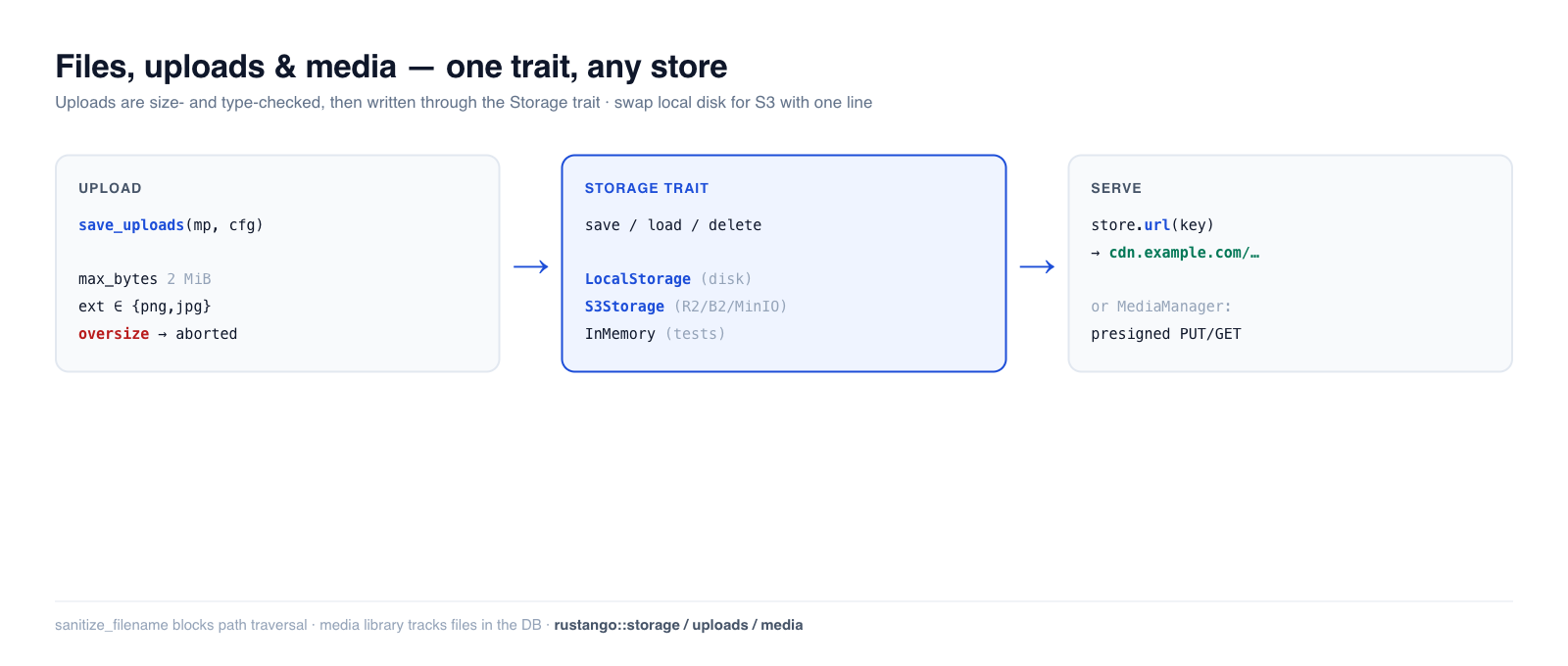
Almost every app stores user files — avatars, attachments, exported reports,
images. Rustango gives you a Storage trait with swappable backends (local
disk, S3-compatible object storage, in-memory for tests), a safe multipart
upload helper with size/type guards, and — when you need a tracked media
library — a database-backed MediaManager with presigned URLs. Write your code
once against the trait; switch from local disk to S3 with a one-line change.
New to a term here? storage backend, multipart, object storage, presigned URL — see the glossary.
Source:
rustango::storage(Storage,LocalStorage,InMemoryStorage,s3::S3Storage,BoxedStorage),rustango::uploads(save_uploads,UploadConfig,sanitize_filename), andrustango::media(Media,MediaManager) — behind thestorage/uploads/storage-s3/mediafeatures (all on by default).Runnable version: the Storage + upload-guard snippets are copied from
files_doc.rs(cargo test -p rustango --test files_doc); the end-to-end multipartsave_uploadsflow is dogfooded by the in-file tests incrates/rustango/src/uploads.rs, and the media library bymedia_sqlite_live.rs.
Table of contents
- Step 1 — Pick a storage backend
- Step 2 — Save, load, and serve files
- Step 3 — Accept an upload
- Safe filenames
- Production: S3-compatible storage
- The media library
- Reference
- See also
Step 1 — Pick a storage backend
Every backend implements the same Storage trait, so your code never names the
concrete type — it holds a BoxedStorage (Arc<dyn Storage>):
use rustango::storage::{BoxedStorage, LocalStorage};
use std::path::PathBuf;
use std::sync::Arc;

let storage: BoxedStorage = Arc::new(LocalStorage::new(PathBuf::from("./uploads")));
| Backend | Feature | Use for |
|---|---|---|
LocalStorage | storage | single-server deployments — files on local disk |
S3Storage | storage-s3 | production — S3 / R2 / B2 / MinIO object storage |
InMemoryStorage | storage | tests — a HashMap, never touches disk |
Step 2 — Save, load, and serve files
The trait is four async methods, keyed by a string path. save writes bytes,
load reads them back, plus exists / delete:
use rustango::storage::{Storage, InMemoryStorage};

let store = InMemoryStorage::new();
store.save("avatars/7.png", &png_bytes).await?;
assert!(store.exists("avatars/7.png").await?);
let bytes = store.load("avatars/7.png").await?;
store.delete("avatars/7.png").await?;
Serving the file. Attach a base URL (your CDN or static host) and url(key)
builds the public address you store on the model and hand to the browser:
let store = LocalStorage::new("./uploads".into())
    .with_base_url("https://cdn.example.com/uploads");

store.url("docs/report.pdf");   // Some("https://cdn.example.com/uploads/docs/report.pdf")
Without a base URL, url() returns None — you'd stream the bytes through a
handler instead. LocalStorage also guards against path traversal in keys.
Step 3 — Accept an upload
save_uploads consumes an axum Multipart body, validates each file against an
UploadConfig, and writes the survivors to your Storage — streaming, so an
oversize file is rejected mid-transfer instead of buffering into memory first.
use rustango::uploads::{save_uploads, UploadConfig};
use axum::extract::Multipart;

async fn upload(mp: Multipart) -> Result<impl IntoResponse, UploadError> {
    let cfg = UploadConfig::new("avatars/")          // key prefix
        .max_bytes(2 * 1024 * 1024)                  // reject files over 2 MiB
        .allowed_extensions(&["png", "jpg", "jpeg", "webp"])
        .randomize_filename(true);                   // avoid collisions

    let saved = save_uploads(mp, &cfg, &storage).await?;   // Vec<SavedUpload>
    Ok(Json(saved))
}
The guards are enforced (and verified): allowed_extensions is case-insensitive
("PNG" and "png" are the same), and max_bytes aborts the stream as soon as
the size is exceeded. The in-file uploads tests drive real multipart bodies and
assert files land in storage, oversize files are rejected, and disallowed
extensions are refused.
let cfg = UploadConfig::new("avatars/").allowed_extensions(&["PNG", "Jpg"]);
assert!(cfg.allowed_extensions.contains("png"));   // normalized to lowercase
assert!(cfg.allowed_extensions.contains("jpg"));
Safe filenames
Never trust a client-supplied filename. sanitize_filename reduces it to a safe
basename — stripping directory components (path traversal) and replacing unsafe
characters:
use rustango::uploads::sanitize_filename;

sanitize_filename("../../etc/passwd");   // "passwd"   — no traversal
sanitize_filename("my photo!.png");      // "my_photo_.png"
sanitize_filename("");                    // "upload"   — never empty
save_uploads applies this for you; call it directly only if you build keys by
hand.
Production: S3-compatible storage
For multi-server deployments, swap LocalStorage for S3Storage (behind the
storage-s3 feature). It speaks the S3 API with a hand-rolled SigV4 signer, so
it works with AWS S3, Cloudflare R2, Backblaze B2, and MinIO. The trait is
identical — only the constructor changes:
use rustango::storage::s3::S3Storage;   // needs the `storage-s3` feature

let storage: BoxedStorage = Arc::new(
    S3Storage::new(/* bucket, region, endpoint, credentials */)
);
// save / load / delete / url — exactly the same calls as LocalStorage
Your handlers and models don't change; only the wiring at startup does.
The media library
When files are first-class records — tracked in the database, browsable in the
admin, with thumbnails and CDN/presigned delivery — reach for rustango::media
instead of raw Storage. MediaManager persists a Media row per file and
supports two upload flows:
- Server-side:
manager.save_bytes(...)stores the bytes and the row in one call. - Direct-to-storage:
manager.begin_upload(...)returns a presigned PUT URL the browser uploads to directly (your server never proxies the bytes), then you confirm the row.
use rustango::media::{Media, MediaManager};

let manager = MediaManager::new_pool(pool.clone(), registry);
// Hand the browser a short-lived download link:
let url = manager.presigned_get(&media, Duration::from_secs(3600)).await?;
It also handles soft-delete and orphan purging. The full flow is dogfooded in
media_sqlite_live.rs; the manager's presigned/direct-upload methods are
PostgreSQL-oriented.
Reference
Storage trait: save(key, &bytes) · load(key) · delete(key) ·
exists(key) · url(key) -> Option<String>.
UploadConfig: new(prefix) · .max_bytes(n) · .allowed_extensions(&[..])
(case-insensitive) · .randomize_filename(bool). Used by
save_uploads(multipart, &cfg, &storage).
Backends: LocalStorage (disk) · S3Storage (object storage, storage-s3)
· InMemoryStorage (tests). All return a BoxedStorage.
See also
- The admin — media and FK widgets surface uploaded files in the UI.
- Background jobs — resize/transcode an upload off the request.
- Caching — the same swap-the-backend trait pattern.
- Security guide — validating untrusted upload input.