 Rustango
 MCP server
The Model Context Protocol (MCP) is the open standard for letting an AI agent — Claude, an IDE assistant, your own LLM app — securely call your application's tools, read its resources, and use its prompts. Rustango ships a production MCP server: register a tool with one macro, mount a router, and any MCP client can discover and call it over the standard JSON-RPC transport — with per-agent, fail-closed authorization and OAuth 2.1 built in.
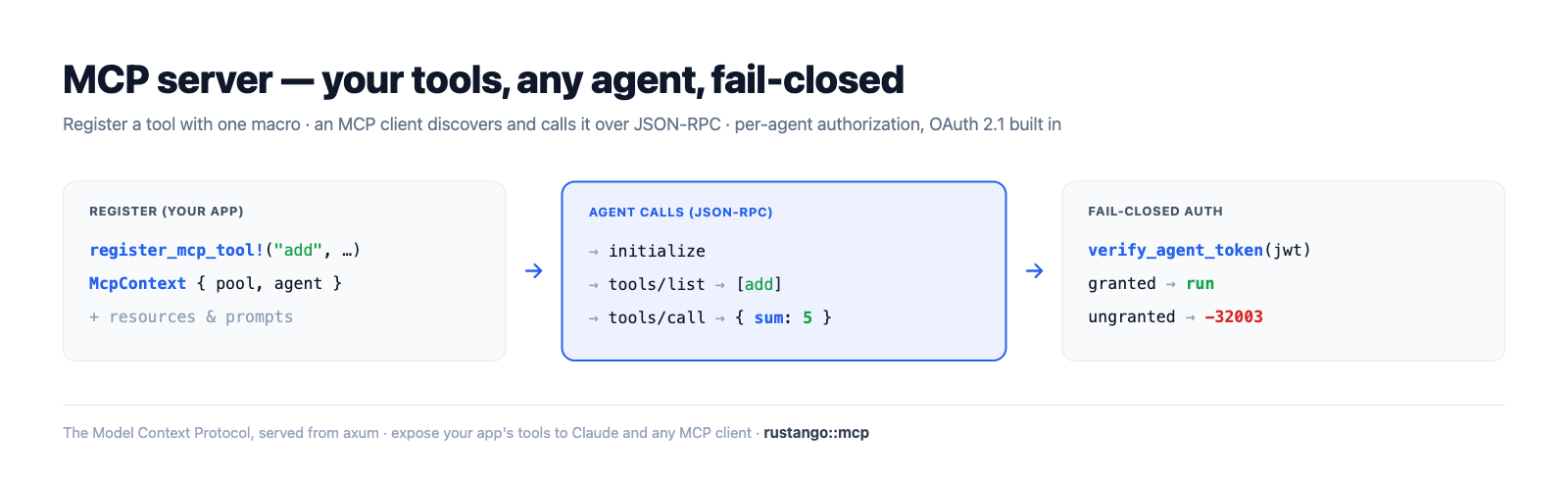
New to a term here? MCP, JSON-RPC, tool/resource/prompt, agent, JWT, OAuth — see the glossary.
Source:
rustango::mcp(router,tenant_router,secure_tenant_router,secure_tenant_router_from_settings,register_mcp_tool!,register_mcp_resource!,McpContext,issue_agent_token) and therustango::tenancyagent/skill helpers — behind themcpfeature (OFF by default; pullstenancy, sse, serializer, openapi, jwt).Runnable version: every snippet is copied from
mcp_doc.rs(cargo test -p rustango --features sqlite,mcp --test mcp_doc); the full protocol surface is dogfooded by thecrates/rustango/tests/mcp_*.rssuite, and a runnable server lives inexamples/mcp_demo.
Table of contents
- What MCP gives you
- Step 1 — Enable the feature
- Step 2 — Define a tool
- Step 3 — Mount the server
- Step 4 — Authorize agents
- The protocol
- Settings
- How to test — the suite · curl · the visual MCP Inspector · a real client
- Optional vs default build
- See also
What MCP gives you
A Rustango MCP server exposes three things an agent can use, all hand-registered for explicit control (nothing is auto-exposed):
| Primitive | What it is | How it's declared |
|---|---|---|
| Tool | a function the agent calls (with typed JSON args) | register_mcp_tool! |
| Resource | readable content the agent fetches by URI | register_mcp_resource! + skill-attached |
| Prompt | a reusable instruction template | derived from a granted skill |
Every call is authorized per agent: an agent's JWT carries the skills
(and the tools they unlock) it was granted, and tools/list / tools/call
fail closed — an agent never sees or runs a tool it wasn't granted.
Step 1 — Enable the feature
MCP is the optional mcp feature (off by default). Turn it on:
# Cargo.toml
rustango = { version = "0.44", features = ["mcp"] }
It pulls in tenancy (agents/skills), sse (the notification stream),
serializer + openapi (tool input schemas), and jwt (agent tokens). A build
without the feature compiles none of the MCP module — see
Optional vs default build.
Step 2 — Define a tool
A tool is a typed input struct + an async handler, registered at compile time
with register_mcp_tool!. The input type derives serde::Deserialize and
implements OpenApiSchema (which becomes the tool's published JSON Schema):
use rustango::mcp::{McpContext, McpError};
use serde_json::json;

rustango::register_mcp_tool!(
    "add",
    "Add two integers",
    AddInput,
    |_ctx: McpContext, input: AddInput| async move {
        Ok::<_, McpError>(json!({ "sum": input.a + input.b }))
    },
);

#[derive(serde::Deserialize)]
struct AddInput { a: i64, b: i64 }

impl rustango::openapi::OpenApiSchema for AddInput {
    fn openapi_schema() -> rustango::openapi::Schema {
        rustango::openapi::Schema::object()
            .property("a", rustango::openapi::Schema::integer())
            .property("b", rustango::openapi::Schema::integer())
            .required(["a", "b"])
    }
}
The handler gets an McpContext { pool, agent, progress, cancel } — the tenant
DB pool, the authenticated agent, a progress reporter, and a cancellation token —
so a tool can query your models, report progress on long work, and bail on
cancel. Return any serde_json::Value (it's surfaced as the tool's
structuredContent) or an McpError.
Resources are static content registered the same way:
rustango::register_mcp_resource!(
    "rustango://about", "About", "text/plain",
    || "This server exposes the demo tools.".to_string(),
);
Prompts come from skills (next step) — a skill's instructions become a prompt the agent can fetch.
Step 3 — Mount the server
Pick a mount to match your deployment; all return an axum::Router you nest
under a prefix (conventionally /mcp):
| Mount | Tenancy | Auth | Use for |
|---|---|---|---|
mcp::router(pool) | single-tenant | none | transport only (initialize/ping) |
mcp::tenant_router() | multi-tenant | none | transport only (per-request pool) |
mcp::secure_tenant_router() | multi-tenant | agent JWT | the real thing |
mcp::secure_tenant_router_from_settings(&s) | multi-tenant | agent JWT | production (CORS, rate-limit, SSE, body cap from [mcp]) |
Tools require the authed path (an agent context), so production servers use
secure_tenant_router*:
use rustango::mcp;

let api = axum::Router::new()
    .nest("/mcp", mcp::secure_tenant_router_from_settings(&settings.mcp));
// hand `api` to your tenancy Cli/Builder as usual
The authed router mounts: POST {prefix} (JSON-RPC), GET {prefix} (SSE
notifications), POST {prefix}/token (credential → JWT), POST {prefix}/oauth/token
(OAuth 2.1), and the two .well-known/* discovery documents. It signs agent
tokens with RUSTANGO_SESSION_SECRET.
The initialize handshake is a plain JSON-RPC POST and works on any mount:
// → POST /mcp
{ "jsonrpc": "2.0", "id": 1, "method": "initialize",
  "params": { "protocolVersion": "2025-06-18", "capabilities": {},
              "clientInfo": { "name": "my-client", "version": "0" } } }

// ← 200
{ "jsonrpc": "2.0", "id": 1, "result": {
    "protocolVersion": "2025-06-18",
    "serverInfo": { "name": "rustango", "version": "0.44.0" },
    "capabilities": { "tools": { "listChanged": true }, "prompts": {}, "resources": {} } } }
Step 4 — Authorize agents
Authorization is skill-based and fail-closed. You provision an agent (which gets a one-time secret), define a skill that bundles tools (and resources/prompt), then grant the skill to the agent in a tenant:
use rustango::tenancy::{create_agent_pool, create_skill_pool, grant_skill_pool};

// 1. Provision an agent — returns a one-time `name`.`secret` credential.
let issued = create_agent_pool(&pool, "calc-bot").await?;

// 2. A skill bundles tools (here, the `add` tool) + a prompt body.
create_skill_pool(&pool, "calculator", "Calculator", "does arithmetic",
                  "You are a precise calculator.", &["add".into()]).await?;

// 3. Grant it to the agent in tenant "acme".
grant_skill_pool(&pool, "acme", "calc-bot", "calculator").await?;
The client exchanges its credential for a tenant-pinned, scoped JWT at
POST /mcp/token (or the OAuth client_credentials flow at /mcp/oauth/token).
The server resolves the grant into the token's skills + tools claims; every
request re-verifies it. The effect, verified end to end:
// tools/list returns ONLY the granted tool, with its JSON Schema:
let listed = list_tools(&agent);                       // → { "tools": [ { "name": "add", … } ] }

// tools/call runs the handler and returns a structured result:
let out = call_tool(ctx, json!({ "name": "add", "arguments": { "a": 2, "b": 3 } })).await?;
assert_eq!(out["structuredContent"]["sum"], 5);

// An agent WITHOUT the grant sees an empty list and is refused:
//   list_tools(&ungranted) → { "tools": [] }
//   call_tool(ungranted, "add") → Err(code = TOOL_FORBIDDEN)
Tokens are tenant-pinned: a token minted for acme is rejected against any other
tenant (cross-tenant replay → 401). Revoke an agent and its JTI is blacklisted.
The protocol
JSON-RPC 2.0 (protocol version 2025-06-18) over HTTP POST, with an optional SSE
stream (GET {prefix}) for server→client notifications. Methods:
| Method | Auth | Purpose |
|---|---|---|
initialize · ping | no | handshake + liveness |
tools/list · tools/call | yes | discover + invoke tools (granted only) |
prompts/list · prompts/get | yes | skill-derived prompts |
resources/list · resources/read · resources/templates/list | yes | static + skill resources |
logging/setLevel · completion/complete | yes | log level + prefix completion |
notifications/progress · notifications/*/list_changed | — | server→client over SSE |
notifications/cancelled | — | client cancels an in-flight call |
A failed tool handler returns a normal result with isError: true (the agent
can react); protocol-level problems (unknown/forbidden tool, bad params) return a
JSON-RPC error with codes like -32002 (TOOL_NOT_FOUND), -32003
(TOOL_FORBIDDEN), -32602 (INVALID_PARAMS). Long tools report progress and
honor cancellation via the McpContext.
Settings
The [mcp] section (read by secure_tenant_router_from_settings):
[mcp]
prefix                = "/mcp"   # URL prefix the router mounts under
token_ttl_secs        = 900      # agent access-token lifetime (15 min)
enable_sse            = true     # serve the GET {prefix} SSE stream
allowed_origins       = []       # CORS allow-list (empty = same-origin only)
rate_limit_per_minute = 0        # per-IP cap (0/unset = unlimited)
max_tools_listed      = 0        # tools/list page size (0/unset = unlimited)
How to test
(a) The test suite
The whole protocol is covered by crates/rustango/tests/mcp_*.rs + the doc's
backing test. Run them with the feature on:
# The doc's headline flow (register → initialize → grant → list → call → fail-closed):
cargo test -p rustango --features sqlite,mcp --test mcp_doc

# Slices + end-to-end + OAuth + settings:
cargo test -p rustango --features sqlite,mcp,config --test 'mcp_*'
(b) curl the JSON-RPC
Boot the demo (next section) and talk to it directly. The demo guards every
method behind an agent token (an unauthed call returns 401), so mint one first
— the demo prints the agent secret on boot:
TOKEN=$(curl -sX POST http://localhost:8090/mcp/token \
  -H 'content-type: application/json' -d '{"name":"demo-bot","secret":"<printed-secret>"}' \
  | jq -r .access_token)

# initialize:
curl -sX POST http://localhost:8090/mcp -H "authorization: Bearer $TOKEN" \
  -H 'content-type: application/json' \
  -d '{"jsonrpc":"2.0","id":1,"method":"initialize","params":{"protocolVersion":"2025-06-18","capabilities":{},"clientInfo":{"name":"curl","version":"0"}}}'

# tools/call — only the granted `add` tool is callable:
curl -sX POST http://localhost:8090/mcp -H "authorization: Bearer $TOKEN" \
  -H 'content-type: application/json' \
  -d '{"jsonrpc":"2.0","id":2,"method":"tools/call","params":{"name":"add","arguments":{"a":2,"b":3}}}'
# → { ... "result": { "structuredContent": { "sum": 5 }, "isError": false } }
(c) Test it visually with the MCP Inspector
The MCP Inspector is the official visual client — connect it to your server and click through tools, resources, and prompts. Run the demo, then the Inspector:
# 1. Start the demo MCP server (seeds an `acme` tenant + `demo-bot` agent + the `add` tool):
cd crates/rustango/examples/mcp_demo && cargo run   # serves on http://localhost:8090/mcp

# 2. Launch the Inspector (opens a browser UI on http://localhost:6274):
npx @modelcontextprotocol/inspector
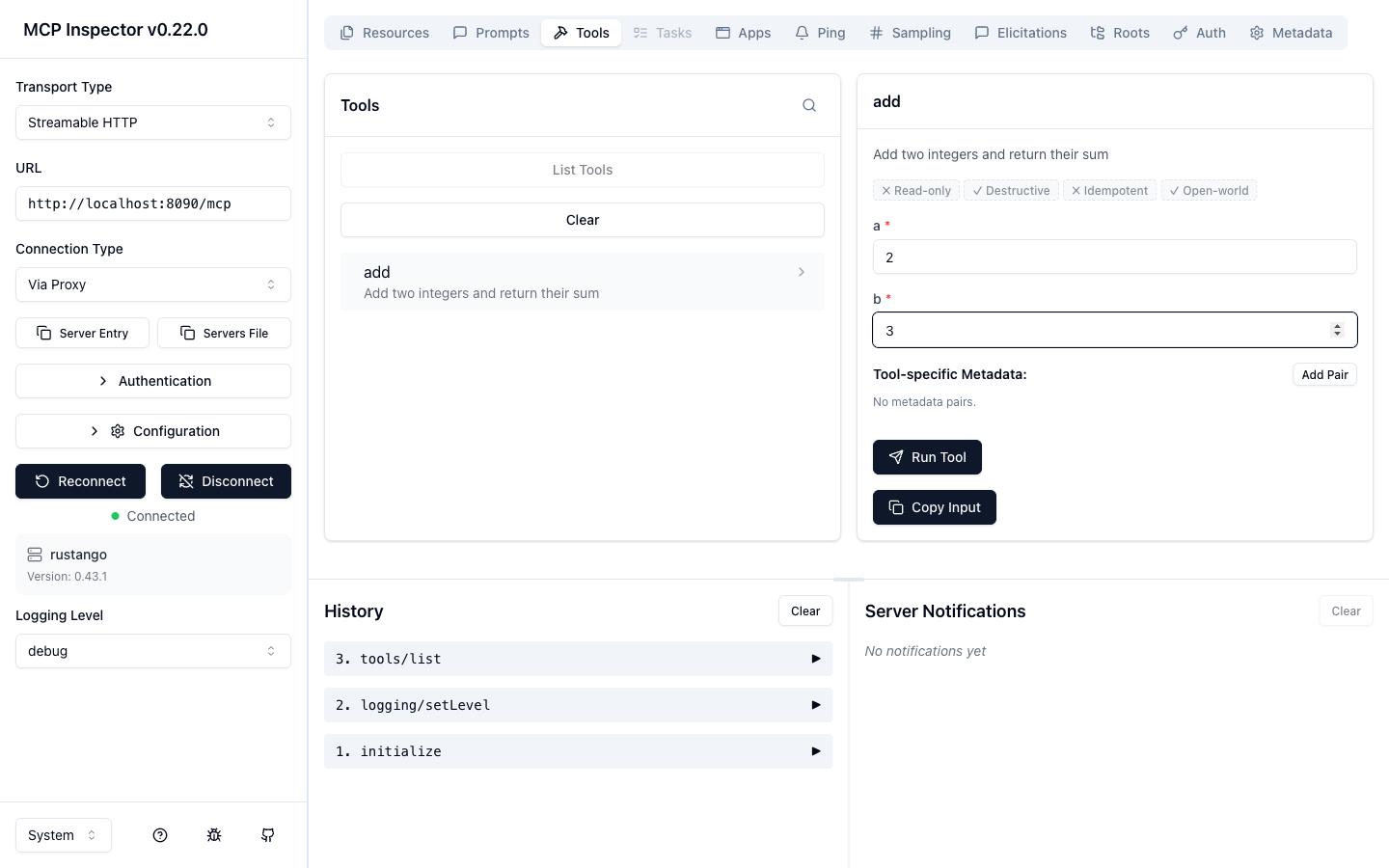
In the Inspector: set the transport to Streamable HTTP and the URL to
http://localhost:8090/mcp. Open Authentication → Custom Headers, add a
header Authorization with value Bearer <token> (mint the token with the
/mcp/token call above), flip the row on, then Connect.
Switch to the Tools tab and click List Tools — you'll see only the
add tool the agent's skill grants, with its JSON Schema. Select it, enter
a = 2, b = 3, and Run Tool:
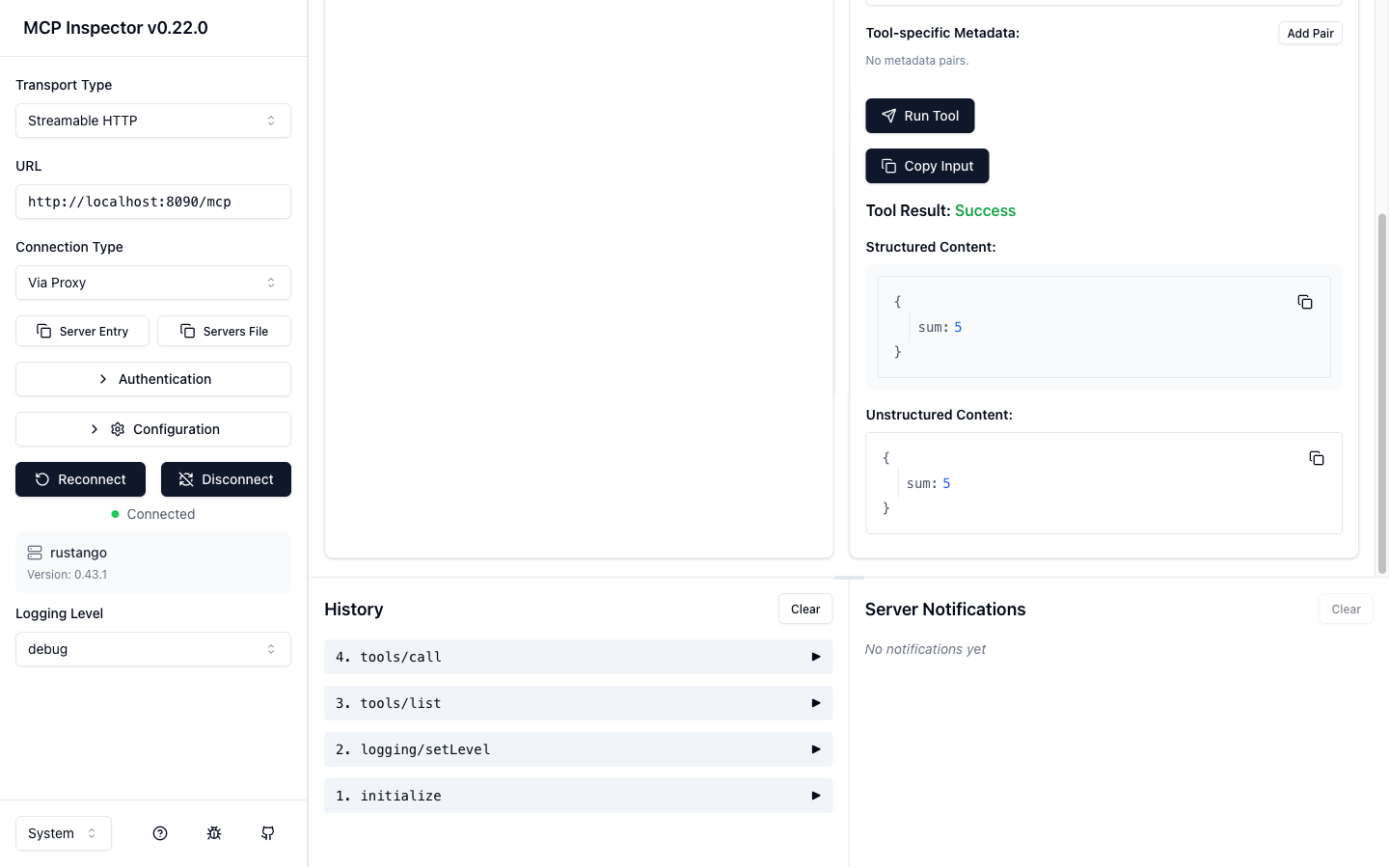
The call returns a structured result — { "sum": 5 } — and the request shows up
in the History pane (initialize → tools/list → tools/call):
(d) Connect a real MCP client
Point Claude Code (or any MCP client) at the running server, passing the agent
token as a header (mint it with the /mcp/token call above):
claude mcp add --transport http rustango-demo http://localhost:8090/mcp \
  --header "Authorization: Bearer $TOKEN"
Then ask the agent to add two numbers — it discovers and calls the add tool
over the same protocol the Inspector used.
Optional vs default build
The feature is fully gated — the entire rustango::mcp module is behind
#[cfg(feature = "mcp")], so it never affects apps that don't opt in:
cargo build -p rustango                 # default — MCP module NOT compiled
cargo build -p rustango --features mcp  # MCP server compiled + linked
A default app carries zero MCP code, dependencies, or routes; enabling the feature is the only thing that turns it on.
See also
- OpenAPI — the JSON Schema machinery a tool's input reuses.
- JWT auth API · Auth backends — the token lifecycle agent auth is built on.
- Security guide — fail-closed authorization, secrets, rate limits.
- Background jobs — run a long tool's work off the request.