 Rustango
 Files, uploads & media
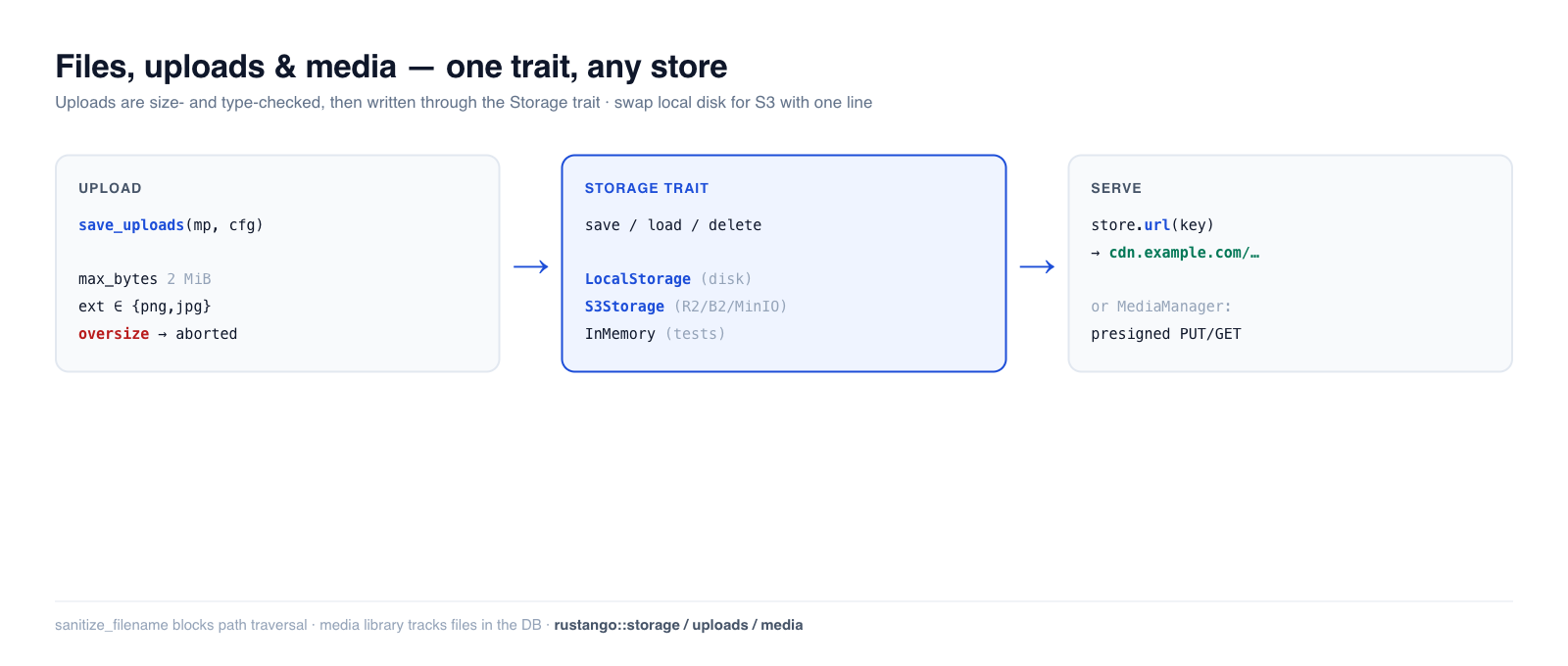
Almost every app stores user files — avatars, attachments, exported reports,
images. Rustango gives you a Storage trait with swappable backends (local
disk, S3-compatible object storage, in-memory for tests), a safe multipart
upload helper with size/type guards, and — when you need a tracked media
library — a database-backed MediaManager with presigned URLs. Write your code
once against the trait; switch from local disk to S3 with a one-line change.
New to a term here? storage backend, multipart, object storage, presigned URL — see the glossary.
Source:
rustango::storage(Storage,LocalStorage,InMemoryStorage,s3::S3Storage,azure::AzureBlobStorage,StorageRegistry,BoxedStorage),rustango::uploads(save_uploads,UploadConfig,sanitize_filename), andrustango::media(Media,MediaManager) — behind thestorage/uploads/storage-s3/storage-azure/mediafeatures (all on by default).Runnable version: the Storage + upload-guard snippets are copied from
files_doc.rs(cargo test -p rustango --test files_doc); the end-to-end multipartsave_uploadsflow is dogfooded by the in-file tests incrates/rustango/src/uploads.rs, and the media library bymedia_sqlite_live.rs.
Table of contents
- Step 1 — Pick a storage backend
- Step 2 — Save, load, and serve files
- Step 3 — Accept an upload
- Safe filenames
- Production: S3-compatible storage
- Large files: stream them
- The media library
- Reference
- See also
Step 1 — Pick a storage backend
Every backend implements the same Storage trait, so your code never names the
concrete type — it holds a BoxedStorage (Arc<dyn Storage>):
use rustango::storage::{BoxedStorage, LocalStorage};
use std::path::PathBuf;
use std::sync::Arc;

let storage: BoxedStorage = Arc::new(LocalStorage::new(PathBuf::from("./uploads")));
| Backend | Feature | Use for |
|---|---|---|
LocalStorage | storage | single-server deployments — files on local disk |
S3Storage | storage-s3 | production — S3 / R2 / B2 / MinIO object storage |
AzureBlobStorage | storage-azure | production — Azure Blob Storage (Azurite in dev) |
InMemoryStorage | storage | tests — a HashMap, never touches disk |
Step 2 — Save, load, and serve files
The trait is four async methods, keyed by a string path. save writes bytes,
load reads them back, plus exists / delete:
use rustango::storage::{Storage, InMemoryStorage};

let store = InMemoryStorage::new();
store.save("avatars/7.png", &png_bytes).await?;
assert!(store.exists("avatars/7.png").await?);
let bytes = store.load("avatars/7.png").await?;
store.delete("avatars/7.png").await?;
Serving the file. Attach a base URL (your CDN or static host) and url(key)
builds the public address you store on the model and hand to the browser:
let store = LocalStorage::new("./uploads".into())
    .with_base_url("https://cdn.example.com/uploads");

store.url("docs/report.pdf");   // Some("https://cdn.example.com/uploads/docs/report.pdf")
Without a base URL, url() returns None — you'd stream the bytes through a
handler instead. LocalStorage also guards against path traversal in keys.
Step 3 — Accept an upload
save_uploads consumes an axum Multipart body, validates each file against an
UploadConfig, and writes the survivors to your Storage — streaming, so an
oversize file is rejected mid-transfer instead of buffering into memory first.
use rustango::uploads::{save_uploads, UploadConfig};
use axum::extract::Multipart;

async fn upload(mp: Multipart) -> Result<impl IntoResponse, UploadError> {
    let cfg = UploadConfig::new("avatars/")          // key prefix
        .max_bytes(2 * 1024 * 1024)                  // reject files over 2 MiB
        .allowed_extensions(&["png", "jpg", "jpeg", "webp"])
        .randomize_filename(true);                   // avoid collisions

    let saved = save_uploads(mp, &cfg, &storage).await?;   // Vec<SavedUpload>
    Ok(Json(saved))
}
The guards are enforced (and verified): allowed_extensions is case-insensitive
("PNG" and "png" are the same), and max_bytes aborts the stream as soon as
the size is exceeded. The in-file uploads tests drive real multipart bodies and
assert files land in storage, oversize files are rejected, and disallowed
extensions are refused.
let cfg = UploadConfig::new("avatars/").allowed_extensions(&["PNG", "Jpg"]);
assert!(cfg.allowed_extensions.contains("png"));   // normalized to lowercase
assert!(cfg.allowed_extensions.contains("jpg"));
Safe filenames
Never trust a client-supplied filename. sanitize_filename reduces it to a safe
basename — stripping directory components (path traversal) and replacing unsafe
characters:
use rustango::uploads::sanitize_filename;

sanitize_filename("../../etc/passwd");   // "passwd"   — no traversal
sanitize_filename("my photo!.png");      // "my_photo_.png"
sanitize_filename("");                    // "upload"   — never empty
save_uploads applies this for you; call it directly only if you build keys by
hand.
Production: S3-compatible storage
For multi-server deployments, swap LocalStorage for S3Storage (behind the
storage-s3 feature). It speaks the S3 API with a hand-rolled SigV4 signer, so
it works with AWS S3, Cloudflare R2, Backblaze B2, and MinIO. The trait is
identical — only the constructor changes:
use rustango::storage::s3::S3Storage;   // needs the `storage-s3` feature

let storage: BoxedStorage = Arc::new(
    S3Storage::new(/* bucket, region, endpoint, credentials */)
);
// save / load / delete / url — exactly the same calls as LocalStorage
Your handlers and models don't change; only the wiring at startup does.
Production: Azure Blob Storage
AzureBlobStorage (behind storage-azure) signs server calls with the
account's Shared Key and hands out service SAS URLs for presigned GET and PUT:
use rustango::storage::azure::{AzureBlobStorage, AzureConfig};

let key = std::env::var("AZURE_STORAGE_KEY")?; // base64, from the portal
let cfg = AzureConfig::new("myaccount", key, "uploads");
// Azurite: cfg.endpoint("http://127.0.0.1:10000/devstoreaccount1")
let storage: BoxedStorage = Arc::new(AzureBlobStorage::new(cfg)?);
Differences from S3 a direct upload has to respect:
- The browser must send every header in
storage.presigned_put_headers(&put), which addsx-ms-blob-type: BlockBlob. The account's CORS rule must allow it along withContent-TypeandIf-None-Match. - A SAS cannot sign headers, so size and type are not enforced by the URL.
Confirm the upload with
metadata.MediaManager::begin_uploadrefuses an Azure disk; upload through the server withsave_bytes. A create-only PUT is grantedcwithoutw, so the URL still cannot replace a blob. - A single PUT holds up to 5000 MiB;
save_streamstages blocks above that.
Large files: stream them
save and load take and return whole buffers. For a large object, or to keep
the bucket private and pass uploads through your server, use save_stream and
load_stream: chunks go through as they arrive, so memory stays flat. A
ByteStream comes from an axum Body, a reqwest::Response, Bytes or a
Vec<u8>.
use axum::{body::Body, extract::{Path, State}, http::{header, HeaderMap, StatusCode}};
use rustango::storage::{BoxedStorage, ByteStream, PutConditions, StorageError};

// PUT /files: proxy the request body into storage.
async fn upload(State(storage): State<BoxedStorage>, headers: HeaderMap, body: Body)
    -> Result<String, StatusCode>
{
    let len = headers
        .get(header::CONTENT_LENGTH)
        .and_then(|v| v.to_str().ok()?.parse::<u64>().ok())
        .ok_or(StatusCode::LENGTH_REQUIRED)?;
    let key = format!("uploads/{}", uuid::Uuid::new_v4());
    let put = PutConditions::new().create_only();
    storage
        .save_stream(&key, len, ByteStream::from(body), &put)
        .await
        .map_err(|_| StatusCode::BAD_REQUEST)?;
    Ok(key)
}

// GET /files/{*key}: stream it back.
async fn download(State(storage): State<BoxedStorage>, Path(key): Path<String>)
    -> Result<Body, StatusCode>
{
    let stream = storage.load_stream(&key).await.map_err(|e| match e {
        StorageError::NotFound(_) => StatusCode::NOT_FOUND,
        _ => StatusCode::BAD_GATEWAY,
    })?;
    Ok(Body::from_stream(stream))
}
save_stream writes exactly len bytes. A body of another size, or a
put.content_length other than len, is refused, and create_only refuses an
existing key. A body that fails or is dropped leaves nothing behind. A
body-limit layer on the route must allow the size you accept.
| Backend | How it streams |
|---|---|
LocalStorage | temp file in the target directory, fsync, then rename; create_only links, so it never replaces a file |
S3Storage | one PUT up to 5 GiB; above, a multipart upload of up to 10,000 parts (5 TiB), one part in flight. Over https the body is sent as UNSIGNED-PAYLOAD; over plain http (local MinIO, SeaweedFS) every 64 KiB chunk is signed. create_only sends If-None-Match: * (on Complete for multipart), which AWS, MinIO and SeaweedFS honour |
AzureBlobStorage | one Put Blob up to 5000 MiB; above, Put Block for each part then one Put Block List. create_only sends If-None-Match: * (on the list) |
| others | the trait default: collects the body in memory, then save; it refuses create_only |
A failed or dropped multipart upload is aborted, and Azure never shows
uncommitted blocks, so no partial object is ever visible. A server that keeps
parts after a crash should still have a lifecycle rule that removes incomplete
multipart uploads. LocalStorage create_only needs hard links; on FAT, SMB or
some FUSE mounts it fails with an error that says so.
Several disks from config
One app can mix backends — two S3 buckets, an Azure container, a local cache —
as named disks. Declare them in [storage] and build a StorageRegistry:
[storage]
default = "uploads"

[storage.disks.uploads]
driver          = "azure"
account         = "myaccount"
container       = "uploads"
public_endpoint = "https://files.example.com"   # optional: links browsers follow

[storage.disks.archive]
driver = "s3"
bucket = "archive"
region = "eu-west-1"
cdn    = "https://cdn.example.com/archive"

[storage.disks.cache]
driver = "local"
root   = "./var/cache"
let registry = StorageRegistry::from_settings(&settings.storage)?;
let uploads = registry.default_disk().expect("default disk");
Keys stay out of the file: RUSTANGO__STORAGE__DISKS__UPLOADS__ACCOUNT_KEY,
RUSTANGO__STORAGE__DISKS__ARCHIVE__SECRET_ACCESS_KEY. Disk names are lowercase
[a-z0-9_] so these overrides can reach them. A driver whose feature is
not compiled in is an error naming the disk, not a silently missing disk.
public_endpoint makes presigned URLs and url() point at the address browsers
reach, while reads and writes keep using endpoint.
The media library
When files are first-class records — tracked in the database, browsable in the
admin, with CDN/presigned delivery — reach for rustango::media
instead of raw Storage. MediaManager persists a Media row per file and
supports two upload flows:
- Server-side:
manager.save_bytes(...)stores the bytes and the row in one call. - Direct-to-storage:
manager.begin_upload(...)returns a presigned PUT URL the browser uploads to directly (your server never proxies the bytes), then you confirm the row. The PUT must send every header inticket.headers(Content-Type,If-None-Match: *, andx-ms-blob-typeon Azure), so the bucket's CORS rule must allow them. The URL can create the object once and never replace it. Grants3:ListBuckettoo: without it S3 answers a missing object with 403, and finalize returns 502 instead of marking the rowFailed.
use rustango::media::{Media, MediaManager};

let manager = MediaManager::new_pool(pool.clone(), registry);
// Hand the browser a short-lived download link:
// Returns Option<String> — None on backends that cannot sign (e.g. local disk).
let Some(url) = manager.presigned_get(&media, Duration::from_secs(3600)).await else {
    return Err(/* no signed URL for this backend */);
};
It also handles soft-delete and orphan purging. The full flow is dogfooded in
media_sqlite_live.rs; the manager's presigned and direct-upload methods
run on all three backends.
Serving media on a public page
A public page does not go through media::router. That router is the
internal management API — uploads, deletes, tagging, browsing — and it
answers 401 to anyone not signed in, on every route, by design.
Render the URL from your own handler instead:
// your own public route
let url = manager.public_url(media_id).await?;   // Option<String>, no signature
public_url is a database lookup plus a string; it mints nothing and awaits
no signer, which is why it suits a page. Two delivery models, and choosing
between them is the actual decision:
| public bucket / CDN | private bucket + presigned | |
|---|---|---|
| address | manager.public_url(id) — stable | manager.presigned_get(&m, ttl) — expires |
| cacheable | yes, by browsers and CDNs | no; the router sends no-store |
| who may fetch | anyone with the URL | anyone with the URL, until it expires |
| use for | public pages, <img src> | the management router, internal tools |
public_url tells you where the object would be served from; it does not
make the object readable. Point it at a private bucket and you get a correct
URL and a 403 — that case wants a presigned URL, which is deliberately not
cacheable and not shareable.
For files on local disk rather than a bucket, the static handler already does this and needs no media row at all:
Cli::new(pool).with_uploads("/uploads", "./var/uploads")
If you were about to write an AllowAll authorizer to make a public page
work, stop. That opens all 16 routes — including DELETE and the presigned
PUT — to everyone, which is the hole 0.57.7 closed.
The management router needs an authorization policy
media::router mounts 16 JSON routes over the manager, all of them operator
actions on the library. Every one is gated, and there is no permissive
default. Build it with media_router_with and supply a policy:
use rustango::media::router::{media_router_with, MediaPerms};

let app = axum::Router::new()
    .nest("/media", media_router_with(manager, MediaPerms::new(pool)));
media_router(manager) — the old constructor — is deprecated and now
answers 403 on every route. That is a deliberate behaviour change in
0.57.7: before it, those routes took no authentication, authorization or
tenant extractor at all, so GET /media/{id} returned the row and a
presigned S3 download URL to anyone who could guess an integer, and
POST /uploads/begin minted a presigned PUT for a caller-chosen key
prefix.
MediaPerms (needs the tenancy feature) checks the {table}.{action}
permission codenames the admin already uses — rustango_media.view to read,
rustango_media_collections.add to create a folder, and so on. Mount it
inside require_auth, which is what injects the identity it reads;
without that every request is a 401. Superusers skip the codename check —
but not allow_disks, which binds them too: is_superuser elevates
inside one tenant, and the object store is shared across all of them.
Only a superuser may set another user's uploaded_by_id, and filing into a
collection (upload, move or a nested collection) also needs
rustango_media_collections.view.
Three things it does not do:
- Row-level decisions. A grant of
rustango_media.viewreads any media row by id.MediaManagerholds one pool, so a multi-tenant deployment scopes rows itself — implementMediaAuthorizerfor that.MediaTargetnames the row (Media(id),Collection(id),CollectionSubtree(id), …) precisely so a per-row policy can be written.?recursiveon a collection's contents arrives asCollectionContents { id, recursive: true }— same target, flagged — so a policy can be stricter about the wide read without losing the collection it names. - Scope the object store.
diskis caller-supplied onPOST /uploads/beginand theStorageRegistryis process-wide, so pool-per-tenant isolates the database and not the bucket: a barerustango_media.addgrant writes into any disk the process knows about. Say which ones withMediaPerms::new(pool).allow_disks(["user-uploads"]). Prefixes within a disk still needMediaAuthorizer, which is handedkey_prefix. - Guess what a new route means. Both
MediaActionandMediaTargetare#[non_exhaustive], so end a hand-written policy on_ => falseand a route added in a later release arrives denied rather than allowed.
Worth knowing when you write your own: DELETE /collections/{id} deletes the
whole subtree and re-parents the media under every level of it, so it
arrives as Delete(CollectionSubtree(id)) rather than
Delete(Collection(id)) — and under MediaPerms it needs
rustango_media.change as well as rustango_media_collections.delete,
because it writes to the media table.
UPGRADING.md has
the migration notes.
How the media tables are created
The media tables (rustango_media, rustango_media_collections,
rustango_media_tags, rustango_media_tag_links) are managed models. Their
schema ships as a system migration and is created — per tenant, when the
media feature is enabled — the same way as the rest of the framework's own
tables, whenever you run migrate / provision a tenant. There is no lazy
"create on first use" step; if the feature is off, the tables are never created.
Upgrading from before 0.51. Earlier versions created the media tables lazily via an
ensure_tableDDL call rather than a migration. On the firstmigrate(or tenant provision) after upgrading, the framework auto-reconciles: because the tables already exist, the generated media migration is recorded in the system-migration ledger without re-running itsCREATE TABLE, and your existing rows are left untouched. No manual step is required — the upgrade that would otherwise fail withrelation already exists/table already existsnow just works.Upgrade to 0.51.2 or later, not 0.51.1. 0.51.0 moved the media tables onto system migrations and 0.51.1 claimed this reconcile — cross-version testing against real 0.46–0.50 databases showed neither worked, and both are yanked. The reconcile guard demanded a migration be purely
CreateTable, while a generated initial migration is tables and indexes, so it bailed on every real one. 0.51.2 is the release where this actually fires (#1167).
Reference
Storage trait: save(key, &bytes) · load(key) · delete(key) ·
exists(key) · url(key) -> Option<String>, plus defaulted save_with_content_type,
presigned_get_url(key, ttl), presigned_put_url(key, ttl, &put), presigned_put_headers(&put), metadata(key),
save_stream(key, len, body, &put) and load_stream(key)
(a signing backend overrides the presign pair; the defaults return None).
UploadConfig: new(prefix) · .max_bytes(n) · .max_files(n) · .allowed_extensions(&[..])
(case-insensitive) · .randomize_filename(bool). Used by
save_uploads(multipart, &cfg, &storage).
Backends: LocalStorage (disk) · S3Storage (object storage, storage-s3) · AzureBlobStorage (storage-azure)
· InMemoryStorage (tests). All return a BoxedStorage.
See also
- The admin — media and FK widgets surface uploaded files in the UI.
- Background jobs — resize/transcode an upload off the request.
- Caching — the same swap-the-backend trait pattern.
- Security guide — validating untrusted upload input.