 Rustango
MCP server
The Model Context Protocol (MCP) is the open standard for letting an AI agent — Claude, an IDE assistant, your own LLM app — securely call your application's tools, read its resources, and use its prompts. Rustango ships a production MCP server: register a tool with one macro, mount a router, and any MCP client can discover and call it over the standard JSON-RPC transport — with per-agent, fail-closed authorization and OAuth 2.1 built in.
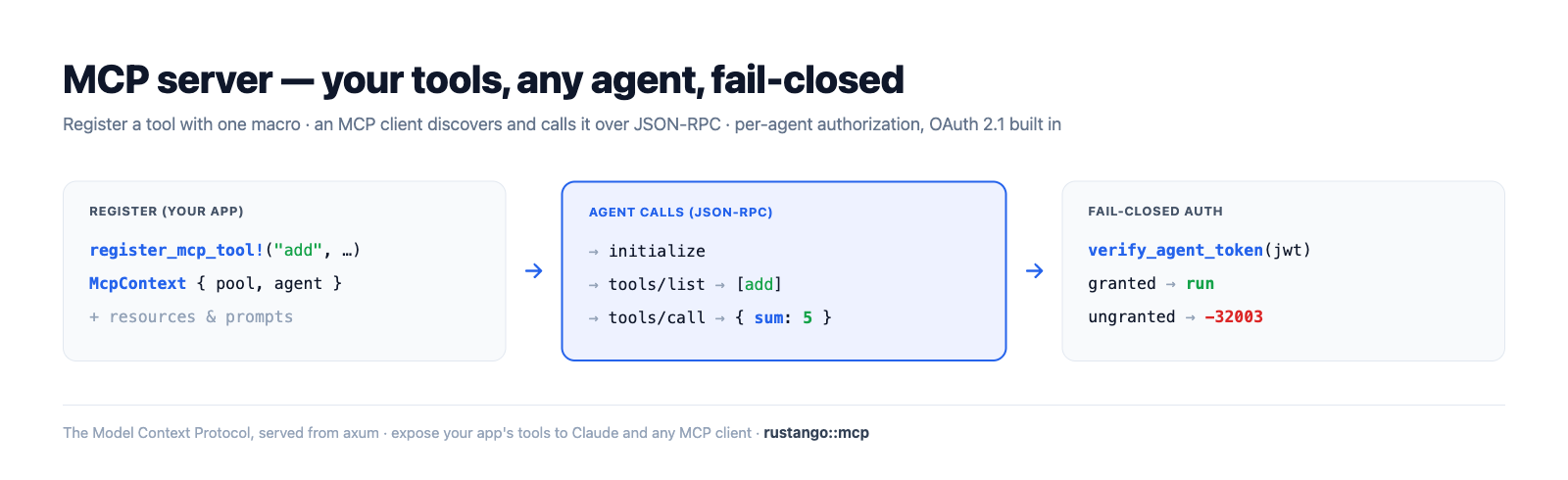
New to a term here? MCP, JSON-RPC, tool/resource/prompt, agent, JWT, OAuth — see the glossary.
Source:
rustango::mcp(router,tenant_router,secure_tenant_router,secure_tenant_router_from_settings,register_mcp_tool!,register_mcp_resource!,McpContext,issue_agent_token) and therustango::tenancyagent/skill helpers — behind themcpfeature (OFF by default; pullstenancy, sse, serializer, openapi, jwt).Runnable version: every snippet is copied from
mcp_doc.rs(cargo test -p rustango --features sqlite,mcp --test mcp_doc); the full protocol surface is dogfooded by thecrates/rustango/tests/mcp_*.rssuite, and a runnable server lives inexamples/mcp_demo.
Table of contents
- What MCP gives you
- Step 1 — Enable the feature
- Step 2 — Define a tool
- Step 3 — Mount the server
- Step 4 — Authorize agents
- The protocol
- Settings
- How to test — the suite · curl · the visual MCP Inspector · a real client
- Optional vs default build
- See also
What MCP gives you
A Rustango MCP server exposes three things an agent can use, all hand-registered for explicit control (nothing is auto-exposed):
| Primitive | What it is | How it's declared |
|---|---|---|
| Tool | a function the agent calls (with typed JSON args) | register_mcp_tool! |
| Resource | readable content the agent fetches by URI | register_mcp_resource! + skill-attached |
| Prompt | a reusable instruction template | derived from a granted skill |
Every call is authorized per agent: an agent's JWT carries the skills
(and the tools they unlock) it was granted, and tools/list / tools/call
fail closed — an agent never sees or runs a tool it wasn't granted.
Step 1 — Enable the feature
MCP is the optional mcp feature (off by default). Turn it on:
# Cargo.toml
rustango = { version = "0.62", features = ["mcp"] }
It pulls in tenancy (agents/skills), sse (the notification stream),
serializer + openapi (tool input schemas), and jwt (agent tokens). A build
without the feature compiles none of the MCP module — see
Optional vs default build.
Step 2 — Define a tool
A tool is a typed input struct + an async handler, registered at compile time
with register_mcp_tool!. The input type derives serde::Deserialize and
implements OpenApiSchema (which becomes the tool's published JSON Schema):
use rustango::mcp::{McpContext, McpError};
use serde_json::json;

rustango::register_mcp_tool!(
    "add",
    "Add two integers",
    AddInput,
    |_ctx: McpContext, input: AddInput| async move {
        Ok::<_, McpError>(json!({ "sum": input.a + input.b }))
    },
);

#[derive(serde::Deserialize)]
struct AddInput { a: i64, b: i64 }

impl rustango::openapi::OpenApiSchema for AddInput {
    fn openapi_schema() -> rustango::openapi::Schema {
        rustango::openapi::Schema::object()
            .property("a", rustango::openapi::Schema::integer())
            .property("b", rustango::openapi::Schema::integer())
            .required(["a", "b"])
    }
}
The handler gets an McpContext { pool, agent, progress, cancel } — the tenant
DB pool, the authenticated agent, a progress reporter, and a cancellation token —
so a tool can query your models, report progress on long work, and bail on
cancel. Return any serde_json::Value (it's surfaced as the tool's
structuredContent) or an McpError.
Resources are static content registered the same way:
rustango::register_mcp_resource!(
    "rustango://about", "About", "text/plain",
    || "This server exposes the demo tools.".to_string(),
);
Prompts come from skills (next step) — a skill's instructions become a prompt the agent can fetch.
Step 3 — Mount the server
Pick a mount to match your deployment; all return an axum::Router you nest
under a prefix (conventionally /mcp):
| Mount | Tenancy | Auth | Use for |
|---|---|---|---|
mcp::router(pool) | single-tenant | none | transport only (initialize/ping) |
mcp::tenant_router() | multi-tenant | none | transport only (per-request pool) |
mcp::secure_tenant_router() | multi-tenant | agent JWT | the real thing |
mcp::secure_tenant_router_from_settings(&s) | multi-tenant | agent JWT | production (CORS, rate-limit, SSE, body cap from [mcp]) |
Tools require the authed path (an agent context), so production servers use
secure_tenant_router*:
use rustango::mcp;

let api = axum::Router::new()
    .nest("/mcp", mcp::secure_tenant_router_from_settings(&settings.mcp));
// hand `api` to your tenancy Cli/Builder as usual
With several backends compiled in, the default tenant type is Postgres. For a
SQLite or MySQL tenancy use secure_tenant_router_from_settings_for::<sqlx::Sqlite>
(or tenant_router_authed_for). Without config,
secure_tenant_router_for::<sqlx::Sqlite>() is secure_tenant_router() for that backend.
The authed router mounts: POST {prefix} (JSON-RPC), GET {prefix} (SSE
notifications), POST {prefix}/token (credential → JWT), POST {prefix}/oauth/token
(OAuth 2.1), and the two .well-known/* discovery documents. It signs agent
tokens with RUSTANGO_SESSION_SECRET. If that is unset or shorter than 32 bytes,
off the prod tier it uses the tenant session key saved in ./var/; on prod it
logs a warning and uses a random per-process key, so tokens die on restart.
Each process keeps at most 8 open SSE streams per agent and 256 per tenant; past
that GET {prefix} answers 429. Set RUSTANGO_MCP_SSE_PER_AGENT /
RUSTANGO_MCP_SSE_PER_TENANT to change them (0 is no cap).
The notification bus and the cancel registry live in one process too. With
several replicas, a list_changed or progress frame reaches only SSE clients on
the same pod, and a notifications/cancelled that lands on another pod does not
stop the call.
The initialize handshake is a plain JSON-RPC POST. On the authed mount every
POST needs a Bearer token, initialize and ping included; an unauthed call
gets 401.
// → POST /mcp
{ "jsonrpc": "2.0", "id": 1, "method": "initialize",
  "params": { "protocolVersion": "2025-06-18", "capabilities": {},
              "clientInfo": { "name": "my-client", "version": "0" } } }

// ← 200
{ "jsonrpc": "2.0", "id": 1, "result": {
    "protocolVersion": "2025-06-18",
    "serverInfo": { "name": "rustango", "version": "0.62.0" },
    "capabilities": { "tools": { "listChanged": true }, "prompts": { "listChanged": true },
                      "resources": { "listChanged": true, "subscribe": false },
                      "logging": {}, "completions": {} } } }
To give agents server-wide guidance, call
rustango::mcp::register_instructions("…") at startup. The text is sent as
instructions in the initialize reply; without a call the field is left out.
Several calls (a library and its app, say) are joined with a blank line in call
order; a blank or repeated text is skipped.
Step 4 — Authorize agents
Authorization is skill-based and fail-closed. You provision an agent (which gets a one-time secret), define a skill that bundles tools (and resources/prompt), then grant the skill to the agent in a tenant:
use rustango::tenancy::{create_agent_pool, create_skill_pool, grant_skill_pool};

// 1. Provision an agent — returns a one-time `name`.`secret` credential.
let issued = create_agent_pool(&pool, "calc-bot").await?;

// 2. A skill bundles tools (here, the `add` tool) + a prompt body.
create_skill_pool(&pool, "calculator", "Calculator", "does arithmetic",
                  "You are a precise calculator.", &["add".into()]).await?;

// 3. Grant it to the agent in tenant "acme".
grant_skill_pool(&pool, "acme", "calc-bot", "calculator").await?;
The client exchanges its credential for a tenant-pinned, scoped JWT at
POST /mcp/token (or the OAuth client_credentials flow at /mcp/oauth/token).
The server resolves the grant into the token's skills + tools claims; every
request re-verifies it.
Or skip the exchange entirely: the raw prefix.secret credential
itself is accepted as the Bearer token — paste the show-once key straight into
any MCP client:
claude mcp add --transport http my-app https://acme.example/mcp \
  --header "Authorization: Bearer 3f9c1a2b.7d…"
On the raw-key path the server verifies the secret (argon2, with a short
process-local cache so the hash isn't recomputed per request), re-checks
liveness, and resolves grants on every request — a user-owned key always
reflects its owner's live RBAC. The JWT path does the same: each request
re-checks that the agent (and its owner) is active and its secret not rotated,
and reads grants from the rows, not the claims. So revocation applies at once on
both paths. Set [mcp] rate_limit_per_minute in production to
bound verification work. The effect, verified end to end:
// tools/list returns ONLY the granted tool, with its JSON Schema:
let listed = list_tools(&agent);                       // → { "tools": [ { "name": "add", … } ] }

// tools/call runs the handler and returns a structured result:
let out = call_tool(ctx, json!({ "name": "add", "arguments": { "a": 2, "b": 3 } })).await?;
assert_eq!(out["structuredContent"]["sum"], 5);

// An agent WITHOUT the grant sees an empty list and is refused:
//   list_tools(&ungranted) → { "tools": [] }
//   call_tool(ungranted, "add") → Err(code = TOOL_FORBIDDEN)
Tokens are tenant-pinned: a token minted for acme is rejected against any other
tenant (cross-tenant replay → 401). Rotating the secret or deactivating the agent
refuses its tokens on the next request; a JTI revoked through the
JwtLifecycle is refused too.
User-owned keys (permission-driven capabilities)
The agents above are standalone machine identities. A member can instead generate a personal key — a user-owned agent — so an LLM acts on their behalf, with capabilities that follow the tenant's existing RBAC instead of a list pinned onto the key.
Two pieces wire it up:
use rustango::tenancy::{create_user_key_pool, create_skill_pool, map_skill_to_permission_pool};

// 1. Map a skill to a permission codename. Any user-owned key whose owner
//    holds `mcp.coach` is then granted this skill's tools + prompt + resources.
create_skill_pool(&pool, "coach", "Coach", "logs workouts",
                  "You are the member's coach.", &["log_set".into()]).await?;
map_skill_to_permission_pool(&pool, "coach", "mcp.coach").await?;

// 2. The member generates a key — a one-time `name`.`secret`, shown once.
//    `&[]` = a FULL key: everything the owner is entitled to. Pass skill
//    codenames to SCOPE the key to a single skill or a skillset instead —
//    always bounded by the owner's entitlement (you can't exceed your perms):
let issued = create_user_key_pool(&pool, user_id, "Alice's phone", &[]).await?;
// scoped: create_user_key_pool(&pool, user_id, "coach bot", &["coach".into()]).await?;
println!("copy once: {}", issued.token);
At token-issue the server calls
resolve_user_agent_grants_pool —
the owner's effective permissions (user_permissions_pool, i.e. roles + direct
grants − denials) select the mapped skills, whose tools/prompts/resources are
flattened into the JWT's skills/tools claims. So tools/list,
tools/call, prompts/get, and resources/read are all gated by RBAC,
with no change to those handlers. The owning user rides in the token's uid
claim; a tool handler reads it as ctx.agent.user_id to scope work to that
member. Revoke fresh capabilities by changing the user's permissions (they
re-resolve on the next request); revoke the key itself with
revoke_user_key_pool(&pool, user_id, agent_id). List a member's keys with
list_user_keys_pool(&pool, user_id).
Per-key scope vs per-user entitlement. Skills reach a key along two axes:
the owner's entitlement (superuser → every skill; otherwise the skills
mapped to a permission they hold) and the key's scope (skills pinned at
creation). An unscoped key (skills = &[]) gets the owner's full entitlement;
a scoped key (skills = &["coach", …]) is limited to those, and gets nothing
once its last pinned skill is revoked. Resolution always
re-intersects scope with the current entitlement — so a key can never exceed
the owner's permissions, and losing a permission narrows every key on the next
request. Scoping to a skill the owner isn't entitled to is refused at creation.
Standalone agents are unaffected — a machine agent (user_id = None) still
uses only its explicit grant_skill_pool grants.
From the CLI (manage verbs)
Everything above is also available out of the box through the tenancy-aware
manage dispatcher (these verbs compile in with the mcp feature). Each is
tenant-scoped and takes a <slug>:
| Verb | What it does |
|---|---|
create-agent <slug> <name> | Provision a machine agent; prints its prefix.secret once. |
rotate-agent-secret <slug> <name> | Issue a fresh secret, invalidating the old one. |
list-agents <slug> | List a tenant's agents (id, name, status, prefix). |
create-skill <slug> <codename> [--name ..] [--description ..] [--tools a,b] [--instructions ..] | Define a skill (a bundle of tools + prompt). |
grant-skill <slug> <agent> <skill> | Grant a skill to an agent. |
revoke-skill <slug> <agent> <skill> | Revoke a skill from an agent. |
list-skills <slug> | List a tenant's skills. |
create-user-key <slug> <username> [--label <l>] [--skill <codename>]… | Issue a user-owned key; prints its token once. Repeat --skill to scope the key to a single skill or a skillset; omit for a full key (default label = username). |
list-user-keys <slug> <username> | List a user's personal keys (id, label, created-at). |
revoke-user-key <slug> <username> <key_id> | Revoke one of a user's personal keys by id (ownership-verified). |
map-skill-permission <slug> <skill> <permission> | Map a skill to a permission codename. Idempotent — any user key whose owner holds <permission> gains the skill. |
unmap-skill-permission <slug> <skill> <permission> | Remove a skill↔permission mapping. |
The permission → skill → tools flow end to end:
# 1. Define the skill and map it to a permission codename.
$ cargo run -- create-skill acme coach --tools log_set --instructions "You are the member's coach."
$ cargo run -- map-skill-permission acme coach mcp.coach

# 2. Grant the permission to the member (roles or direct — see grant-perm),
#    then issue their personal key.
$ cargo run -- grant-perm acme alice mcp.coach
$ cargo run -- create-user-key acme alice --label "Alice's phone"
created key #7 for user `alice` in tenant `acme` (label `Alice's phone`, scope full (owner's permissions))
  token: 3f9c1a2b.7d…            # copy once — never shown again
  store this safely — it won't be shown again

# …or scope the key to a single skill / skillset (repeat --skill):
$ cargo run -- create-user-key acme alice --label "coach bot" --skill coach
Alice's key now resolves the coach skill's tools on every request because
she holds mcp.coach. Change her permissions and the capabilities re-resolve on
her next request; revoke the key itself with revoke-user-key. The same key id is
distinguishable from machine agents in the tenant admin (the Agent list shows
user_id).
The auto-admin surfaces these too: Agent, AgentSkill, AgentSkillPermission
(and AgentGrant) each render an auto-CRUD table in the tenant admin, so the
skill↔permission mappings can be reviewed and edited without the CLI.
The protocol
JSON-RPC 2.0 (protocol version 2025-06-18) over HTTP POST, with an optional SSE
stream (GET {prefix}) for server→client notifications. Methods:
| Method | Auth | Purpose |
|---|---|---|
initialize · ping | on the authed mount | handshake + liveness |
tools/list · tools/call | yes | discover + invoke tools (granted only) |
prompts/list · prompts/get | yes | skill-derived prompts |
resources/list · resources/read · resources/templates/list | yes | static + skill resources |
logging/setLevel · completion/complete | yes | log level + prefix completion |
notifications/progress · notifications/*/list_changed | — | server→client over SSE |
notifications/cancelled | — | client cancels an in-flight call |
A failed tool handler returns a normal result with isError: true (the agent
can react); protocol-level problems (unknown/forbidden tool, bad params) return a
JSON-RPC error with codes like -32002 (TOOL_NOT_FOUND), -32003
(TOOL_FORBIDDEN), -32602 (INVALID_PARAMS). Long tools report progress and
honor cancellation via the McpContext.
Each tools/call writes an audit-log entry with the tool name and its arguments.
Values under sensitive keys (password, token, secret, …) are redacted.
An audit failure only logs a warning; the call still runs.
Settings
The [mcp] section (read by secure_tenant_router_from_settings):
[mcp]
prefix                = "/mcp"   # not applied by the router: pass
                                 # settings.mcp.prefix() to .nest() yourself
token_ttl_secs        = 900      # agent access-token lifetime (15 min)
enable_sse            = true     # serve the GET {prefix} SSE stream
allowed_origins       = []       # CORS allow-list (empty = same-origin only)
rate_limit_per_minute = 0        # per-IP cap (0/unset = unlimited)
max_tools_listed      = 0        # page size of every */list (0/unset = unlimited)
max_body_bytes        = 1048576  # JSON-RPC body cap — raise for tools that
                                 # accept inline payloads (base64 uploads)
How to test
(a) The test suite
The whole protocol is covered by crates/rustango/tests/mcp_*.rs + the doc's
backing test. Run them with the feature on:
# The doc's headline flow (register → initialize → grant → list → call → fail-closed):
cargo test -p rustango --features sqlite,mcp --test mcp_doc

# Slices + end-to-end + OAuth + settings:
cargo test -p rustango --features sqlite,mcp,config --test 'mcp_*'
(b) curl the JSON-RPC
Boot the demo (next section) and talk to it directly. The demo guards every
method behind an agent token (an unauthed call returns 401 with a JSON-RPC error body, code -32001), so mint one first
— the demo prints the agent secret on boot:
TOKEN=$(curl -sX POST http://localhost:8090/mcp/token \
  -H 'content-type: application/json' -d '{"name":"demo-bot","secret":"<printed-secret>"}' \
  | jq -r .access_token)

# initialize:
curl -sX POST http://localhost:8090/mcp -H "authorization: Bearer $TOKEN" \
  -H 'content-type: application/json' \
  -d '{"jsonrpc":"2.0","id":1,"method":"initialize","params":{"protocolVersion":"2025-06-18","capabilities":{},"clientInfo":{"name":"curl","version":"0"}}}'

# tools/call — only the granted `add` tool is callable:
curl -sX POST http://localhost:8090/mcp -H "authorization: Bearer $TOKEN" \
  -H 'content-type: application/json' \
  -d '{"jsonrpc":"2.0","id":2,"method":"tools/call","params":{"name":"add","arguments":{"a":2,"b":3}}}'
# → { ... "result": { "structuredContent": { "sum": 5 }, "isError": false } }
(c) Test it visually with the MCP Inspector
The MCP Inspector is the official visual client — connect it to your server and click through tools, resources, and prompts. Run the demo, then the Inspector:
# 1. Start the demo MCP server (seeds an `acme` tenant + `demo-bot` agent + the `add` tool):
cd crates/rustango/examples/mcp_demo && cargo run   # serves on http://localhost:8090/mcp

# 2. Launch the Inspector (opens a browser UI on http://localhost:6274):
npx @modelcontextprotocol/inspector
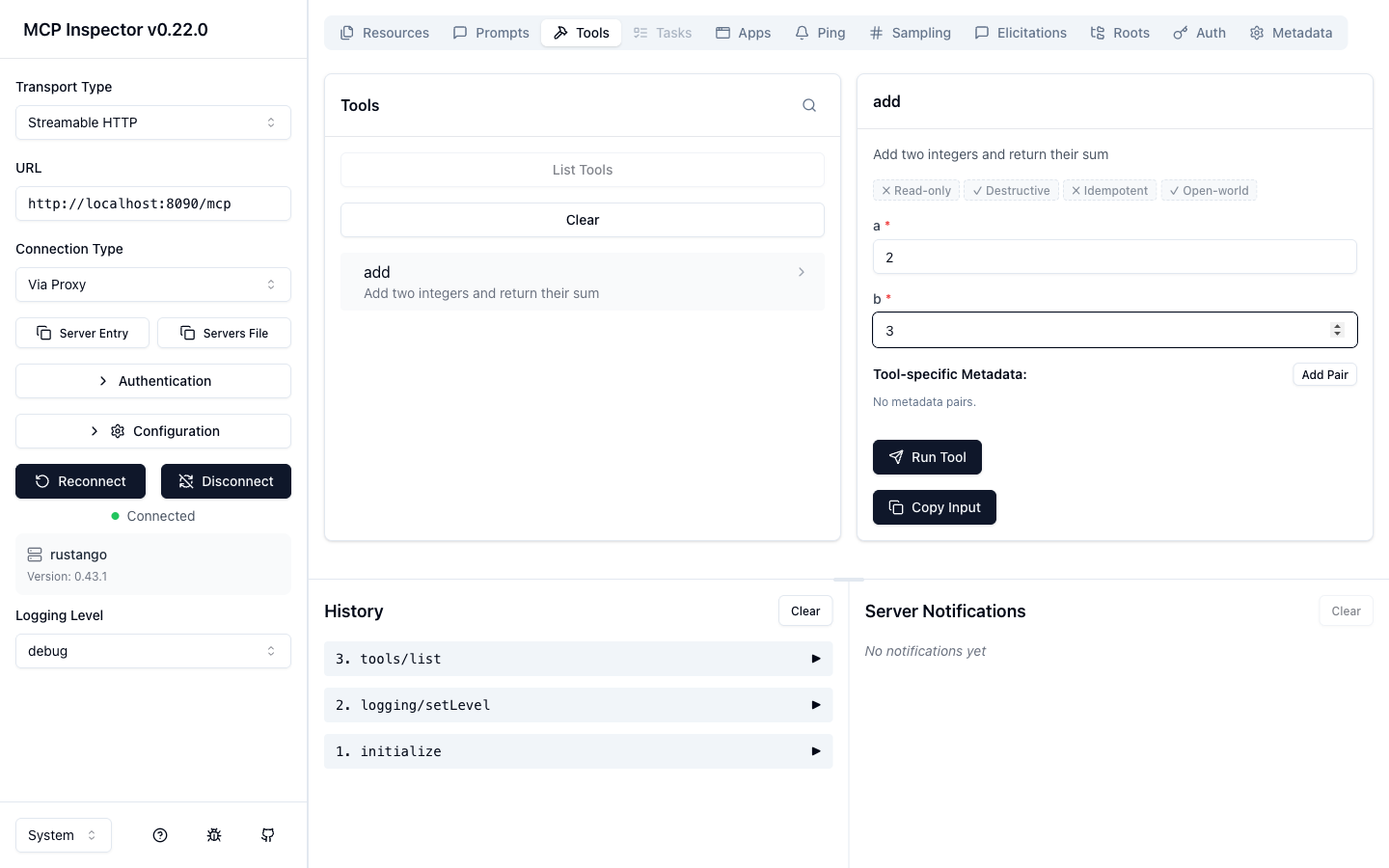
In the Inspector: set the transport to Streamable HTTP and the URL to
http://localhost:8090/mcp. Open Authentication → Custom Headers, add a
header Authorization with value Bearer <token> (mint the token with the
/mcp/token call above), flip the row on, then Connect.
Switch to the Tools tab and click List Tools — you'll see only the
add tool the agent's skill grants, with its JSON Schema. Select it, enter
a = 2, b = 3, and Run Tool:
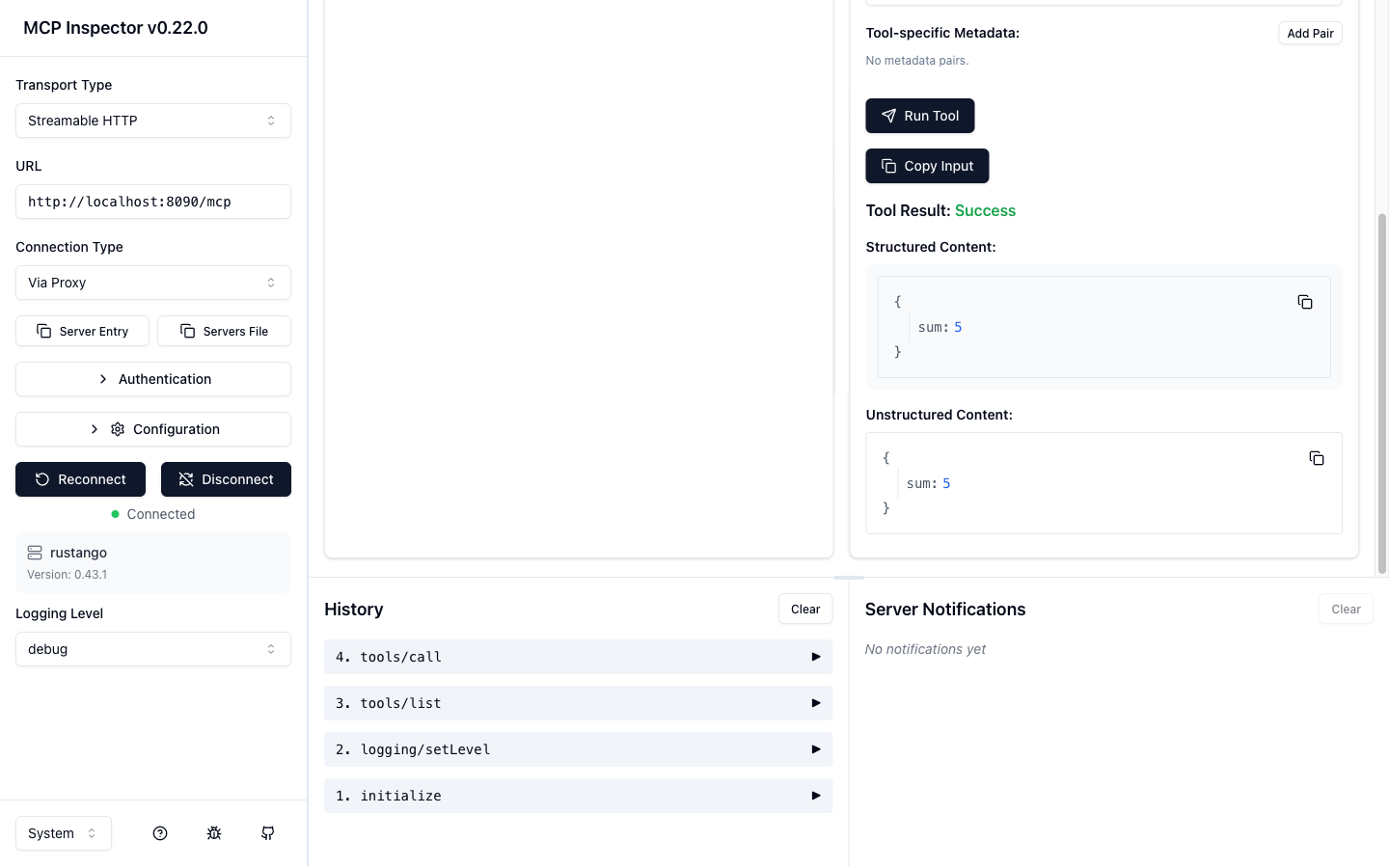
The call returns a structured result — { "sum": 5 } — and the request shows up
in the History pane (initialize → tools/list → tools/call):
(d) Connect a real MCP client
Point Claude Code (or any MCP client) at the running server, passing the agent
token as a header (mint it with the /mcp/token call above):
claude mcp add --transport http rustango-demo http://localhost:8090/mcp \
  --header "Authorization: Bearer $TOKEN"
Then ask the agent to add two numbers — it discovers and calls the add tool
over the same protocol the Inspector used.
Optional vs default build
The feature is fully gated — the entire rustango::mcp module is behind
#[cfg(feature = "mcp")], so it never affects apps that don't opt in:
cargo build -p rustango                 # default — MCP module NOT compiled
cargo build -p rustango --features mcp  # MCP server compiled + linked
A default app carries zero MCP code, dependencies, or routes; enabling the feature is the only thing that turns it on.
See also
- OpenAPI — the JSON Schema machinery a tool's input reuses.
- JWT auth API · Auth backends — the token lifecycle agent auth is built on.
- Security guide — fail-closed authorization, secrets, rate limits.
- Background jobs — run a long tool's work off the request.