 Rustango
SSO (OpenID Connect / social login)
Sign in with an external identity provider (IdP) instead of a local password: Google, Microsoft Entra ID, GitHub, GitLab, Discord, or any OpenID Connect provider (Okta, Auth0, Keycloak, …). Each provider is a row you add in the admin: no config file, no rebuild.
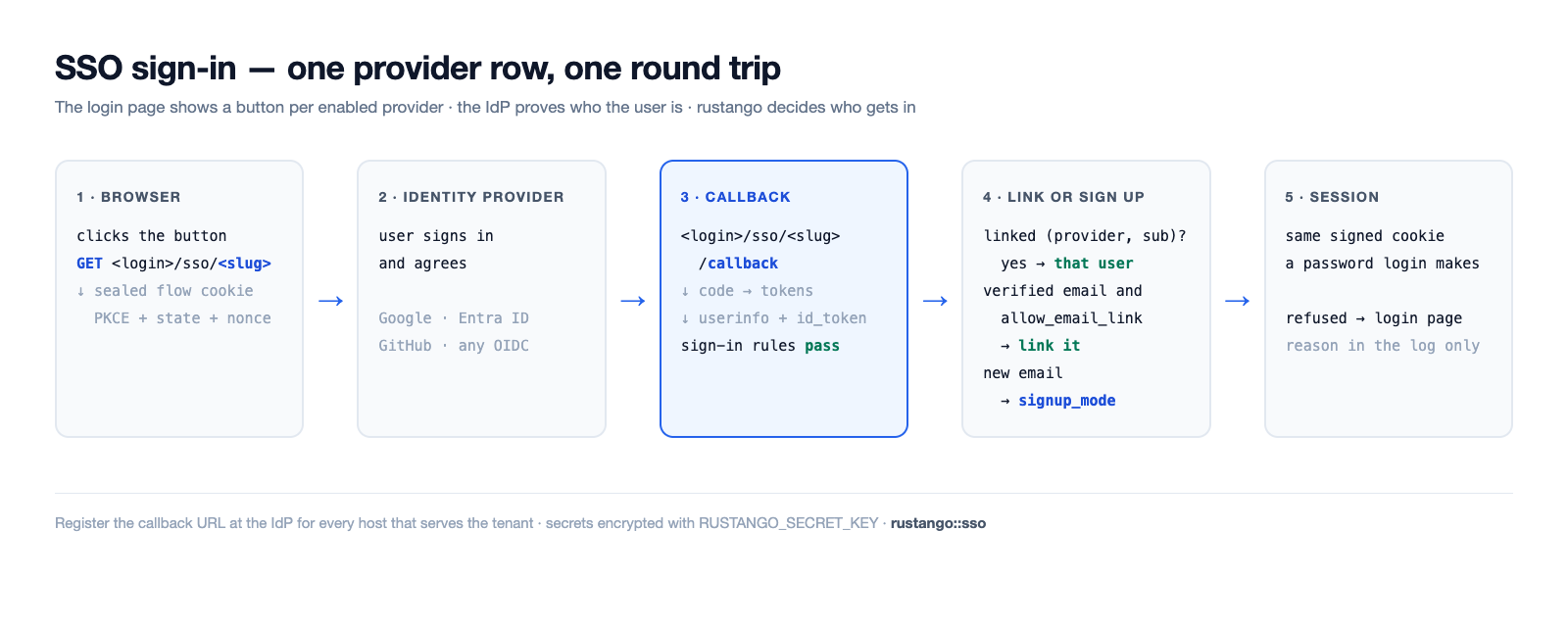
Set up SSO in four steps
- Create an app at the IdP. Register a web application (an "OAuth client" or "app registration"). Copy its client ID and client secret. The provider guides below say where.
- Register the callback URL at the IdP, for every host that serves
the sign-in page. It is
<login>/sso/<slug>/callbackon that host; see Callback URLs. Pick theslugnow, e.g.google. - Add the provider row. In the tenant admin, add a row to the
rustango_sso_providersmodel:slug,label,kind,client_id,client_secret, andissuer_urlwhenkindisoidc. Only a superuser can add or change provider rows. Every field has help text under its input; the field reference lists the same texts.RUSTANGO_SECRET_KEYmust be set, or the secret cannot be saved. - Test the sign-in. Open the sign-in page in a private window and use
the new button. A refused sign-in shows one generic message; the reason
is in the server log (
sso refused) and the audit log. Runmanage check --deployto catch a provider that would refuse every existing user.
SSO signs in the user linked to the IdP identity: one
rustango_sso_links row per (provider, sub). The email the IdP sends is
never enough on its own. A first-time user is linked by verified email
only when the provider has allow_email_link on (default off), and
never when the account is a superuser or, without allow_email_link_staff,
staff (tenant: holds any role or any direct permission; bare admin: every account). Those accounts are linked by an
admin, who adds the SsoLink row in the admin; the refusal log line names
the subject. (The member flow, below, can also create an account for an
unknown email; that is off by default.)
Source: the admin-independent core
rustango::sso(SsoProvider,build_provider,verified_email,ResolvedSso,SsoError), the link tablerustango::sso::link(SsoLink,ProviderKey,sign_in), the bare-admin wiringrustango::admin::sso, per-tenant/console SSOrustango::tenancy::sso(SharedSsoProvider), and member SSOrustango::tenancy::member_auth.
Callback URLs
The callback is built per request from the host and the slug:
https://<host><login>/sso/<slug>/callback. On the admin surfaces the
scheme is https unless a trusted proxy sends X-Forwarded-Proto; the
member flow also uses http on a loopback host (see
Member SSO). Register one URL per host the provider
is used on.
| Sign-in surface | Tenant on its own host | Tenant under a path prefix |
|---|---|---|
Tenant admin (<login> is /login) | https://acme.example.com/login/sso/<slug>/callback | https://app.example.com/acme/login/sso/<slug>/callback |
Member sign-in (member_sso_router, login_base default /auth) | https://acme.example.com/auth/sso/<slug>/callback | https://app.example.com/acme/auth/sso/<slug>/callback |
Bare admin (no tenancy), mounted at /admin | https://admin.example.com/admin/login/sso/<slug>/callback | — |
With RouteConfig::legacy() the tenant admin's <login> is /__login. A
tenant reachable both on its own host and under a prefix needs both URLs.
For a shared provider, the operator console shows the callback URL to
register next to each row.
Provider guides
- In the Google Cloud console, open APIs & Services → Credentials and create an OAuth client ID of type Web application.
- Add the callback URL under Authorized redirect URIs.
- Provider row:
kind = google, the client ID and secret. Leaveissuer_urlempty. Default scopes:openid email profile. - To allow only your Google Workspace, set
allowed_hosted_domains(thehdclaim), e.g.client.org.
Microsoft Entra ID
- In the Entra admin center, open App registrations → New registration. Add the callback URL as a Web redirect URI.
- Copy the Application (client) ID. Under Certificates & secrets, create a client secret and copy its value.
- Provider row:
kind = microsoft. It uses thecommonendpoint, so withallowed_idp_tenantsempty any Entra directory can sign in. Set it to your Directory (tenant) ID to allow only your directory; then its emails count as verified androle_mapandrequired_claimsapply.check --deploywarns whenrole_maporrequired_claimsis set andallowed_idp_tenantsis empty. - Do not use
kind = oidcwith a single-directory Entra issuer (…/<tenant-id>/v2.0): that row is not treated as Microsoft, Entra sends noemail_verified, so email linking, sign-up andallowed_email_domainsrefuse everyone.
GitHub
- In GitHub, open Settings → Developer settings → OAuth Apps → New OAuth App. Set the Authorization callback URL to the callback URL.
- Copy the client ID and generate a client secret.
- Provider row:
kind = github. Default scopes:read:user user:email. The verified email comes from/user/emails. GitHub sends no id_token, so a rule that needs one, such asallowed_idp_tenants, refuses.
Generic OpenID Connect
- Create a web (confidential) client at your IdP and add the callback URL.
- Provider row:
kind = oidc, the client ID and secret, andissuer_url, for examplehttps://<org>.okta.com,https://<host>/realms/<realm>(Keycloak) orhttps://<tenant>.auth0.com/. - rustango reads
<issuer>/.well-known/openid-configurationto find the endpoints, once per issuer per hour. Default scopes:openid email profile.
check --deploy warns about email linking on an oidc provider and about
an http:// issuer that is not loopback.
Field reference
These are the help texts the admin shows under each input.
SsoProvider and SharedSsoProvider
A tenant's own providers are SsoProvider rows. The operator console's
shared providers (SharedSsoProvider) have the same fields and show the
same texts.
| Field | What to enter |
|---|---|
slug | Short id in this provider's URLs, e.g. google: the IdP sends users back to <login>/sso/<slug>/callback. Unique; a new slug means a new callback URL at the IdP. |
label | Text on the sign-in button, e.g. Sign in with Google. |
kind | google, microsoft, github, gitlab or discord for a built-in provider, or oidc for any other OpenID Connect provider (then fill in the issuer URL). |
issuer_url | Only for oidc: the issuer URL, e.g. https://<org>.okta.com or https://<host>/realms/<realm>. The endpoints are read from <issuer>/.well-known/openid-configuration; for Microsoft Entra ID use the microsoft kind. |
client_id | Client ID (application ID) from your identity provider's app registration. |
client_secret | Client secret from the same app registration. Stored encrypted with RUSTANGO_SECRET_KEY. |
enabled | Show this provider's button on the sign-in page. |
sort_order | Button order on the sign-in page; lower numbers come first. |
scopes | OAuth scopes, space separated, e.g. openid email profile. Empty: the kind's default scopes. |
allow_email_link | Security: link a first-time sign-in to the existing account with the same verified email; that account's password stops working, its sessions end, its API keys are deleted and its agent keys are turned off. Never a superuser, and a user with any role or permission only with email linking for staff; the bare admin ignores it. |
allowed_email_domains | Security: only users whose verified email is in these domains may sign in. Comma or newline list: client.org is that domain only, *.client.org its subdomains only. Empty: any domain. |
blocked_email_domains | Users with an email in these domains never sign in, even if the allowed list has them. Same format as the allowed list. |
allowed_idp_tenants | Microsoft Entra directory (tenant) IDs allowed to sign in, comma separated, read from a verified id_token. Empty: any Entra directory can sign in through a microsoft provider. |
allowed_hosted_domains | Google Workspace domains (the hd claim) allowed to sign in, comma separated, e.g. client.org. |
required_claims | JSON object of claims a sign-in must carry, each holding one of its values: {"roles": ["App.User"]}. {}: no claim is required. |
signup_mode | Security: who gets a new account at first sign-in: closed (no one), invite_only (an invite for the email), allowlist (an invite for the email or its domain) or open (anyone the sign-in rules let in). Empty: the sign-in page's default. |
default_roles | Tenant roles a new user gets, comma separated, e.g. Viewer. An invite with roles replaces them. |
role_map | JSON object from an IdP group or app role to tenant roles: {"Admins": "Editor"} or {"Admins": ["Editor", "Viewer"]}. |
role_claims | Claims the role map reads, comma separated. Empty: groups,roles. |
sync_roles_on_login | Apply the role map at every sign-in, not only the first. Only roles named in the role map are added or removed. |
username_from | Where a new user's username comes from: the email's local part, the whole email, or the IdP's preferred_username (falls back to the local part). |
username_clash | What happens when that username is taken: add a short suffix, or refuse the sign-up. |
sync_profile | Update the user's name and email from the IdP at every sign-in. Never for a superuser. |
allow_email_link_staff | Security: with email linking on, also link users who hold any role or permission. A superuser is never linked by email. |
sso_only | Users linked through this provider may not sign in with a password, even while the provider is off. |
auto_deactivate_after_days | After this many days without use, sso-deactivate-idle turns off the users this provider signed up who cannot use a password: SSO only here, or password login off for the tenant. Empty: never. |
session_ttl_secs | Longest session, in seconds, after a sign-in through this provider. Empty: the normal session length. |
superuser_session_ttl_secs | Longest session, in seconds, for a superuser who signs in through this provider. Empty: the normal session length. |
SsoTenantPolicy
The tenant-wide settings, one row.
| Field | What to enter |
|---|---|
name | Always default: the tenant uses this one row. |
access_denied_message | Message shown on the sign-in page after a refused SSO sign-in, e.g. who to contact. Shown as plain text. |
password_login | The password form: on, off (also for superusers), or superusers_only (shown only at ?local=1, for superusers). |
sso_only | No one except a superuser may sign in with a password. |
default_provider | Slug of the provider the sign-in page opens straight away, except at ?local=1 or after an error. |
signups_per_hour | Most SSO sign-ups per hour. Empty: 100; 0: no limit. |
SsoSharedOverride
A tenant's narrowing of one shared provider. Empty fields keep the shared value.
| Field | What to enter |
|---|---|
shared_slug | Slug of the shared provider this row narrows for this tenant. |
shared_provider_id | The shared provider row this override is bound to, set at its first use. |
shared_issuer | That row's issuer when bound. If the shared row moves to another issuer, sign-in is refused until the override is added again. |
allowed_email_domains | Security: only these email domains may sign in here, on top of the shared rules. Same comma or newline format as on the provider. |
blocked_email_domains | More email domains that never sign in here. |
allowed_idp_tenants | Microsoft directory IDs allowed here, comma separated. Narrows the shared list. |
allowed_hosted_domains | Google Workspace domains allowed here, comma separated. Narrows the shared list. |
required_claims | More claims a sign-in must carry here, as JSON: {"roles": ["App.User"]}. |
signup_mode | Security: sign-up here. It can only be stricter than the shared provider's. Empty: the shared value. |
allow_email_link | Off: no email linking here. Empty or on: the shared setting. |
allow_email_link_staff | Off: email linking never links a user with any role or permission here. Empty or on: the shared setting. |
sso_only | On: users of this provider may not sign in with a password here. |
session_ttl_secs | A shorter longest session here, in seconds. Empty: the shared value. |
superuser_session_ttl_secs | A shorter longest superuser session here, in seconds. Empty: the shared value. |
allowed_roles | Roles the shared provider may grant here, comma separated. Empty: none. |
SsoInvite
An invitation to sign up through SSO.
| Field | What to enter |
|---|---|
provider_slug | Slug of the provider this invite is for. Empty: any provider. |
target | Who may sign up: one email ([email protected]) or a domain (@client.org, or *.client.org for its subdomains). A domain invite needs max uses or an expiry. |
roles | Roles the new user gets, comma separated. They replace the provider's default roles. |
expires_at | After this time the invite no longer works. Empty: it does not expire. |
max_uses | How many sign-ups may use this invite. Empty: no limit. |
link_user_id | Re-link only: the existing user the next sign-in links, instead of a new account. Set by the Re-link action. |
link_key | Re-link only: the provider the next sign-in must come through. Set by the Re-link action; leave empty. |
Features & who uses them
Since 0.49 the SSO core is its own feature, independent of the
auto-admin, so an end-user (member) login can build without pulling in
crate::admin:
| Feature | Pulls in | Gives you |
|---|---|---|
sso | oauth2, casts | The admin-independent core: rustango::sso — the OIDC / social OAuth handshake, the DB-backed SsoProvider model (secret encrypted at rest via casts), and the member flow (tenancy::member_auth, with tenancy). |
admin-sso | admin, sso | The above plus the bare-admin login wiring (rustango::admin::sso) — SSO buttons on the admin login page that mint the admin session. |
[dependencies]
# Admin login with SSO:
rustango = { version = "0.63", features = ["admin-sso"] }
# Member (end-user) SSO without the auto-admin:
rustango = { version = "0.63", features = ["tenancy", "sso"] }
admin::sso_provider and the historical admin::sso::* core paths are
now re-export shims over sso::provider / sso::*, so existing
crate::admin::sso::{build_provider, ResolvedSso, …} and
crate::admin::sso_provider::SsoProvider imports keep resolving
unchanged. Since 0.58 rustango_sso_providers has an allow_email_link
column and there is a rustango_sso_links table; makemigrations
emits both.
The email opt-in email linking matches is the email column. On the tenant
User model it is gated on the sso feature (moved off admin-sso
in 0.49, so member-SSO-only builds still get the column); the bare
AdminUser.email remains behind admin-sso. Enabling or disabling the
feature emits an AddColumn / DropColumn migration for that column.
How it works
- The login page shows one "Sign in with <provider>" button per enabled provider.
- Clicking one (
GET <login>/sso/<slug>) redirects to the IdP with a signed, short-lived flow cookie (PKCE + CSRFstate). - The IdP sends the user back to
<login>/sso/<slug>/callback. - rustango verifies the flow, exchanges the code and reads
/userinfo. - It looks up the link for this provider and the IdP
sub. With no link, andallow_email_linkon, a verified email that matches a non-privileged user creates the link. - If the linked user is active, it mints the same signed-cookie session a password login produces — so every existing gate (superuser / permissions, live password-change invalidation) still applies.
- Otherwise the user is bounced back to the login page with a generic error (details go to the server log, never the browser).
On the tenant admin, GET <login>/sso/<slug>?next=/path lands on /path
after sign-in. The path rides in the signed flow cookie and passes the same
check as the password login: same-origin only, and inside the tenant's path
prefix. Anything else lands on admin_url. The login page passes its own
?next on to the SSO buttons. The bare admin does the same without the prefix
rule, keeps the path through the TOTP step, and falls back to its prefix.
The link table is a normal migrated model: in the tenant's storage for tenant logins, and in the admin database for the bare admin. A link is matched exactly (issuer and subject keyed by a SHA-256; the email ignores ASCII case only), whatever the database collation.
The client secret is encrypted at rest — the client_secret column
is an EncryptedString cast, decrypted in-memory only
at login time.
Providers are rows, managed in the admin
Each provider is a SsoProvider row, an ordinary admin model: add, edit
and enable it from the admin UI, no redeploy. The fields are in the
field reference. Only a superuser can add, change or
delete SsoProvider and SsoLink rows; other staff can list them with
the usual permissions. The endpoints are discovered at sign-in, so there
is no per-provider endpoint wiring.
Where each surface manages providers
- Single-tenant / standalone admin (
crate::admin):SsoProviderrows are a plain global table, managed from the bare admin. RequiresBuilder::with_session_auth(SSO mints the same session). - Tenant admin (multi-tenancy): each tenant manages its own
SsoProviderrows from its admin — granular, self-service, isolated per tenant. - Operator console (multi-tenancy): an operator defines a
SharedSsoProvideronce and it's offered to every tenant (a company-wide Google, say). Managed from the console's Shared SSO panel (/sso-shared,admin-ssofeature; every operator can list, changes need an editable console), where Allow email linking togglesallow_email_linkin place (the id and its links stay). The flag applies to every tenant. Edit (/sso-shared/{id}/edit) changes a provider in place (same id and slug; a blank secret keeps the saved one), and each row shows the callback URL to register. The issuer URL field shows only foroidc. A refused add or edit shows the form again (status 400) with the typed values and the error, never the secret.
On a tenant's login page the two sets merge, and on a slug clash the tenant's own provider wins over the shared one — so a tenant can override a shared provider for itself.
Register the callback URL with the IdP. A user is linked by opt-in email linking (non-privileged tenant
users), or by a superuser adding an SsoLink row: provider_source
(tenant, shared, admin, or app for a native sign-in), provider_id (the provider row id),
issuer (kind, or kind|issuer_url without a trailing slash),
subject and user_id. The admin computes
key_sha256. The refusal log line (sso refused) carries provider_id,
issuer and subject. Adding a row needs the admin's session auth
(Builder::with_session_auth, or the tenant admin's with_session);
without it nobody can add links.
A link created more than an hour before the account it points at (an id
reused after a restore, say) is deleted, and sign-in goes on as if unlinked.
A link whose user no longer exists is deleted at the next sign-in, and
deleting a user in the admin deletes its links.
When account created_at values are imported or backfilled after their
links, rustango::sso::link::set_stale_links(StaleLinks::Warn) only logs a
warning and still signs in.
With the totp feature, a bare-admin user with a confirmed TOTP device
must still enter a code after SSO. The admin shows the code form and
keeps the pending sign-in in a signed cookie for 5 minutes; the form
posts to <login>/sso-totp. The tenant admin has no TOTP step.
manage check --deploy warns about an enabled provider that would refuse
every existing user: no SsoLink rows, and email linking off or only
privileged users. In the bare admin that means any provider with no links.
It also warns about email linking on a kind = "oidc" provider, an http://
issuer that is not loopback, and a shared provider that signs users up.
Member (end-user) SSO
The surfaces above sign people in to an admin. tenancy::member_auth
is the member-facing analogue: it logs an end-user into a tenant's own
user pool (rustango_users) and mints a member session, so a gym
member / SaaS customer can "Sign in with Google" without touching the
admin. It reuses the exact same rustango::sso core and the tenant's own
SsoProvider rows — only the session it mints differs, which is why it
lives behind the sso feature (not admin-sso) and needs no auto-admin.
Mount member_sso_router into a rustango::server::Builder stack (it
reads the resolved Arc<TenantContext> the builder injects):
use rustango::tenancy::member_auth::{member_sso_router, MemberAuthConfig};

let members = member_sso_router(MemberAuthConfig {
    login_base:     "/auth".into(),   // buttons link to /auth/sso/<slug>
    landing_url:    "/".into(),       // post-login destination (a same-origin ?next on the begin URL wins)
    auto_provision: true,             // create a user from a verified email on first sign-in
    session_ttl:    7 * 24 * 60 * 60, // 7 days
    ..Default::default()
});
With several backends compiled in, member_sso_router is for the default
(Postgres) tenant type; use member_sso_router_for::<sqlx::Sqlite> (or MySql).
It mounts two per-slug routes off login_base:
GET {login_base}/sso/{slug}— begin the handshake, redirect to the IdP.GET {login_base}/sso/{slug}/callback— complete it, find-or-provision the member, mint the session cookie.
A path-prefix tenant gets the same two routes under its prefix.
Differences from the admin flow:
- Callback scheme. The member
redirect_uritakes its scheme from a trusted proxy'sX-Forwarded-Proto(and its host fromX-Forwarded-Host), elsehttpon a loopback host (localhost,*.localhost, a loopback IP) andhttpseverywhere else, solocalhost.example.comgetshttps. - Auto-provisioning. A provider's
signup_mode(Who may sign up) wins; with none set,auto_provision = true(opt-in; the default isfalse) works asopen: a verified IdP email with no matchingrustango_usersrow creates one — username from the email local-part (deduped on a clash), a real but unusable random password hash (SSO users can't password-login) — and links it. An email that matches an existing account follows theallow_email_linkrule above. Set it tofalseto refuse unknown emails. A native sign-in (an app that verified its own ID token) callsfind_or_provision_memberdirectly, withProviderKey::app(issuer)as the key. ItsMemberSignInresult isMember(id),NotLinked(an account has the email but may not be linked by it),NoAccount,Inactive,UnverifiedorRefused. - Its own session cookie. The member cookie
(
rustango_member_session) is domain-separated from the tenant / admin session cookies: the signed message carries a per-domain tag and an audience claim, so a member cookie can never validate as a tenant/admin cookie (or vice-versa) even though both are signed withRUSTANGO_SESSION_SECRET. It is slug-bound (a cookie minted foracmenever authenticates onglobex) and invalidated by a password rotation (parity with the admin session). - Logout.
member_auth::logout(&pool, &user)ends the member's sessions on every device and returns theSet-Cookievalue that clears the cookie. On a path-prefix tenant uselogout_at, which clears the cookie on the prefix path.
Read the current member in a handler with the CurrentMember
extractor — the member analogue of SessionUser. It's infallible
(None for anonymous / expired / rotated-out / cross-tenant sessions),
so it composes with public routes:
use rustango::tenancy::member_auth::CurrentMember;

async fn dashboard(CurrentMember(member): CurrentMember) -> impl axum::response::IntoResponse {
    match member {
        Some(user) => format!("Hi, {}", user.username),
        None => "Please sign in".to_owned(),
    }
}
v1 scope. Member SSO resolves providers from the tenant's own
SsoProviderrows only — the registry-wideSharedSsoProvidermerge and a customprovisionhook are follow-ups.
Who may sign in
Each provider (and each shared provider in the operator console) has sign-in rules. Every rule left empty admits anyone the IdP signs in.
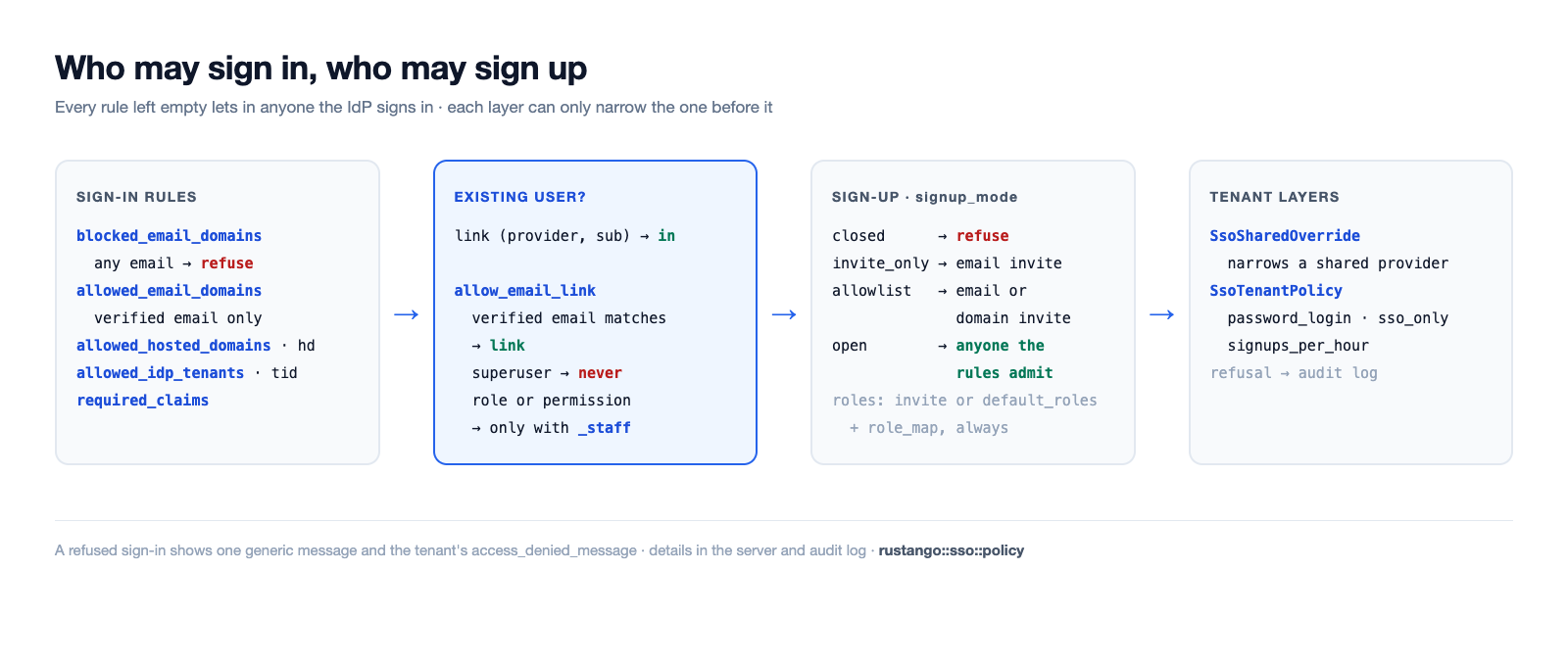
The rule fields are allowed_email_domains, blocked_email_domains,
allowed_idp_tenants, allowed_hosted_domains and required_claims; see
the field reference for their format. The blocked list
is checked against any email the IdP sends, verified or not; the allowed
list only against a verified one. A claim in required_claims may be a
string or a list, and a missing claim refuses.
The admin and the operator console store lists in one canonical form and refuse a value that does not parse. A value that still does not parse (written past them) refuses every sign-in through the provider.
A refused sign-in goes to the server log and to the audit log
(source = sso:<surface>, changes.rule such as domain_not_allowed).
The browser gets one generic message; on the tenant login page it also
shows the tenant's access_denied_message (from SsoTenantPolicy),
escaped.
The member route (member_sso_router) resolves only the tenant's own
providers, so shared providers, and any tenant tightening of them, do not
apply there yet.
id_token trust
Profile data comes from /userinfo over TLS. Claims only an id_token
carries (tid, iss, xms_edov) are used only after the id_token
passes: its signature against the issuer's JWKS (RS256 or ES256; the key
set is cached per its max-age and refetched at most once a minute for an
unknown key), aud holds the client id, exp/nbf with one minute of
leeway, the issuer (Microsoft: https://login.microsoftonline.com/{tid}/v2.0),
and the same sub as userinfo. Otherwise those claims are absent, and a
rule that needs them refuses. A Microsoft email counts as verified when
xms_edov is true, or when the provider pins allowed_idp_tenants and
the token's tid is one of them.
Who may sign up
A provider can also create the account the first time someone signs in. Sign-up runs only when no link and no account match the IdP's verified email, and only after the sign-in rules above pass.
The sign-up fields are signup_mode, default_roles, role_map,
role_claims, sync_roles_on_login, username_from, username_clash,
sync_profile and allow_email_link_staff (see the
field reference). With signup_mode empty, the tenant
login is closed and the member flow follows
MemberAuthConfig::auto_provision; the bare admin never signs anyone up.
A new user gets the invite's roles or default_roles, plus the roles
role_map gives. A provider with a JWKS (OIDC discovery, Microsoft, Google) takes role
claims only from a verified id_token; a userinfo-only provider takes them
from userinfo. sync_roles_on_login adds or removes only roles named in
role_map; roles granted by hand stay, and a sign-in without any of the
role claims changes nothing.
A new user is never a superuser. Roles go through the permission engine
(UserRole); a role name with no Role row is skipped and written to the
audit log (sso_role_unknown). The user, its link (provisioned = true),
its roles and the invite's use commit in one transaction.
Invites (SsoInvite, superuser-only in the tenant admin) target one
email ([email protected]) or a domain (@client.org, or *.client.org for
its subdomains). They can name one provider, carry roles, expire
(expires_at) and limit uses (max_uses). A use is counted atomically:
two sign-ups racing for the last use make one account. .../rustango_sso_invites/bulk
adds many at once from a pasted list or a CSV column.
Unlink and re-link. On SsoLink rows, the admin actions Unlink and
Re-link on next sign-in (superuser-only). Re-link deletes the link and
leaves a one-use invite, good for 7 days, that links the same user again
the next time they sign in through the same provider with their verified
email, even if the IdP gives them a new subject. The user must still have
that email. It never re-links a superuser, and a role holder only with
allow_email_link_staff.
Username and email collision checks ignore case as the backend does:
PostgreSQL folds Unicode case, SQLite only ASCII letters, and MySQL follows
the column collation (by default also accents, so ané and ane collide).
Keep usernames ASCII for the same answer everywhere.
check --deploy does not report a provider whose sign-up is not closed
as refusing everyone, and warns about signup_mode = open with no
allowed_email_domains, allowed_hosted_domains or allowed_idp_tenants.
Passwords, sessions and lifecycle
The provider fields sso_only, session_ttl_secs,
superuser_session_ttl_secs and auto_deactivate_after_days, and the
SsoTenantPolicy row, are in the field reference.
sso_only covers password login, JSON login, HTTP Basic and reset links.
A session lasts the shortest of the provider's limit and the route's
lifetime. sso-deactivate-idle never switches off a superuser or a user
with a link an admin made.
A superuser follows only password_login; sso_only never locks one out.
A refused password looks like a wrong one. An unreadable rule refuses;
unreadable tenant settings still let a superuser in. A provider binds its
users while disabled too; a link to a deleted provider counts as
sso_only until an admin removes it. sso_only covers password logins
(tenant and bare admin) and resets, not API keys or MCP agent secrets.
sso-deactivate-idle only switches off users who cannot use a password.
Logout lands on ?local=1, and the automatic redirect happens at most
once a minute, so a dropped session cannot loop.
Shared providers. A tenant's SsoSharedOverride (one row, bound to
the shared provider) adds its own rules on top: it can block more
domains, narrow sign-up, set sso_only or shorter sessions, never loosen. A shared provider grants only the roles its allowed_roles names;
with no override, none. The override can also switch email linking off
(allow_email_link, allow_email_link_staff). It binds to the shared
provider row on its first sign-in: a renamed row keeps it, a new row with
the old slug does not, and a row moved to another issuer refuses sign-in
until the override is re-added.
Multi-tenant Microsoft. A microsoft provider (or oidc on
/common or /organizations) accepts users from any Entra directory.
Its role_map and required_claims count only when allowed_idp_tenants
pins the token's tid; otherwise roles are not granted and required
claims refuse. check --deploy warns about a row that sets role_map or
required_claims without allowed_idp_tenants.
Throttle and audit. SSO callbacks have their own per-IP limit (a 429
past it), apart from the password one. Email links, sign-ups, re-links and
role changes are audited (sso_linked, sso_signup, sso_relinked,
sso_roles_synced); refusals at most five times per subject in ten minutes.
Account lock. The lock after failed passwords does not stop SSO, so a
guessed username cannot lock its owner out of SSO. To stop a user, set
active = false: SSO refuses inactive users.
Secret storage
client_secret is stored encrypted at rest with XChaCha20-Poly1305
(AEAD), the key derived from the RUSTANGO_SECRET_KEY environment
variable. It's decrypted in memory only at login, to authenticate to the
IdP's token endpoint. So a leaked DB dump never exposes the secret, and
each tenant keeps its own secret with no per-provider env var.
Set
RUSTANGO_SECRET_KEYin the deployment. It is SHA-256'd to a 32-byte key; use at least 32 random characters (with tenant provisioning mounted,check --deploywarns about a shorter key). Without it, saving or using a provider fails fast — the same posture as a missing database URL.
To rotate the key, set the new value in RUSTANGO_SECRET_KEY and the old
one in RUSTANGO_SECRET_KEY_PREVIOUS. Reads fall back to the old key. In
a multi-tenant deployment, manage reseal-tenant-secrets --apply then
re-seals the shared and tenant SSO secrets with the new key.
Providers (presets)
Built-in presets: google, microsoft (Azure AD), github, gitlab,
discord. For anything else, use kind = "oidc" with an issuer_url —
rustango runs OpenID Connect discovery to find the endpoints, once per issuer
per hour. (Sign in
with Apple isn't a preset; it needs id_token/JWKS verification.)
Security notes
- Link first — the
(provider, sub)link decides; the email is used only by opt-in email linking, and only when verified. - No privileged email links — a superuser is never linked by email;
a role holder only with
allow_email_link_staff. A link made by email keeps working after the user is promoted; delete it if that is not wanted. - No auto-provisioning for the admins — an unknown email can't get in.
- Secrets encrypted at rest (
RUSTANGO_SECRET_KEY), decrypted only in memory at login; edit forms mask the stored secret. - The flow cookie is short-lived (10 min),
HttpOnly,SameSite=Lax, andSecureper configuration — not per request scheme. Precedence issecurity.secure_cookies(defaulttrueon themanagepath, so it fails closed), falling back to "secure on the prod tier" fromRUSTANGO_ENVwhen nothing is set. Nothing inspects whether the request actually arrived over HTTPS. The handshake carries PKCE + a signedstate. - SSO sessions are the ordinary admin session — rotating or deactivating the linked user invalidates them through the existing live gate.
- Trust model is
/userinfoover TLS; id_token claims count only after JWKS verification (see id_token trust). Front the admin with HTTPS.
Hardening
- Email links lock the password. When SSO links an existing tenant account by email (or a re-link invite links it), its password is made unusable, its sessions end, its API keys are deleted and its own agent keys switched off, in the link's transaction. Whoever registered the email before its owner loses the account; the owner resets the password to use one again. Any role, even one without permissions, counts as privileged for email linking.
- One use per flow. A callback completes a flow once (per process; the
IdP's one-time code covers other replicas). OIDC sign-ins send a
nonce; a verified id_token without it, or with another, is refused (id_token_replayed). The member landing is the?nextgiven to the begin URL, sealed into the flow; a?nexton the callback is ignored. __Host-flow cookies on HTTPS atPath=/(the bare admin, a tenant on its own host); only that name is read there. A path-prefix tenant keeps the plain name. Under a prefix the member?nextmust stay under it.- Invites. A domain invite for a public suffix or free mail domain
(
@gmail.com,*.co.uk) is refused, and a domain invite needsmax_usesorexpires_at. Stored IdP display names are capped at 150 characters. - Bare admin host. With
security.allowed_hosts(orBuilder::allowed_hosts), the SSO redirect URI is built only for a listed Host. Without a list it uses any Host, and the admin logs a warning at startup.
Tenants on their own host and under a prefix
A tenant can be reached on its own host (cookies at Path=/) and on the
apex host under its prefix (app.example.com/acme, cookies at
Path=/acme). Prefix tenants share one origin with the operator console
and with each other: a cookie Path is not a security boundary there.
Sessions and flows are bound to the tenant slug by their MAC, so one
tenant's cookie never opens another's. Register both callback URLs at the
IdP for a tenant reachable both ways:
https://acme.example.com/login/sso/<slug>/callback and
https://app.example.com/acme/login/sso/<slug>/callback (/__login with
RouteConfig::legacy()).