 Rustango
Multi-tenancy
One rustango app can serve many customers. Each customer is a tenant: an
Org row in the registry database. A request is matched to its tenant,
and the tenant's data lives in its own schema or its own database.
This page explains how the parts fit together. For the steps, see
the operator console, the manage CLI
and tenant databases on a saved server.
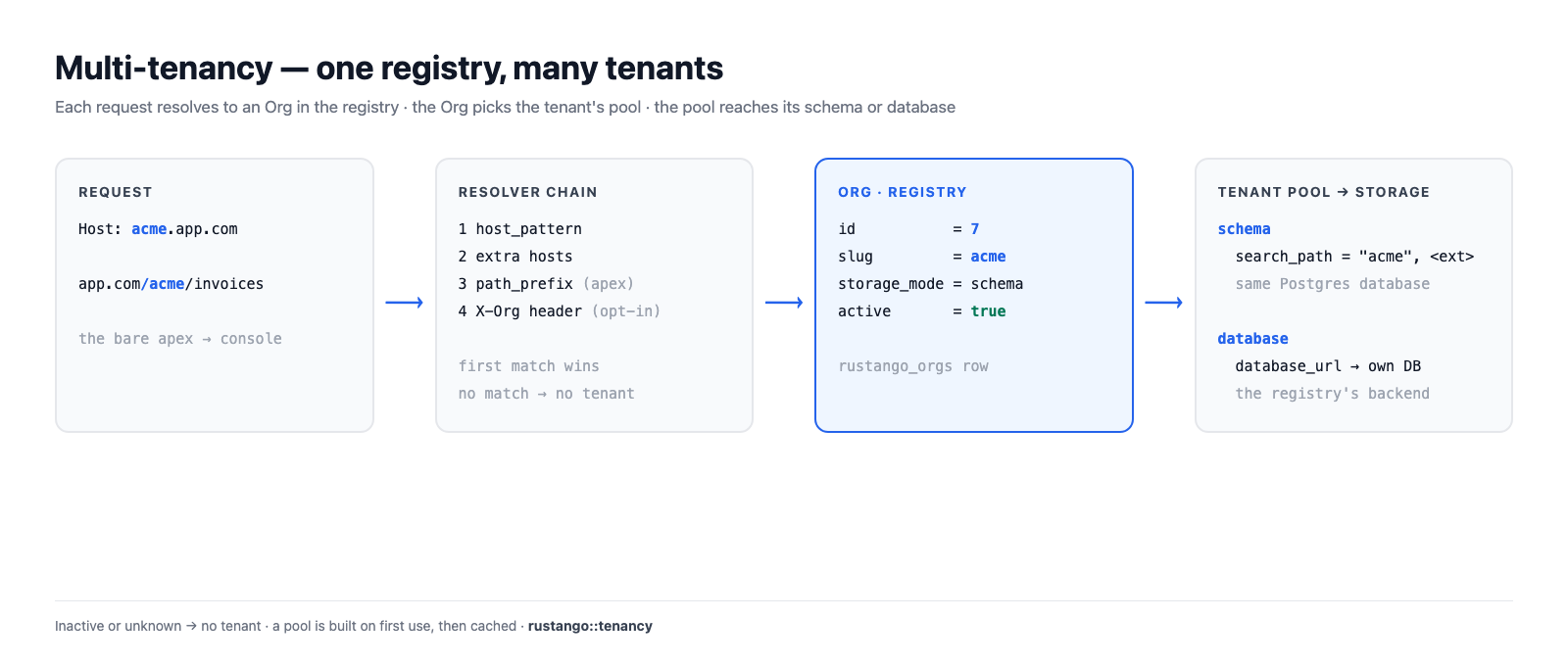
Table of contents
- Registry and tenant
- How a request finds its tenant
- Two ways to reach a tenant
- Storage modes
- Pools
- Migrations
- Credentials and caches bind to the org id
- Lifecycle
Registry and tenant
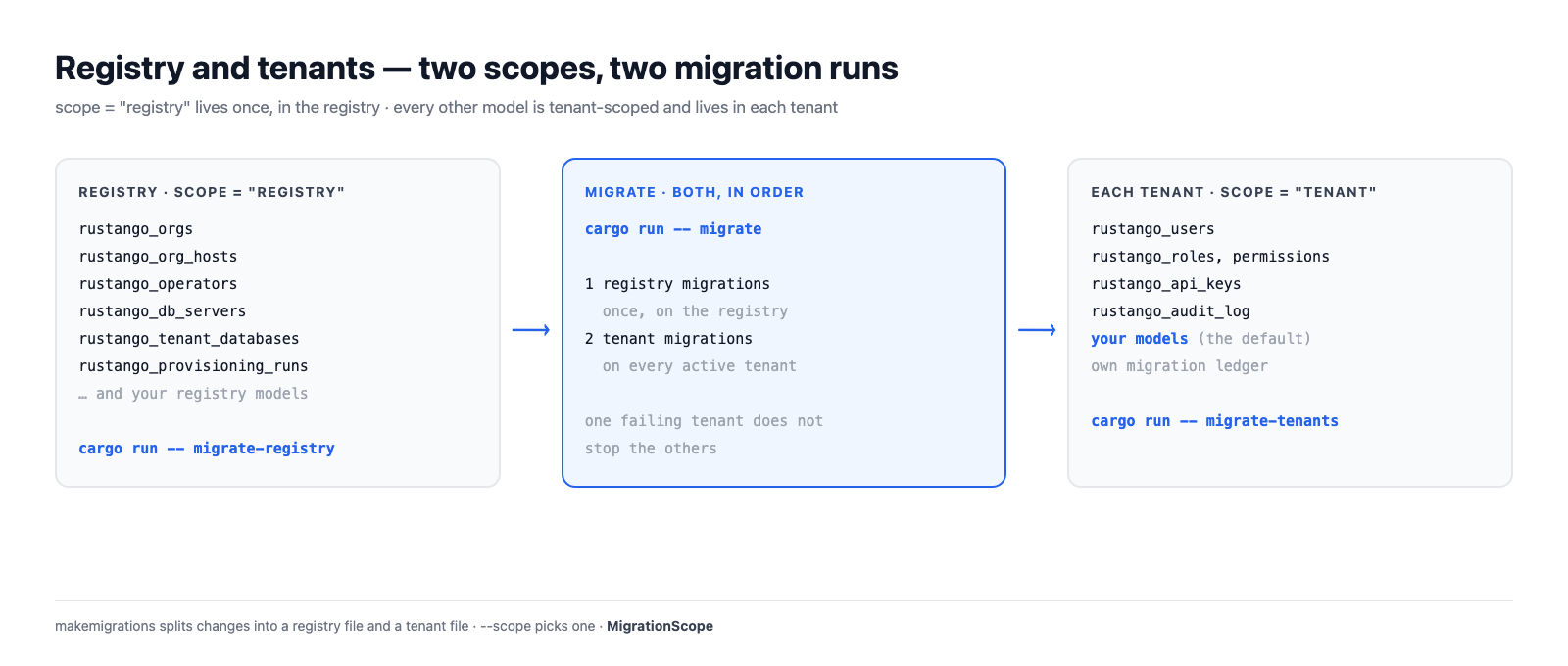
The registry is the one database the app knows at boot (DATABASE_URL).
It holds what is shared by the whole deployment:
rustango_orgs: one row per tenant, with its slug, storage mode, database URL, host, path prefix, port and active flag;rustango_org_hosts: extra hostnames bound to a tenant;rustango_operators: the people who run the deployment;rustango_db_serversandrustango_tenant_databases: saved servers and the databases rustango made on them;rustango_provisioning_runsand their events, shared SSO providers, operator TOTP devices.
Everything else lives per tenant: rustango_users, roles and
permissions, rustango_api_keys, the audit log, and your own models.
A model says where it lives with scope. tenant is the default, so you
only write scope = "registry" for shared tables:
use rustango::sql::Auto;
use rustango::Model;

// One shared table, in the registry.
#[derive(Model)]
#[rustango(table = "billing_plans", scope = "registry")]
pub struct BillingPlan {
    #[rustango(primary_key)]
    pub id: Auto<i64>,
    #[rustango(max_length = 64)]
    pub name: String,
}

// No scope: `tenant` is the default. Each tenant has its own table.
#[derive(Model)]
#[rustango(table = "invoices")]
pub struct Invoice {
    #[rustango(primary_key)]
    pub id: Auto<i64>,
    pub total_cents: i64,
}
Operators and tenant users never mix. Operators live in the registry and sign in on the apex domain. Tenant users live in their tenant and never see the console.
How a request finds its tenant
A resolver turns a request into an Org. The server tries a chain of
resolvers in order, and the first match wins:
- Host. The
Hostheader equals the tenant'shost_pattern, for exampleacme.app.com. The match is exact. When you give no host,create-tenantsets<slug>.<apex>, but only when there is no--path-prefixand the apex is set. - Extra hosts. A hostname bound to the tenant in
rustango_org_hosts. It never beats another tenant's own host. - Path prefix, on the apex only.
app.com/acme/...matches the tenant whosepath_prefixis/acme. On any other host the path picks no tenant. - Header (opt-in).
Builder::header_resolveradds anX-Orgstyle header after the others. Pair it withHeaderResolver::allow_only: the client chooses the header value.
Only active tenants match. The bare apex (RUSTANGO_APEX_DOMAIN)
resolves to no tenant: it serves the operator console. The apex plus a path
prefix does resolve, and so does an apex request with the X-Org header when
HeaderResolver is on. A request that
matches no tenant gets a 404 from the tenant routes, or goes to
unresolved_tenant if you set one.
Port. The built-in server (Builder::serve, run-server) has no port
routing, and no way to add PortResolver to its chain. A tenant reachable
only by its port is not reached there. PortResolver (it reads the
listener's port, never the client's URI) works only in a chain you build and
serve yourself.
A tenant with no host, no path prefix and no port is unroutable, and it
is refused: by create-tenant, by the console, and by an edit that changes
routing.
Resolutions are cached for 30 seconds. Another server sees a change to
rustango_orgs within two fingerprint polls (RUSTANGO_HOST_GEN_CHECK_SECS,
default 5 seconds), and never later than the 30-second cache.
In a handler, take TenantScope (holds no connection) or Tenant (holds
one connection for the request):
use axum::http::StatusCode;
use rustango::extractors::TenantScope;
use rustango::sql::CounterPool as _;

async fn invoice_count(t: TenantScope) -> Result<String, StatusCode> {
    // `t.org` is the Org the resolver found. `t.pool()` is its pool.
    let n = Invoice::objects()
        .count(t.pool())
        .await
        .map_err(|_| StatusCode::INTERNAL_SERVER_ERROR)?;
    Ok(format!("{}: {n} invoices", t.org.slug))
}
Two ways to reach a tenant
| Reach | Example | Cookie Path |
|---|---|---|
| The tenant's own host | acme.app.com/admin | / |
| The apex plus its path prefix | app.com/acme/admin | /acme |
On its own host a tenant has the host to itself, so cookies use Path=/.
Browsers keep cookies apart by host.
Under a path prefix many tenants share the apex host. So the tenant's
cookies use Path=/<prefix>, and /acme's cookies are not sent to
/acmecorp. Links and redirects in the tenant admin carry the prefix too.
Host routing is the stronger choice for production. Path prefixes are handy in development, where you have one host.
Storage modes
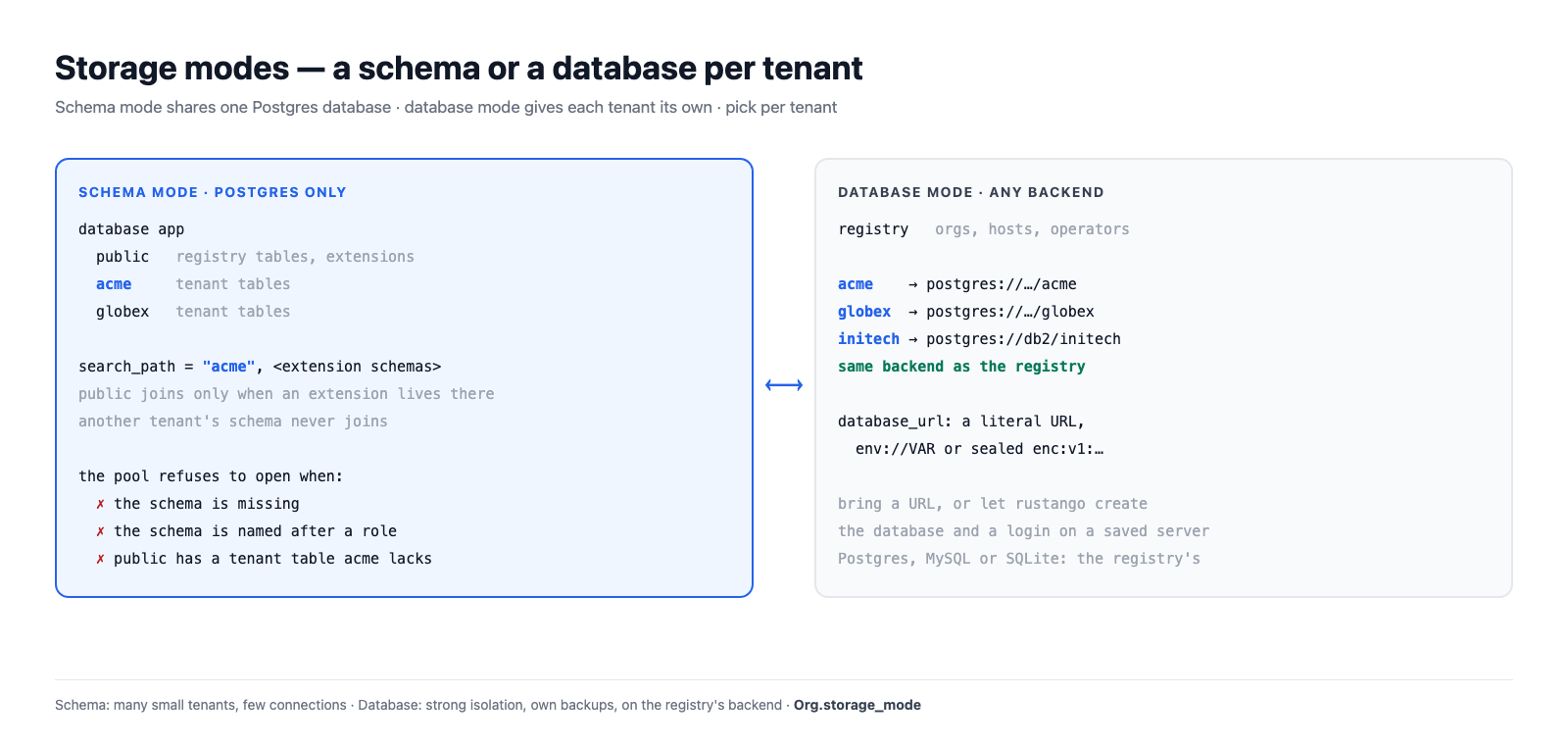
Each tenant has a storage_mode: schema or database.
Schema mode (Postgres only)
All tenants share the registry's Postgres database. Each tenant has its own
schema, named after the slug unless you set schema_name. A tenant
connection's search_path is:
- the tenant's schema;
- then each schema that holds only extensions, so extension types and functions still work.
public is on the path only when an extension lives there. Any other schema
joins only when it holds nothing but extension objects and no org names it,
so other tenants' schemas never appear on the path.
A tenant pool refuses to open when:
- the schema is missing (run
migrate-tenantsfor it); - the schema has the name of a database role, whose sessions would see it first;
- an extension schema on the path, such as
public, holds a tenant table the tenant's schema lacks. Queries would read that table instead.
An extension in the tenant's own schema is fine: that schema is first on
the path. An extension in another tenant's schema, or in a schema with
objects of its own, stays off the path, with a warning. Move it with
ALTER EXTENSION <name> SET SCHEMA public.
On MySQL and SQLite, schema mode is refused with a message that points to database mode.
Database mode (Postgres, MySQL, SQLite)
Each tenant has its own database. database_url holds the connection: a
literal URL, an env://VAR reference, or a sealed enc:v1: value. There
are two ways to get one:
- bring an existing database URL;
- let rustango create the database and a login of its own on a saved server. See tenant databases on a saved server.
A tenant uses the registry's backend.
Which one to choose
| Schema mode | Database mode | |
|---|---|---|
| Backends | Postgres | Postgres, MySQL, SQLite |
| Isolation | schemas in one database, one login | a database each, and its own login on a saved server |
| Connections | to the registry server | per tenant database |
| Backup and restore | the whole database | per tenant |
| Good for | many small tenants | fewer, larger or regulated tenants |
You choose per tenant, so one deployment can have both.
cargo run -- create-tenant acme                                  # schema mode, on a Postgres registry
cargo run -- create-tenant globex --server main                  # database mode, created on a saved server
cargo run -- create-tenant initech --mode database --database-url "postgres://..."
Pools
TenantPools hands out a pool per tenant. What it does:
- Built on first use. The first request for a tenant resolves its URL and connects. Many requests for a cold tenant share one build.
- Cached and capped. Up to 64 database-mode pools and 64 schema-mode pools, counted apart. Past the cap the least recently used tenant is evicted and reconnects on its next request.
- Two per tenant on Postgres. One for queries (
t.pool()), one for the connection aTenantextractor holds, so a held connection never waits on the queries. - Rebuilt on change. A pool remembers the URL or schema it was built
from. When the
Orgnames another one, the next request builds a new pool. - Tagged. A database-mode Postgres connection carries
application_name=rustango-tenant:<org id>, so a purge can end its sessions. Schema-mode pools are not tagged.
Defaults: 16 connections per database-mode pool, 8 per schema-mode pool, no idle connections kept warm, idle timeout 10 minutes, max lifetime 30 minutes, acquire timeout 30 seconds.
Connections multiply by tenant and by process. Size them with
Builder::tenant_pools:
use rustango::sql::sqlx::Database;
use rustango::tenancy::TenantPoolsConfig;

fn sized<DB: Database>(b: rustango::server::Builder<DB>) -> rustango::server::Builder<DB> {
    b.tenant_pools(TenantPoolsConfig {
        max_cached_database_pools: 200,
        database_pool_max_connections: 4,
        ..Default::default()
    })
}
To open every active database-mode tenant's pool up front, run
prewarm-pools, use the console button, or set
prewarm_active_tenants: true.
Migrations
Each migration file has a scope, registry or tenant. makemigrations in
a tenancy project writes the two kinds into separate files; --scope picks
one. See migrations.
| Command | What it runs |
|---|---|
migrate | registry migrations, then tenant migrations on every active tenant |
migrate-registry | registry migrations, on the registry only |
migrate-tenants | tenant migrations, on every active tenant |
cargo run -- makemigrations
cargo run -- migrate
Each tenant has its own migration ledger, in its schema or database. A
tenant that fails does not stop the others; the command reports each
tenant at the end. In schema mode public is added at the end of the path
while the tenant migrates, and the strict path checks run after.
The tenancy server never migrates on boot. Run migrate as a deploy step.
The console can migrate one tenant; migrate-tenants takes no slug.
Credentials and caches bind to the org id
A slug can come back. Purge acme, then create a new acme: it gets a new
row, so a new id. rustango binds tenant state to a TenantSlug, which is
the org id plus the slug. So the new acme gets none of the old one's
state.
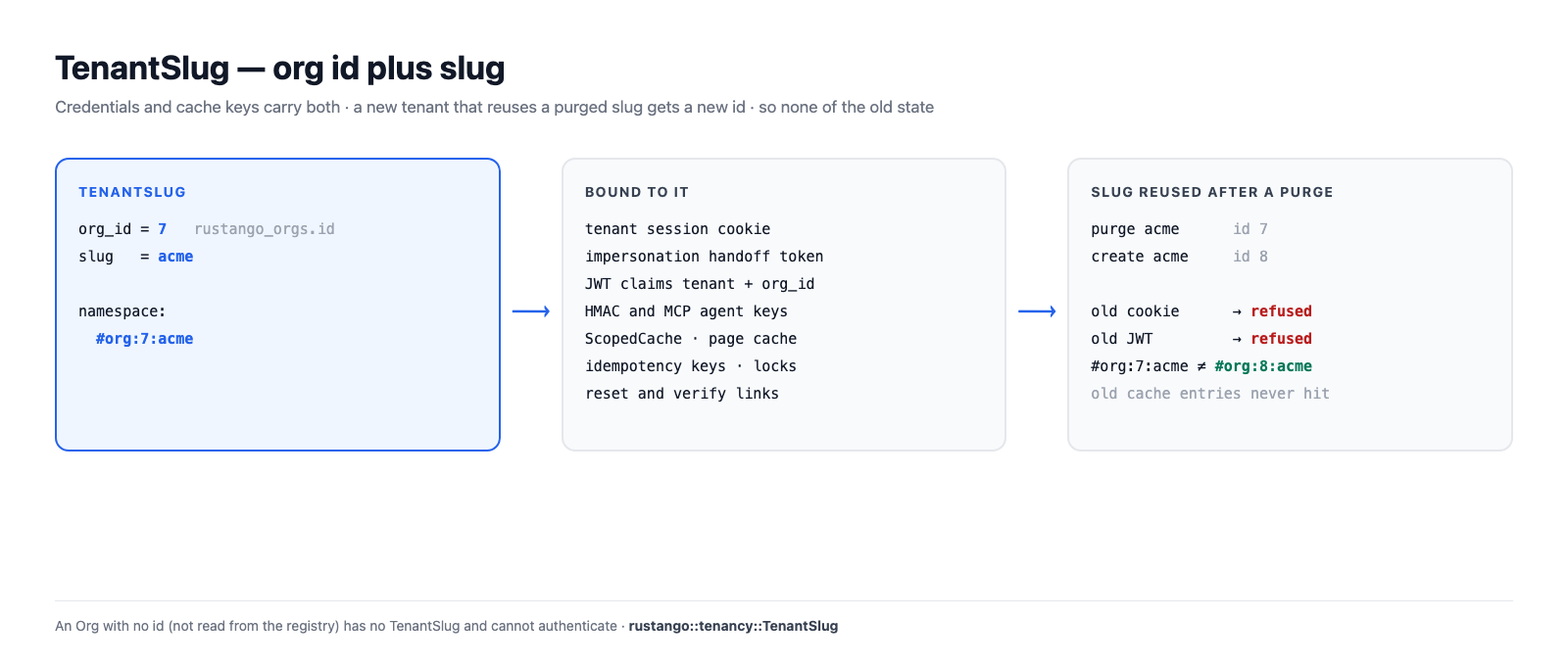
What carries it:
- the tenant session cookie and the impersonation handoff token;
- JWTs: the
tenantandorg_idclaims must both match; - HMAC signing keys and MCP agent keys bound to a tenant;
ScopedCache::for_tenant, the page cache, idempotency keys andDistributedLock::for_tenant, all keyed#org:<id>:<slug>;- password-reset and verify links.
Tenant API keys and users live in the tenant's own storage, which a purge
drops. An Org with no id (one not read from the registry) has no
TenantSlug, and authentication refuses it.
use rustango::cache::{BoxedCache, ScopedCache};
use rustango::extractors::TenantScope;
use rustango::tenancy::TenantSlug;

fn tenant_cache(cache: BoxedCache, t: &TenantScope) -> Option<ScopedCache> {
    // `None` only for an Org that was not read from the registry.
    let tenant = TenantSlug::of(&t.org)?;
    Some(ScopedCache::for_tenant(cache, &tenant))
}
More in caching under multi-tenancy.
Lifecycle
| Step | Console | CLI |
|---|---|---|
| Create | Organizations → New tenant | create-tenant <slug> |
| Edit routing, URL, branding | Organizations → Edit | edit-tenant <slug> |
| Suspend (keeps the data) | Deactivate on the tenant's page | drop-tenant <slug> or edit-tenant <slug> --deactivate |
| Bring back | the tenant's edit page | edit-tenant <slug> --activate |
| Purge (no undo) | Purge | purge-tenant <slug>, plus --purge-database in database mode |
A suspended tenant does not resolve, so its hosts get no tenant. Its slug
stays taken until a purge. A purge drops the schema or database, then the
Org row. On a saved server it also drops the tenant's login; see
purge a tenant.
Details: the operator console and tenancy commands.