 Rustango
Files, uploads & media
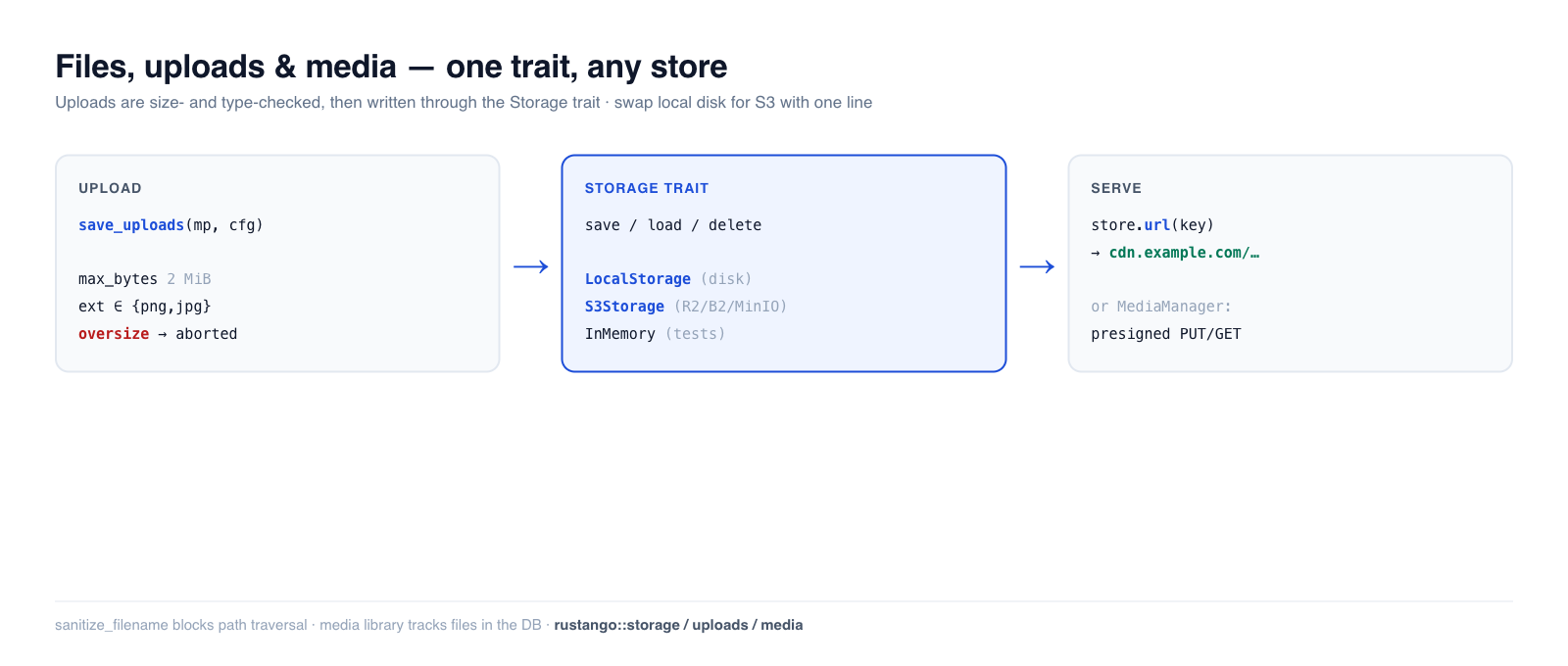
Almost every app stores user files — avatars, attachments, exported reports,
images. Rustango gives you a Storage trait with swappable backends (local
disk, S3-compatible object storage, in-memory for tests), a safe multipart
upload helper with size/type guards, and — when you need a tracked media
library — a database-backed MediaManager with presigned URLs. Write your code
once against the trait; switch from local disk to S3 with a one-line change.
New to a term here? storage backend, multipart, object storage, presigned URL — see the glossary.
Source:
rustango::storage(Storage,LocalStorage,InMemoryStorage,s3::S3Storage,azure::AzureBlobStorage,StorageRegistry,BoxedStorage),rustango::uploads(save_uploads,UploadConfig,sanitize_filename), andrustango::media(Media,MediaManager) — behind thestorage/uploads/storage-s3/storage-azure/mediafeatures (all on by default).Runnable version: the Storage + upload-guard snippets are copied from
files_doc.rs(cargo test -p rustango --test files_doc); the end-to-end multipartsave_uploadsflow is dogfooded by the in-file tests incrates/rustango/src/uploads.rs, and the media library bymedia_sqlite_live.rs.
Table of contents
- Step 1 — Pick a storage backend
- Step 2 — Save, load, and serve files
- Step 3 — Accept an upload
- Upload an avatar, end to end
- Safe filenames
- Production: S3-compatible storage
- Production: Azure Blob Storage
- Large files: stream them
- Several disks from config
- The media library
- Reference
- See also
Step 1 — Pick a storage backend
Every backend implements the same Storage trait, so your code never names the
concrete type — it holds a BoxedStorage (Arc<dyn Storage>):
use rustango::storage::{BoxedStorage, LocalStorage};
use std::path::PathBuf;
use std::sync::Arc;

let storage: BoxedStorage = Arc::new(LocalStorage::new(PathBuf::from("./uploads")));
| Backend | Feature | Use for |
|---|---|---|
LocalStorage | storage | single-server deployments — files on local disk |
S3Storage | storage-s3 | production — S3 / R2 / B2 / MinIO object storage |
AzureBlobStorage | storage-azure | production — Azure Blob Storage (Azurite in dev) |
InMemoryStorage | storage | tests — a HashMap, never touches disk |
Step 2 — Save, load, and serve files
The trait is four async methods, keyed by a string path. save writes bytes,
load reads them back, plus exists / delete:
use rustango::storage::{Storage, InMemoryStorage};

let store = InMemoryStorage::new();
store.save("avatars/7.png", &png_bytes).await?;
assert!(store.exists("avatars/7.png").await?);
let bytes = store.load("avatars/7.png").await?;
store.delete("avatars/7.png").await?;
Serving the file. Attach a base URL (your CDN or static host) and url(key)
builds the public address you store on the model and hand to the browser:
let store = LocalStorage::new("./uploads".into())
    .with_base_url("https://cdn.example.com/uploads");

store.url("docs/report.pdf");   // Some("https://cdn.example.com/uploads/docs/report.pdf")
Without a base URL, url() returns None. Then either serve the folder with
Cli::with_uploads (avatar example) or stream
the bytes through your own handler (Large files).
LocalStorage also guards against path traversal in keys.
Step 3 — Accept an upload
save_uploads consumes an axum Multipart body, validates each file against an
UploadConfig, and writes the survivors to your Storage — streaming, so an
oversize file is rejected mid-transfer instead of buffering into memory first.
use axum::extract::{Multipart, State};
use axum::http::StatusCode;
use axum::Json;
use rustango::storage::BoxedStorage;
use rustango::uploads::{save_uploads, UploadConfig};

async fn upload(
    State(storage): State<BoxedStorage>,             // router state, see below
    mp: Multipart,                                   // must be the last argument
) -> Result<Json<Vec<String>>, (StatusCode, String)> {
    let cfg = UploadConfig::new("avatars/")          // key prefix
        .max_bytes(2 * 1024 * 1024)                  // reject files over 2 MiB
        .allowed_extensions(&["png", "jpg", "jpeg", "webp"])
        .randomize_filename(true);                   // avoid collisions

    // UploadError is not a response: map it yourself.
    let saved = save_uploads(mp, &cfg, &storage)     // Vec<SavedUpload>
        .await
        .map_err(|e| (StatusCode::BAD_REQUEST, e.to_string()))?;
    Ok(Json(saved.into_iter().map(|s| s.key).collect()))
}
The storage reaches the handler as router state:
Router::new().route("/upload", post(upload)).with_state(storage). The
avatar example below shows the whole wiring.
The guards are enforced (and verified): allowed_extensions is case-insensitive
("PNG" and "png" are the same), and max_bytes aborts the stream as soon as
the size is exceeded. The in-file uploads tests drive real multipart bodies and
assert files land in storage, oversize files are rejected, and disallowed
extensions are refused.
Defaults: max_bytes 10 MiB, max_files 20, randomize_filename on (a UUID
prefix on the key). With no allowed_extensions, any extension is accepted
except the ones a browser runs as script (html, svg, xml, js, … —
uploads::ACTIVE_EXTENSIONS). The first error stops the loop and deletes the
files already saved, so a refused request leaves nothing behind. Each
SavedUpload carries key, original_filename, content_type (as the client
claimed it — do not trust it) and size_bytes. A body over axum's request
limit (DefaultBodyLimit) is UploadError::BodyTooLarge: answer it with 413.
let cfg = UploadConfig::new("avatars/").allowed_extensions(&["PNG", "Jpg"]);
assert!(cfg.allowed_extensions.contains("png"));   // normalized to lowercase
assert!(cfg.allowed_extensions.contains("jpg"));
Upload an avatar, end to end
This puts the pieces together in the app from
Getting started: a profile with an avatar, a route that
accepts the image, and a URL the browser can load. Files go to ./var/uploads
on local disk.
1. Store the key on a model
Store the storage key, not the file and not the URL. Add a model below Post
in src/blog/models.rs. The use rustango::{Auto, Model}; line from Step 8
already covers it:
#[derive(Model, Clone, Debug)]
#[rustango(table = "profiles")]
pub struct Profile {
    #[rustango(primary_key)]
    pub id: Auto<i64>,

    pub user_id: i64,

    // Storage key, e.g. "avatars/3f2c…-me.png". None until the first upload.
    pub avatar_key: Option<String>,
}
Then create the table, as in Step 9:
cargo run -- makemigrations
cargo run -- migrate
The URL is built from the key when you need it. Move the files to S3 later and no row changes.
avatar_key has no max_length, so it is a TEXT column. The key keeps the
client's file name, and save_uploads does not shorten it, so a fixed
VARCHAR length could be too short.
2. Accept the upload and save the key
The handler needs two things: the database pool and the storage. Put both in
one state struct. Add this to src/blog/views.rs. Skip any use line the file
already has: the same use twice does not compile.
use axum::extract::{Multipart, Path, State};
use axum::http::StatusCode;
use axum::Json;
use rustango::sql::Pool;
use rustango::storage::BoxedStorage;
use rustango::uploads::{save_uploads, UploadConfig};

use crate::blog::models::Profile;

/// What the avatar routes need: the database and the file storage.
#[derive(Clone)]
pub struct AvatarState {
    pub pool: Pool,
    pub storage: BoxedStorage,
}

type HttpError = (StatusCode, String);

fn server_error(e: impl std::fmt::Display) -> HttpError {
    (StatusCode::INTERNAL_SERVER_ERROR, e.to_string())
}

/// POST /profiles/{id}/avatar with a multipart form that holds one image.
pub async fn upload_avatar(
    State(state): State<AvatarState>,
    Path(id): Path<i64>,
    mp: Multipart,
) -> Result<Json<serde_json::Value>, HttpError> {
    let mut profile = Profile::objects()
        .find(id, &state.pool)
        .await
        .map_err(server_error)?
        .ok_or((StatusCode::NOT_FOUND, "no such profile".to_owned()))?;

    let cfg = UploadConfig::new("avatars/")
        .max_bytes(2 * 1024 * 1024) // 2 MiB
        .max_files(1)
        .allowed_extensions(&["png", "jpg", "jpeg", "webp"]);
    let saved = save_uploads(mp, &cfg, &state.storage)
        .await
        .map_err(|e| (StatusCode::BAD_REQUEST, e.to_string()))?;
    let Some(file) = saved.into_iter().next() else {
        return Err((StatusCode::BAD_REQUEST, "send one file".to_owned()));
    };

    // Save the key on the row. If that fails, remove the new file.
    let old_key = profile.avatar_key.replace(file.key.clone());
    if let Err(e) = profile.save(&state.pool).await {
        let _ = state.storage.delete(&file.key).await;
        return Err(server_error(e));
    }
    // Nothing points at the old file any more.
    if let Some(old) = old_key {
        let _ = state.storage.delete(&old).await;
    }

    Ok(Json(serde_json::json!({
        "key": file.key,
        "url": state.storage.url(&file.key), // "/uploads/avatars/…-me.png"
    })))
}
find returns Ok(None) when no row has that id, so the handler answers
404. save writes the row back on PostgreSQL, MySQL and SQLite alike.
Multipart comes from axum's multipart feature. Rustango's uploads feature
turns it on, so this builds as is. Add "multipart" to the axum features in
your Cargo.toml too, so your code names what it uses.
3. Create the storage and mount the route
Build the storage once, next to the router that uses it. Add this to
src/blog/urls.rs, which already has use axum::Router;:
use std::path::PathBuf;
use std::sync::Arc;

use axum::routing::post;
use rustango::sql::Pool;
use rustango::storage::{BoxedStorage, LocalStorage};

use crate::blog::views::{upload_avatar, AvatarState};

/// The folder that holds uploads, and the URL prefix that serves it.
pub const UPLOAD_DIR: &str = "./var/uploads";
pub const UPLOAD_URL: &str = "/uploads";

pub fn avatar_routes(pool: Pool) -> Router {
    let storage: BoxedStorage = Arc::new(
        LocalStorage::new(PathBuf::from(UPLOAD_DIR)).with_base_url(UPLOAD_URL),
    );
    Router::new()
        .route("/{id}/avatar", post(upload_avatar))
        .with_state(AvatarState { pool, storage })
}
Then add two lines to the Cli chain in src/main.rs:
rustango::manage::Cli::new()
    .api(urls::api())
    // … the lines you already have …
    .nest_with("/profiles", myblog::blog::urls::avatar_routes)
    .with_uploads(myblog::blog::urls::UPLOAD_URL, myblog::blog::urls::UPLOAD_DIR)
    .with_loaded_settings(loaded)
    .run()
    .await
nest_with builds the router from the pool the server opens, as in Step 12b.
It needs its own prefix: a second nest_with("/api", …) would clash with the
ViewSet. with_uploads serves the files in ./var/uploads at /uploads/….
It sends HTML, SVG and XML as downloads, so an uploaded page cannot run script
on your site. LocalStorage creates the folders on the first save. The
scaffolded .gitignore already leaves var/ out of git.
4. Try it
Create a profile row first, in the admin (Step 11) or with save as in
Step 10. Then:
curl -F "[email protected]" http://localhost:8080/profiles/1/avatar
# {"key":"avatars/3f2c…-me.png","url":"/uploads/avatars/3f2c…-me.png"}

curl -O http://localhost:8080/uploads/avatars/3f2c…-me.png
Put the url in an <img src>. A .gif gets 400 with the message
file extension `gif` not allowed.
This route has no login check. Anyone can replace any avatar. Before you ship it, put it behind your authentication and check that the signed-in user owns the profile. See Auth decorators.
Private files. with_uploads serves every file to anyone who has the
URL. For files only some users may see, skip with_uploads and the base URL,
and stream the file through a handler that checks access first: the download
handler in Large files is that handler.
More than one server. Local disk works for one server. With several, use
S3Storage or AzureBlobStorage and give it a public URL; url() then points
at the bucket and you drop with_uploads. The handler does not change.
The request body limit
axum caps a request body at 2 MiB by default, and Multipart reads under that
cap. The cap counts the whole form, not one file. So without a change, the
10 MiB max_bytes default can never be reached, and a file close to 2 MiB
fails as a multipart parse error.
Raise the cap with max_body_bytes in config/default.toml:
[server]
max_body_bytes = 5242880   # 5 MiB: room for a 2 MiB file and the form
or with the environment variable RUSTANGO__SERVER__MAX_BODY_BYTES=5242880.
The Cli turns it into a BodyLimitLayer (rustango::body_limit) on the API
and on every router added with nest_with, and it replaces axum's 2 MiB cap.
A request whose Content-Length is larger gets 413 Payload Too Large
before your handler runs. Set it a little above your largest max_bytes.
To let one route take more than the rest, give it its own cap, and its own
timeout (0 means none, so a slow upload is not cut at
request_timeout_secs). The key is the route pattern as you registered it,
nest prefix included:
[server]
max_body_bytes = 2097152
request_timeout_secs = 30

[server.routes."/api/uploads"]
max_body_bytes = 1073741824   # 1 GiB on this route only
request_timeout_secs = 0
In code it is BodyLimitLayer::new(n).route("/api/uploads", 1 << 30) and
RequestTimeoutLayer::new(t).exempt("/api/uploads") (or .route(pattern, t)).
With route entries and no max_body_bytes, other routes keep axum's 2 MiB.
The timeout ends when the handler returns its response, so a streamed
download, an SSE stream or a WebSocket after its upgrade is never cut.
The Cli reads this setting only when it has your settings. The scaffolded
main.rs passes them with .with_loaded_settings(loaded). Without that call
(or .with_settings_from_env()) the value is ignored, and the server logs a
warning that names it.
Safe filenames
Never trust a client-supplied filename. sanitize_filename reduces it to a safe
basename — stripping directory components (path traversal) and replacing unsafe
characters:
use rustango::uploads::sanitize_filename;

sanitize_filename("../../etc/passwd");   // "passwd"   — no traversal
sanitize_filename("my photo!.png");      // "my_photo_.png"
sanitize_filename("");                    // "upload"   — never empty
Names longer than 100 bytes (MAX_FILENAME_BYTES) are cut, keeping a short
extension. save_uploads applies this for you; call it directly only if you
build keys by hand.
Production: S3-compatible storage
For multi-server deployments, swap LocalStorage for S3Storage (behind the
storage-s3 feature). It speaks the S3 API with a hand-rolled SigV4 signer, so
it works with AWS S3, Cloudflare R2, Backblaze B2, and MinIO. The trait is
identical — only the constructor changes:
use rustango::storage::s3::S3Storage;   // needs the `storage-s3` feature

use rustango::storage::s3::{S3Config, S3Credentials};

let cfg = S3Config::new("my-bucket", "us-east-1")
    .with_endpoint("https://<account>.r2.cloudflarestorage.com"); // R2 / B2 / MinIO; omit for AWS
let creds = S3Credentials::new(access_key_id, secret_access_key);
let storage: BoxedStorage = Arc::new(S3Storage::new(cfg, creds));
// save / load / delete / url — exactly the same calls as LocalStorage
Your handlers and models don't change; only the wiring at startup does.
Production: Azure Blob Storage
AzureBlobStorage (behind storage-azure) signs server calls with the
account's Shared Key and hands out service SAS URLs for presigned GET and PUT:
use rustango::storage::azure::{AzureBlobStorage, AzureConfig};

let key = std::env::var("AZURE_STORAGE_KEY")?; // base64, from the portal
let cfg = AzureConfig::new("myaccount", key, "uploads");
// Azurite: cfg.endpoint("http://127.0.0.1:10000/devstoreaccount1")
let storage: BoxedStorage = Arc::new(AzureBlobStorage::new(cfg)?);
Differences from S3 a direct upload has to respect:
- The browser must send every header in
storage.presigned_put_headers(&put), which addsx-ms-blob-type: BlockBlob. The account's CORS rule must allow it along withContent-TypeandIf-None-Match. - A SAS cannot sign headers, so size and type are not enforced by the URL.
Confirm the upload with
metadata.MediaManager::begin_uploadrefuses an Azure disk; upload through the server withsave_bytes. A create-only PUT is grantedcwithoutw, so the URL still cannot replace a blob. - A single PUT holds up to 5000 MiB;
save_streamstages blocks above that.
Large files: stream them
save and load take and return whole buffers. For a large object, or to keep
the bucket private and pass uploads through your server, use save_stream and
load_stream: chunks go through as they arrive, so memory stays flat. A
ByteStream comes from an axum Body, a reqwest::Response, Bytes or a
Vec<u8>.
use axum::{body::Body, extract::{Path, State}, http::{header, HeaderMap, StatusCode}};
use rustango::storage::{BoxedStorage, ByteStream, PutConditions, StorageError};

// PUT /files: proxy the request body into storage.
async fn upload(State(storage): State<BoxedStorage>, headers: HeaderMap, body: Body)
    -> Result<String, StatusCode>
{
    let len = headers
        .get(header::CONTENT_LENGTH)
        .and_then(|v| v.to_str().ok()?.parse::<u64>().ok())
        .ok_or(StatusCode::LENGTH_REQUIRED)?;
    let key = format!("uploads/{}", uuid::Uuid::new_v4());
    let put = PutConditions::new().create_only();
    storage
        .save_stream(&key, len, ByteStream::from(body), &put)
        .await
        .map_err(|_| StatusCode::BAD_REQUEST)?;
    Ok(key)
}

// GET /files/{*key}: stream it back.
async fn download(State(storage): State<BoxedStorage>, Path(key): Path<String>)
    -> Result<Body, StatusCode>
{
    let stream = storage.load_stream(&key).await.map_err(|e| match e {
        StorageError::NotFound(_) => StatusCode::NOT_FOUND,
        _ => StatusCode::BAD_GATEWAY,
    })?;
    Ok(Body::from_stream(stream))
}
save_stream writes exactly len bytes. A body of another size, or a
put.content_length other than len, is refused, and create_only refuses an
existing key. A body that fails or is dropped leaves nothing behind. A
body-limit layer on the route must allow the size you accept.
| Backend | How it streams |
|---|---|
LocalStorage | temp file in the target directory, fsync, then rename; create_only links, so it never replaces a file |
S3Storage | one PUT up to 5 GiB; above, a multipart upload of up to 10,000 parts (5 TiB), one part in flight. Over https the body is sent as UNSIGNED-PAYLOAD; over plain http (local MinIO, SeaweedFS) every 64 KiB chunk is signed. create_only sends If-None-Match: * (on Complete for multipart), which AWS, MinIO and SeaweedFS honour |
AzureBlobStorage | one Put Blob up to 5000 MiB; above, Put Block for each part then one Put Block List. create_only sends If-None-Match: * (on the list) |
InMemoryStorage | collects the body in memory; create_only is checked under its lock |
| others | the trait default: collects the body in memory, then save; it refuses create_only |
A failed or dropped multipart upload is aborted, and Azure never shows
uncommitted blocks, so no partial object is ever visible. A server that keeps
parts after a crash should still have a lifecycle rule that removes incomplete
multipart uploads. LocalStorage create_only needs hard links; on FAT, SMB or
some FUSE mounts it fails with an error that says so.
Several disks from config
One app can mix backends — two S3 buckets, an Azure container, a local cache —
as named disks. Declare them in [storage] and build a StorageRegistry:
[storage]
default = "uploads"

[storage.disks.uploads]
driver          = "azure"
account         = "myaccount"
container       = "uploads"
public_endpoint = "https://files.example.com"   # optional: links browsers follow

[storage.disks.archive]
driver = "s3"
bucket = "archive"
region = "eu-west-1"
cdn    = "https://cdn.example.com/archive"

[storage.disks.cache]
driver = "local"
root   = "./var/cache"
let registry = StorageRegistry::from_settings(&settings.storage)?;
let uploads = registry.default_disk().expect("default disk");
Keys stay out of the file: RUSTANGO__STORAGE__DISKS__UPLOADS__ACCOUNT_KEY,
RUSTANGO__STORAGE__DISKS__ARCHIVE__SECRET_ACCESS_KEY. Disk names are lowercase
[a-z0-9_] so these overrides can reach them. A driver whose feature is
not compiled in is an error naming the disk, not a silently missing disk.
public_endpoint makes presigned URLs and url() point at the address browsers
reach, while reads and writes keep using endpoint.
The media library
When files are first-class records — tracked in the database, browsable in the
admin, with CDN/presigned delivery — reach for rustango::media
instead of raw Storage. MediaManager persists a Media row per file and
supports two upload flows:
- Server-side:
manager.save_bytes(...)stores the bytes and the row in one call. - Direct-to-storage:
manager.begin_upload(...)returns a presigned PUT URL the browser uploads to directly (your server never proxies the bytes), then you confirm the row. The PUT must send every header inticket.headers(Content-Type,If-None-Match: *, andx-ms-blob-typeon Azure), so the bucket's CORS rule must allow them. The URL can create the object once and never replace it. Grants3:ListBuckettoo: without it S3 answers a missing object with 403, and finalize returns 502 instead of marking the rowFailed.
use rustango::media::{Media, MediaManager};

let manager = MediaManager::new(pool.clone(), registry);
// Hand the browser a short-lived download link:
// Returns Option<String> — None on backends that cannot sign (e.g. local disk).
let Some(url) = manager.presigned_get(&media, Duration::from_secs(3600)).await else {
    return Err(/* no signed URL for this backend */);
};
It also handles soft-delete and orphan purging. The full flow is dogfooded in
media_sqlite_live.rs; the manager's presigned and direct-upload methods
run on all three backends.
Serving media on a public page
A public page does not go through media::router. That router is the
internal management API — uploads, deletes, tagging, browsing — and it
answers 401 to anyone not signed in, on every route, by design.
Render the URL from your own handler instead:
// your own public route
let url = manager.public_url(media_id).await?;   // Option<String>, no signature
public_url is a database lookup plus a string; it mints nothing and awaits
no signer, which is why it suits a page. Two delivery models, and choosing
between them is the actual decision:
| public bucket / CDN | private bucket + presigned | |
|---|---|---|
| address | manager.public_url(id) — stable | manager.presigned_get(&m, ttl) — expires |
| cacheable | yes, by browsers and CDNs | no; the router sends no-store |
| who may fetch | anyone with the URL | anyone with the URL, until it expires |
| use for | public pages, <img src> | the management router, internal tools |
public_url tells you where the object would be served from; it does not
make the object readable. Point it at a private bucket and you get a correct
URL and a 403 — that case wants a presigned URL, which is deliberately not
cacheable and not shareable.
For files on local disk rather than a bucket, the static handler already does this and needs no media row at all:
Cli::new().with_uploads("/uploads", "./var/uploads")
If you were about to write an AllowAll authorizer to make a public page
work, stop. That opens all 16 routes — including DELETE and the presigned
PUT — to everyone, which is the hole 0.57.7 closed.
The management router needs an authorization policy
media::router mounts 16 JSON routes over the manager, all of them operator
actions on the library. Every one is gated, and there is no permissive
default. Build it with media_router_with and supply a policy:
use rustango::media::router::{media_router_with, MediaPerms};

let app = axum::Router::new()
    .nest("/media", media_router_with(manager, MediaPerms::new(pool)));
There is no router without a policy. Before 0.57.7 those routes took no authentication, authorization or
tenant extractor at all, so GET /media/{id} returned the row and a
presigned S3 download URL to anyone who could guess an integer, and
POST /uploads/begin minted a presigned PUT for a caller-chosen key
prefix.
MediaPerms (needs the tenancy feature) checks the {table}.{action}
permission codenames the admin already uses — rustango_media.view to read,
rustango_media_collections.add to create a folder, and so on. Mount it
inside require_auth, which is what injects the identity it reads;
without that every request is a 401. Superusers skip the codename check —
but not allow_disks, which binds them too: is_superuser elevates
inside one tenant, and the object store is shared across all of them.
Only a superuser may set another user's uploaded_by_id, and filing into a
collection (upload, move or a nested collection) also needs
rustango_media_collections.view.
Three things it does not do:
- Row-level decisions. A grant of
rustango_media.viewreads any media row by id.MediaManagerholds one pool, so a multi-tenant deployment scopes rows itself — implementMediaAuthorizerfor that.MediaTargetnames the row (Media(id),Collection(id),CollectionSubtree(id), …) precisely so a per-row policy can be written.?recursiveon a collection's contents arrives asCollectionContents { id, recursive: true }— same target, flagged — so a policy can be stricter about the wide read without losing the collection it names. - Scope the object store.
diskis caller-supplied onPOST /uploads/beginand theStorageRegistryis process-wide, so pool-per-tenant isolates the database and not the bucket: a barerustango_media.addgrant writes into any disk the process knows about. Say which ones withMediaPerms::new(pool).allow_disks(["user-uploads"]). Prefixes within a disk still needMediaAuthorizer, which is handedkey_prefix. - Guess what a new route means. Both
MediaActionandMediaTargetare#[non_exhaustive], so end a hand-written policy on_ => falseand a route added in a later release arrives denied rather than allowed.
Worth knowing when you write your own: DELETE /collections/{id} deletes the
whole subtree and re-parents the media under every level of it, so it
arrives as Delete(CollectionSubtree(id)) rather than
Delete(Collection(id)) — and under MediaPerms it needs
rustango_media.change as well as rustango_media_collections.delete,
because it writes to the media table.
UPGRADING.md has
the migration notes.
How the media tables are created
The media tables (rustango_media, rustango_media_collections,
rustango_media_tags, rustango_media_tag_links) are managed models. Their
schema ships as a system migration and is created — per tenant, when the
media feature is enabled — the same way as the rest of the framework's own
tables, whenever you run migrate / provision a tenant. There is no lazy
"create on first use" step; if the feature is off, the tables are never created.
Upgrading from before 0.51. Earlier versions created the media tables lazily via an
ensure_tableDDL call rather than a migration. On the firstmigrate(or tenant provision) after upgrading, the framework auto-reconciles: because the tables already exist, the generated media migration is recorded in the system-migration ledger without re-running itsCREATE TABLE, and your existing rows are left untouched. No manual step is required — the upgrade that would otherwise fail withrelation already exists/table already existsnow just works.Upgrade to 0.51.2 or later, not 0.51.1. 0.51.0 moved the media tables onto system migrations and 0.51.1 claimed this reconcile — cross-version testing against real 0.46–0.50 databases showed neither worked, and both are yanked. The reconcile guard demanded a migration be purely
CreateTable, while a generated initial migration is tables and indexes, so it bailed on every real one. 0.51.2 is the release where this actually fires.
Static assets: hashed names, SRI and one-file images
Your own CSS, JS and WASM are not uploads; serve them with
static_files::StaticFiles. Apps without admin turn on just the
static-files feature (and security-headers, test-client as needed).
AssetManifest gives each file a content-hashed name and a Subresource
Integrity hash. Mount it with the files so the hashed names are served
immutable for a year, and link to them from templates:
use rustango::static_files::{static_router, AssetManifest, StaticFiles};

let manifest = AssetManifest::from_dir("static")?.prefix("/static");
let app = Router::new()
    .nest("/static", static_router(StaticFiles::new("static").manifest(manifest.clone())));
manifest.register_tera(&mut tera); // asset_url(name=...) and asset_integrity(name=...)
<script src="{{ asset_url(name='js/app.js') }}"
        integrity="{{ asset_integrity(name='js/app.js') }}" crossorigin="anonymous"></script>
The manifest is built from the files as they are at boot, so it never goes
stale; to_json() writes it for a bundler. To ship one binary with no
static/ folder, compile the directory in:
use rustango::static_files::{AssetManifest, EmbeddedDir, StaticFiles};

static ASSETS: EmbeddedDir = rustango::embed_static!("static");
let manifest = AssetManifest::from_embedded(&ASSETS).prefix("/static");
let files = StaticFiles::embedded(ASSETS).manifest(manifest);
embed_static! leaves out names starting with .. Edits rebuild the crate; a
new file needs println!("cargo:rerun-if-changed=static"); in build.rs.
Reference
Storage trait: save(key, &bytes) · load(key) · delete(key) ·
exists(key) · url(key) -> Option<String>, plus defaulted save_with_content_type,
presigned_get_url(key, ttl), presigned_put_url(key, ttl, &put), presigned_put_headers(&put), metadata(key),
save_stream(key, len, body, &put) and load_stream(key)
(a signing backend overrides the presign pair; the defaults return None).
UploadConfig: new(prefix) · .max_bytes(n) · .max_files(n) · .allowed_extensions(&[..])
(case-insensitive) · .randomize_filename(bool). Used by
save_uploads(multipart, &cfg, &storage).
Backends: LocalStorage (disk) · S3Storage (object storage, storage-s3) · AzureBlobStorage (storage-azure)
· InMemoryStorage (tests). All return a BoxedStorage.
See also
- The admin — media and FK widgets surface uploaded files in the UI.
- Background jobs — resize/transcode an upload off the request.
- Caching — the same swap-the-backend trait pattern.
- Security guide — validating untrusted upload input.
- Common tasks — short answers that point at full examples.