 Rustango
 manage CLI reference
This is Rustango's command-line tool, like Django's manage.py, Laravel's
artisan, or Rails' rails command. In a project scaffolded via
cargo rustango new, one binary runs every command ("verb"):
cargo run                          # runserver (no args = boot the HTTP server)
cargo run -- migrate               # any other verb
cargo run -- --help                # full subcommand list
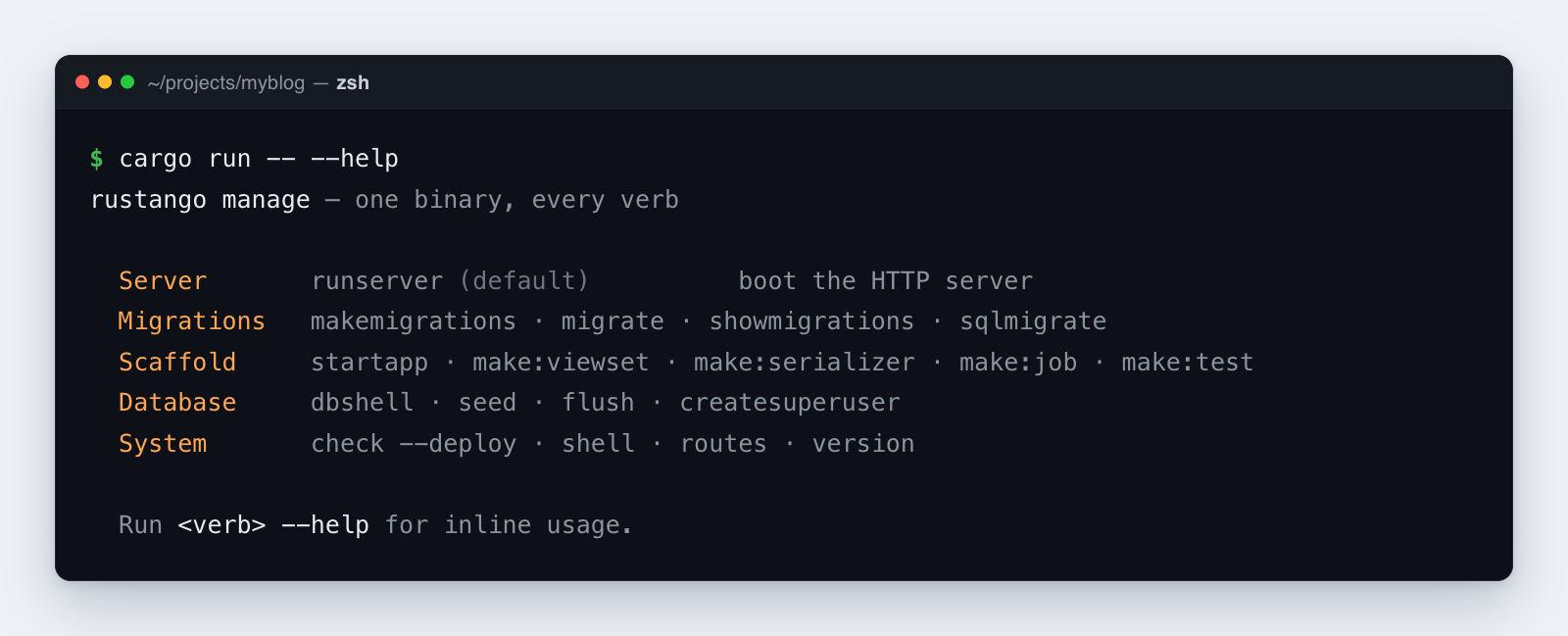
Source:
rustango::manage(Cli, the verb dispatcher) — behind themanagefeature (on by default).Runnable version: every verb here runs in a scaffolded project; the
getting_started_blogexample is driven bycargo run -- migrateand friends.
New to a term here? scaffold, migration, tenant — see the glossary.
The command router lives in rustango::manage::Cli;
your src/main.rs wires it up like this:
#[rustango::main]
async fn main() -> Result<(), Box<dyn std::error::Error>> {
    let _ = dotenvy::dotenv();
    rustango::manage::Cli::new().api(urls::api()).run().await
}
Multi-tenant projects add .tenancy() to the chain. That switches the
router to rustango::tenancy::manage
and unlocks the multi-tenant commands.
Older shape — projects scaffolded by
manage startapp --with-manage-bin(or pre-v0.16 ones) still shipsrc/bin/manage.rs. Those usecargo run --bin manage -- <verb>. Both forms accept the same verbs.
Every command prints to stdout and exits with a non-zero code on
validation or I/O errors. Run cargo run -- --help (or <verb> --help)
for inline usage.
Table of contents
- Migrations
- Data migrations
- Project / app scaffolders
- File generators (
make:*) - Database utilities
- System commands
- Tenancy commands
- Custom subcommands
- Common workflows
Migrations
makemigrations [name]
Generates a migration file from changes to your models — like Django's
makemigrations. It compares your registered models against the last
saved schema snapshot in migrations/ and writes a new JSON file with
whatever changed.
cargo run -- makemigrations                          # auto-name (e.g. 0004_add_slug_to_posts)
cargo run -- makemigrations rename_status_to_state   # custom suffix
Auto-detected changes:
CreateTable/DropTableAddColumn/DropColumnAlterColumnType/AlterColumnNullable/AlterColumnDefault/AlterColumnMaxLengthAlterColumnUniqueCreateIndex/DropIndexAddCheckConstraint/DropCheckConstraintCreateM2MTable/DropM2MTable
NOT auto-detected (rename vs drop+add is ambiguous):
RenameTable,RenameColumn— use--emptyand edit the JSON.
makemigrations --app <app>
Scopes the migration to a single app. It writes to that app's own
<project_root>/<app>/migrations/ directory and only looks at models
belonging to that app.
cargo run -- makemigrations --app blog
cargo run -- makemigrations --app blog backfill_slugs
makemigrations --scope <registry|tenant>
Multi-tenant only. Writes a single migration for just the models in one
scope — those whose #[rustango(scope = "...")] attribute matches.
("Registry" tables are shared across all tenants; "tenant" tables live
per tenant.) Without this flag, a plain makemigrations in a tenancy
project automatically splits the changes into TWO files — one for
registry models, one for tenant models — so shared framework tables
(Org, Operator) don't leak into the per-tenant migrations that
migrate-tenants runs.
cargo run -- makemigrations                       # tenancy: writes 0NN_<auto>.json (registry) + 0MM_<auto>.json (tenant) as needed
cargo run -- makemigrations --scope tenant        # explicit single-scope diff
cargo run -- makemigrations --scope registry      # explicit single-scope diff
Why the split matters: before v0.24.2, a plain makemigrations on a
tenancy project bundled operations on rustango_operators (a registry
table) into a tenant migration. When migrate-tenants ran that file,
rustango_operators resolved via search_path to the registry copy
and clashed with the constraint already there.
makemigrations --empty <name>
Creates a blank migration (no forward operations) for you to fill in
by hand — like Django's makemigrations --empty. Use it when you need
to write data operations or rename operations the auto-detector can't
generate. Edit the resulting JSON yourself.
cargo run -- makemigrations --empty rename_status_to_state
# Then edit migrations/0005_rename_status_to_state.json:
#   "forward": [
#     {"schema": {"RenameColumn": {"table": "posts", "old_column": "status", "new_column": "state"}}}
#   ]
makemigrations --merge
Fixes a migration history that has split into two branches — same idea
as Django's makemigrations --merge (issue #346). This happens when two
people each run makemigrations on their own feature branch, so both
new files point at the same parent. After both branches merge, the
history has two "leaves" (end points), and the next makemigrations
would arbitrarily pick one as its parent.
--merge detects this and writes an empty NNNN_merge.json whose parent
points at the last leaf alphabetically, reuniting the history into one
chain. Its schema snapshot reflects the combined state, read from the
live model registry — both branches' models are compiled in at this
point, so the snapshot is accurate.
cargo run -- makemigrations --merge
# wrote migrations/0004_merge.json
#     merge node — empty `forward`, anchors the chain after divergent leaves
- Already a single chain → prints
no merge neededand exits cleanly. Safe to run on a healthy history. - Genuinely separate histories (not a branch collision) → errors out instead of inventing a parent. Same safeguard Django uses.
- Cannot be combined with
--empty,--app,--scope, or a positional name.
migrate
Applies all pending migrations to the database, in order — like Django's
migrate or Laravel's php artisan migrate. This is the command you run
after makemigrations to actually change your schema.
cargo run -- migrate
cargo run -- migrate --dry-run                       # print SQL without writing
Each file runs inside a transaction by default, so a failure rolls the
whole file back. Set "atomic": false in the JSON to opt out — you need
that for statements like CREATE INDEX CONCURRENTLY that can't run in a
transaction.
In tenancy mode (Cli::tenancy()), migrate is scope-aware: it
first applies registry migrations to the shared registry database, then
applies tenant migrations across every active tenant. For finer control,
use migrate-registry /
migrate-tenants.
migrate <target>
Migrates to a specific point in the history, forward or backward — like
Django's migrate <app> <name>. Name a migration to move to it; the
special target zero undoes everything.
cargo run -- migrate 0003_add_slug      # forward to 0003
cargo run -- migrate 0001_initial       # roll back to 0001 (unapply 0002+)
cargo run -- migrate zero               # unapply EVERY migration
migrate --squash
Collapses every pending (un-applied) migration into one freshly generated diff — the dev-iteration escape hatch for when a stack of half-finished migrations is easier to regenerate than to fix. It refuses to touch anything already applied.
cargo run -- migrate --squash
The regenerated file records the names it collapsed in its replaces
list. That matters the moment another database is involved: your
colleague's checkout, staging, or CI may already have applied some of the
files you just deleted. Without replaces the new file's CREATE TABLE
would collide there; with it, the runner reconciles instead (see
below).
Squash reconciliation
A squash recreates the end state of the migrations it replaces, so what the runner should do depends entirely on what the target database already contains. It decides automatically:
| database state | what happens |
|---|---|
| fresh — no history, no tables | the squash runs for real |
| every replaced migration is in the ledger | recorded, predecessors tombstoned, no DDL |
| tables exist but the ledger has no history | recorded, no DDL (Django's --fake-initial) |
| only some replaced rows / tables present | refused, naming what's missing |
The partial case is deliberately a hard error: no automatic choice is
safe there, so the runner stops and tells you what it found instead of
guessing. Resolve it with migrate --fake (below).
Migrations superseded by an applied squash are treated as applied, so you can leave the old files on disk for a release or two — deployments that never ran them still migrate forward correctly.
Ordinary (non-squash) migrations are unaffected: a plain migration whose table already exists still fails loudly, because that is a real conflict rather than a known-equivalent history.
migrate --fake <name>
Stamps a migration as applied without running its SQL — the operator escape hatch when the database is already in the target state but the ledger doesn't know it (a DB set up out-of-band, a dropped ledger table, a partially-succeeded migration, a refused partial squash). Repeat the flag to repair several rows at once.
cargo run -- migrate --fake 0004_add_indexes
cargo run -- migrate --fake 0004_add_indexes --system        # framework's own chain
cargo run -- migrate --fake 0004_add_indexes --all-tenants   # every active tenant
The name is validated against the migration directory first, so a typo can't land a bogus row. Stamping is idempotent.
--system targets the framework's own migration chain
(system/migrations/, recorded in __rustango_system_migrations__)
rather than your project's. --all-tenants fans the stamp out across
every active tenant, reporting each one and continuing past failures —
the framework's tables live per tenant, so repairing them is a per-tenant
job.
downgrade [N]
Rolls back the last N applied migrations (default 1) — Laravel's
migrate:rollback. Each migration must be reversible: schema changes
reverse automatically, but data operations need a reverse_sql defined
or the rollback fails.
cargo run -- downgrade                  # one step
cargo run -- downgrade 3                # three steps
showmigrations / status
Lists every migration and whether it's been applied — like Django's
showmigrations. [X] means applied, [ ] means still pending.
cargo run -- showmigrations
cargo run -- status                     # alias
Output:
[X] 0001_initial
[X] 0002_add_status
[ ] 0003_add_slug
Data migrations
add-data-op
Adds a raw-SQL data step to a migration without editing JSON by hand.
Reach for this when you need to transform existing rows — backfill a
column, clean up data — as part of a migration. It's the equivalent of
Django's RunSQL data migration, generated for you from the command
line.
# New migration with up + down
cargo run -- add-data-op \
    --sql "UPDATE posts SET slug = lower(title)" \
    --reverse-sql "UPDATE posts SET slug = NULL" \
    --name backfill_post_slugs

# Append to an existing migration
cargo run -- add-data-op \
    --to 0003_add_slug \
    --sql "UPDATE posts SET slug = id::text"

# Irreversible (no rollback)
cargo run -- add-data-op \
    --sql "DELETE FROM legacy_data" \
    --name purge_legacy
| Flag | Required | Description |
|---|---|---|
--sql <SQL> | yes | Forward SQL to run on migrate |
--reverse-sql <SQL> | no | Rollback SQL on unapply; omit for irreversible |
--name <name> | no | New-migration name suffix; defaults to data_op |
--to <migration> | no | Append to an existing migration instead of creating one |
Leave off --reverse-sql and the step is marked reversible: false —
any attempt to roll it back fails immediately.
Project / app scaffolders
cargo rustango new <name> (separate binary)
Creates a brand-new Rustango project — like django-admin startproject
or laravel new. This is a separate tool, so install it first with
cargo install cargo-rustango. Pick from three templates:
cargo rustango new myblog                          # default = fullstack (ORM + admin)
cargo rustango new myapi --template api            # JSON-only, no admin
cargo rustango new shop --template tenant          # multi-tenancy
Writes:
<name>/
  Cargo.toml
  .env.example
  .gitignore
  rust-toolchain.toml
  docker-compose.yml
  README.md
  migrations/                               (your app's migrations)
  system/migrations/                        (tenant template — framework tables, generated)
  src/{main,models,views,urls}.rs
The tenant template ships an empty system/migrations/ folder. The
framework's own tables (rustango_orgs, rustango_users,
roles/permissions, …) are generated into it from the compiled models on
the first cargo run -- migrate — there's no hand-shipped bootstrap
JSON. See migrate / migrate-registry.
startapp <name> [flags]
Creates a new app (a feature module) under src/<name>/ — exactly like
Django's startapp. Use it to keep models, views, and URLs for one part
of your project grouped together.
cargo run -- startapp blog
cargo run -- startapp shop --with-manage-bin             # also writes src/bin/manage.rs
cargo run -- startapp shop --into apps                   # write under src/apps/shop/ instead
Creates:
src/<name>/
  mod.rs
  models.rs
  views.rs
  urls.rs
Safe to re-run — existing files are left alone. One manual step: add
pub mod <name>; to src/lib.rs so Rust compiles the new module.
File generators (make:*)
These create starter files for common building blocks — much like
Laravel's make:* commands (make:controller, make:model, …). Each
generator writes to src/<snake_name>.rs (or tests/<snake_name>.rs
for make:test) and:
- Checks the name is valid (PascalCase, letters/digits/underscore).
- Converts it to snake_case for the filename (
PostViewSet→post_view_set.rs). - Won't overwrite an existing file.
- Reminds you to add
pub mod X;to yourlib.rs.
make:viewset <Name> [--model <Model>]
Generates a #[derive(ViewSet)] struct — a REST endpoint for a model,
like a Django REST Framework ViewSet. The field lists come pre-stubbed
for you to fill in.
cargo run -- make:viewset PostViewSet --model Post
Generated src/post_view_set.rs:
#[derive(ViewSet)]
#[viewset(model = Post, fields = "id, ", filter_fields = "", search_fields = "", page_size = 20)]
pub struct PostViewSet;
Mount with: .merge(PostViewSet::router("/api/posts", pool.clone())).
make:serializer <Name> [--model <Model>]
Generates a #[derive(Serializer)] struct — controls how a model is
converted to and from JSON (like a DRF serializer).
cargo run -- make:serializer PostSerializer --model Post
make:form <Name>
Generates a #[derive(Form)] struct for validating and processing form
input — like a Django Form.
cargo run -- make:form ContactForm
make:job <Name>
Generates a background-job skeleton (work that runs outside the request, like a Celery task or a Laravel job), with a commented example of how to schedule it.
cargo run -- make:job EmailDigestJob
make:notification <Name>
Generates a notification struct that builds an email — like Laravel's
make:notification.
cargo run -- make:notification WelcomeEmail
make:middleware <Name>
Generates a middleware function — code that runs before and after each request (auth checks, logging, and so on). "axum" is the web framework Rustango is built on, so the stub matches axum's middleware shape.
cargo run -- make:middleware AuditLog
make:test <Name>
Generates an integration test in tests/ that uses TestClient to
make requests against your app.
cargo run -- make:test post_smoke
Database utilities
db:info
Shows which database this build is configured to talk to, without
connecting. It prints the framework version, which database drivers
(postgres/mysql Cargo features) are compiled in, the connection URL
with the password hidden, and the detected backend. Because it never
opens a connection, it's handy in CI or containers where the database
isn't up yet but you want to confirm the settings are right.
cargo run -- db:info
db:dump [--out <path>] [--data-only|--schema-only] [--no-owner]
Backs up your database by running pg_dump against DATABASE_URL —
like php artisan db:dump. By default the SQL goes to stdout (so you
can pipe it); pass --out <path> (-o) to write a file instead.
--data-only and --schema-only map straight to pg_dump's flags, and
--no-owner drops the OWNER lines. You need pg_dump installed and on
your PATH.
cargo run -- db:dump > backups/before-migrate.sql    # stdout → file
cargo run -- db:dump --out backups/before-migrate.sql
db:restore <path> [--clean]
Loads a dump file back into your database — the counterpart to
db:dump. It runs the file through psql against DATABASE_URL with
ON_ERROR_STOP=1, so it stops at the first error. Add --clean to wipe
the existing schema first (it prepends
DROP SCHEMA IF EXISTS public CASCADE; CREATE SCHEMA public;) so the
restore lands on an empty database. You need psql on your PATH.
cargo run -- db:restore backups/before-migrate.sql
cargo run -- db:restore backups/before-migrate.sql --clean
System commands
version / --version
Prints the Rustango framework version.
$ cargo run -- version
rustango 0.44.0
about
Prints a snapshot of your environment: framework version, registered models and apps, whether the database is reachable, and key environment variables. Drop this into support tickets when something's wrong.
$ cargo run -- about
rustango
  version:        0.44.0
  models:         3 registered
  apps:           1 (blog)
  RUSTANGO_ENV:   local
  DATABASE_URL:   postgres://***@localhost:5433/myblog
  db_connect:     ok
check [--deploy]
Runs health checks on your project — like Django's check. Add
--deploy for the stricter production-readiness checks, the same way
Django's check --deploy works.
Always-on checks:
- ≥ 1 model registered via
inventory - DB reachable (
SELECT 1) - Migration count vs model count
With --deploy:
RUSTANGO_ENVisprodorproductionRUSTANGO_SESSION_SECRETset and ≥ 32 bytes (the HMAC key for cookies + JWTs;SECRET_KEYis never read by the framework)DATABASE_URLsetRUSTANGO_APEX_DOMAINset (tenancy projects)
$ cargo run -- check --deploy
running rustango system check (deploy mode)...
  [info]    3 models registered via inventory
  [info]    database reachable
  [info]    4 migration(s) on disk
  [info]    RUSTANGO_SESSION_SECRET length OK
all checks passed
Exits non-zero if any error-level check fails. Warnings alone don't cause a failure.
docs
Opens the Rustango docs (https://docs.rs/rustango) in your browser. It always prints the URL too, so it still works on a headless server.
cargo run -- docs
--help / help
Lists every command with a one-line description. In tenancy mode, the multi-tenant commands listed below are added too.
Tenancy commands
These commands exist only in multi-tenant projects (one app serving many
isolated customers/orgs). They show up only when the project is built
with features = ["tenancy"] AND Cli::new() is chained with
.tenancy().
init-tenancy
No-op — retained for compatibility. The framework no longer ships
hand-built bootstrap migrations. Its own tables (rustango_orgs,
rustango_operators, rustango_users, roles/permissions, …) are
generated into system/migrations/ from the compiled models — the
normal Django flow (models → makemigrations → migrate) — and applied
by migrate / migrate-registry, which
generate them on demand if the files are missing.
cargo run -- init-tenancy # does nothing now; kept so old scripts don't break
Older versions wrote 0001_rustango_*_initial.json here; that hardcoded
flow is gone. To provision, just run cargo run -- migrate. A custom
user model (.user_model::<AppUser>()) flows through the same generated
system/migrations/ — see
Custom user model.
migrate-registry
Applies only the registry migrations — the shared, cross-tenant tables.
The registry holds rustango_orgs and rustango_operators plus any
registry-scoped tables you define. Tenant tables are untouched.
cargo run -- migrate-registry
migrate-tenants
Applies tenant migrations to every active tenant, one after another. Each tenant uses its own connection (its own schema or database), and if one tenant fails, the rest still run — the command reports the outcome per tenant at the end.
cargo run -- migrate-tenants
For the common case, plain migrate already does registry first, then
tenants — reach for migrate-tenants only when you need that step on
its own.
runserver / run-server
Starts the multi-tenant web server — Django's runserver. In a tenancy
project this is the same as bare cargo run; the named form exists so
custom binaries that parse their own arguments can still trigger it.
cargo run                        # implicit
cargo run -- runserver           # explicit
create-tenant <slug> [options]
Sets up a new tenant (customer/org) and applies the tenant migrations to
it. The <slug> is its short identifier. Safe to re-run — calling it
again on an existing tenant won't duplicate anything.
cargo run -- create-tenant acme --display-name "ACME Corp"
cargo run -- create-tenant beta --mode database --database-url postgres://...
| Flag | Description |
|---|---|
--display-name <name> | Human-readable label shown in admin sidebars |
--mode schema | database | Storage mode (default: schema) |
--database-url <url> | Tenant-specific DB URL (required for database mode) |
--host-pattern <pattern> | Override the host pattern used by SubdomainResolver |
--no-migrate | Skip applying tenant-scoped migrations after provisioning |
drop-tenant <slug> [--confirm <slug>]
Deactivates a tenant by setting active = false. This is the soft,
reversible option — the tenant's data stays on disk, and re-running
create-tenant brings it back. When you're not running interactively
(no terminal attached), you must pass --confirm <slug> with the slug
typed again to confirm.
cargo run -- drop-tenant acme --confirm acme
purge-tenant <slug> [--confirm <slug>] [--purge-database]
Permanently deletes a tenant. It drops the tenant's schema and
removes its row from rustango_orgs, with no undo. When you're not
running interactively (no terminal attached), you must pass
--confirm <slug> with the slug typed again. For database-mode tenants,
the underlying database is left in place unless you also pass
--purge-database.
cargo run -- purge-tenant acme --confirm acme
cargo run -- purge-tenant beta --confirm beta --purge-database   # database-mode: also DROP DATABASE
list-tenants
Lists every tenant with its storage mode and active/inactive status.
cargo run -- list-tenants
create-operator <username> --password <pwd>
Creates an operator — a global admin who can manage every tenant from a cross-tenant console. Operators live in the shared registry, not inside any one tenant.
cargo run -- create-operator admin --password letmein
create-user <tenant> <username> --password <pwd> [--superuser]
Creates a user inside one tenant — roughly Django's createsuperuser,
but scoped to a single tenant.
cargo run -- create-user acme alice --password hunter2 --superuser
--superuser sets is_superuser = true for that user inside the
tenant. That makes them an admin of the tenant (full write access in the
tenant admin), but it never grants access to the cross-tenant operator
console.
create-role <tenant> <name>
Creates a role (a named bundle of permissions, like a Django group) inside one tenant.
cargo run -- create-role acme editor
list-roles <tenant>
Lists the roles defined in a given tenant.
cargo run -- list-roles acme
assign-role <tenant> <username> <role>
Gives a user one of the tenant's roles.
cargo run -- assign-role acme alice editor
revoke-role <tenant> <username> <role>
Removes a role from a user — the reverse of assign-role.
cargo run -- revoke-role acme alice editor
grant-perm <tenant> <role-name|username> <codename> [--role]
Grants a single permission. By default the second argument is a
username, so the permission goes straight to that user; add --role
to grant it to a role instead. Permission codenames use Django's
<app>.<action>_<model> format (blog.add_post, blog.change_post,
…). The auto_create_permissions feature creates the four standard CRUD
codenames automatically for any model marked #[rustango(permissions)].
cargo run -- grant-perm acme alice blog.change_post           # grant to user alice
cargo run -- grant-perm acme editor blog.change_post --role   # grant to role editor
revoke-perm <tenant> <role-name|username> <codename> [--role]
Removes a permission — the reverse of grant-perm. Targets a user by
default; add --role to revoke it from a role instead.
cargo run -- revoke-perm acme alice blog.change_post
cargo run -- revoke-perm acme editor blog.change_post --role
create-api-key <tenant> <username> [--label <s>]
Issues an API key for a tenant user. The full token is printed once and never again — copy it now, because only its prefix and a hash are stored.
cargo run -- create-api-key acme alice --label "ci-bot"
audit-cleanup
Prunes old entries from the audit log (rustango_audit_log) to keep it
from growing forever. Trim by age (--days) or by count (--keep-last),
and optionally limit it to one tenant.
cargo run -- audit-cleanup --days 90                       # delete > 90 days old
cargo run -- audit-cleanup --keep-last 50                  # keep most recent 50 per row
cargo run -- audit-cleanup --keep-last 50 --tenant acme    # scoped
Custom user model (extra columns on rustango_users)
This is Rustango's version of Django's "custom user model" — how you add
your own fields to the user table. The built-in tenant User has seven
fixed columns: id, username, password_hash, is_superuser,
active, created_at, plus a data JSONB column (a flexible
JSON blob) for any extra per-user metadata. For most apps that JSONB
column is all you need — no migration, no override, no surprises.
When you want typed, indexable columns on rustango_users instead,
there are two approaches. They're not interchangeable; pick the one that
fits where your project is in its life.
Option 1 — Sibling profile model with FK (works on any project)
Best when the project already exists, or when you'd rather leave the
framework's User table as the single source of truth.
#[derive(rustango::Model)]
pub struct UserProfile {
    #[rustango(primary_key)] pub id: rustango::sql::Auto<i64>,
    #[rustango(fk = "rustango_users")] pub user_id: i64,
    #[rustango(max_length = 128, default = "''")] pub display_name: String,
    #[rustango(max_length = 64, default = "'UTC'")] pub timezone: String,
}
Run cargo run -- makemigrations then cargo run -- migrate, and you
have a typed extras table linked to the user by foreign key. Read it
with the ORM:
let profile = UserProfile::objects()
    .where_(UserProfile::user_id.eq(user.id.get().copied().unwrap()))
    .first(&pool).await?;            // Option<UserProfile>
Tradeoff: one extra row and a JOIN on every access. Upside: zero risk of breaking framework auth.
Option 2 — Cli::user_model::<AppUser>() (greenfield only)
Use this only on a fresh project where you want the extra fields right
on the rustango_users table itself. Because AppUser is the
rustango_users model, its columns flow through the ordinary
makemigrations → migrate engine: the framework's tables are generated
into system/migrations/, so AppUser's columns land in the generated
CREATE TABLE rustango_users.
Step 1. Define your model. It has to declare every framework-required
column exactly (id, username, password_hash, is_superuser,
active, created_at, data), plus your extras. Each extra column must
either allow NULL or have a default = "…".
use rustango::sql::Auto;

#[derive(rustango::Model, Debug, Clone)]
#[rustango(table = "rustango_users")]
pub struct AppUser {
    #[rustango(primary_key)] pub id: Auto<i64>,
    #[rustango(max_length = 64, unique)] pub username: String,
    #[rustango(max_length = 255)] pub password_hash: String,
    pub is_superuser: bool,
    pub active: bool,
    pub created_at: chrono::DateTime<chrono::Utc>,
    #[rustango(default = "'{}'")] pub data: serde_json::Value,
    // extras —
    #[rustango(max_length = 128, default = "''")] pub display_name: String,
    #[rustango(max_length = 64, default = "'UTC'")] pub timezone: String,
}
impl rustango::tenancy::TenantUserModel for AppUser {}
Step 2. Wire the override into main.rs:
#[rustango::main]
async fn main() -> Result<(), Box<dyn std::error::Error>> {
    rustango::manage::Cli::new()
        .api(my_app::urls::router())
        .tenancy()
        .user_model::<AppUser>()
        .run().await
}
Step 3. Register AppUser instead of the framework User — only
one model may claim table = "rustango_users". The scaffolder ships no
static bootstrap JSON (just an empty system/migrations/), so there's
nothing to delete; just don't also register the framework User.
Step 4. Generate + apply:
cargo run -- makemigrations       # generates system/migrations/ with AppUser's columns
cargo run -- migrate              # creates rustango_users with your extras
Caveats:
- Changing
AppUserlater is a normal schema change: re-runmakemigrationsto emit theAddColumnmigration, thenmigrate. - Only one model may map to
rustango_users. Registering both the frameworkUserand yourAppUsermakesmakemigrationsambiguous — registerAppUseralone. This is the main reason Option 2 is for fresh projects only; on an existing project, Option 1 avoids the problem. - Framework auth and admin code reads the seven core columns by name;
your extra columns are reachable only through
AppUser::objects().fetch(...).
Builder::user_model::<AppUser>() does the same thing for code that
builds the server Builder directly, without going through Cli.
Custom subcommands
You can add your own commands — Rustango's take on Django's custom
management commands. The trick is to inspect the arguments yourself and
handle your command before passing the rest to Cli::run. Two ways to
do it:
Inline in src/main.rs (no extra binary):
#[rustango::main]
async fn main() -> Result<(), Box<dyn std::error::Error>> {
    let _ = dotenvy::dotenv();
    let args: Vec<String> = std::env::args().skip(1).collect();
    if matches!(args.first().map(String::as_str), Some("import-csv")) {
        let url = std::env::var("DATABASE_URL")?;
        let pool = rustango::sql::sqlx::PgPool::connect(&url).await?;
        return my_csv_importer::run(&pool, &args[1..]).await;
    }
    rustango::manage::Cli::new().api(urls::api()).run().await
}
Via --with-manage-bin (separate src/bin/manage.rs):
cargo run -- startapp app --with-manage-bin
Then in src/bin/manage.rs:
#[tokio::main]
async fn main() -> Result<(), Box<dyn std::error::Error>> {
    let _ = dotenvy::dotenv();
    let args: Vec<String> = std::env::args().skip(1).collect();
    let url = std::env::var("DATABASE_URL")?;
    let pool = rustango::sql::sqlx::PgPool::connect(&url).await?;

    match args.first().map(String::as_str) {
        Some("import-csv") => my_csv_importer::run(&pool, &args[1..]).await,
        _ => rustango::migrate::manage::run(&pool, "./migrations".as_ref(), args)
            .await
            .map_err(Into::into),
    }
}
Run your own commands just like the built-in ones:
cargo run -- import-csv path/to/file.csv (or
cargo run --bin manage -- import-csv … when using --with-manage-bin).
Common workflows
First-time project setup (single-tenant)
cargo rustango new myapp
cd myapp
cp .env.example .env             # edit DATABASE_URL
docker compose up -d
cargo run -- migrate
cargo run                        # serve at :8080
First-time project setup (tenancy)
cargo rustango new myapp --template tenant
cd myapp
cp .env.example .env             # edit DATABASE_URL + RUSTANGO_APEX_DOMAIN
docker compose up -d
cargo run -- migrate                                      # registry + tenants
cargo run -- create-operator admin --password letmein
cargo run -- create-tenant acme --display-name "ACME Inc" \
                  --host-pattern acme.localhost
cargo run -- create-user acme alice --password tenantpw --superuser
cargo run                        # serve at :8080
Adding tenants after the app is already running
A real tenancy app usually builds up models and migrations long before its first tenant signs up. This flow works at any point in the project's life:
# 1. (any time) develop user models — define structs with #[derive(Model)],
#    add `pub mod ...;` to src/lib.rs.
# 2. Generate scope-aware migrations. In a tenancy project this writes
#    up to TWO files: one tagged registry-scope (touches Org/Operator),
#    one tagged tenant-scope (touches User + your models). Pre-v0.24.2
#    this used to dump everything into one tenant-scoped file and
#    crash on `create-tenant` — see the changelog.
cargo run -- makemigrations

# 3. Apply migrations. `migrate` is scope-aware: it runs registry-
#    scoped files once against the registry pool first, then fans
#    tenant-scoped files across every active tenant.
cargo run -- migrate

# 4. Provision a NEW tenant whenever (could be days, weeks, many
#    migrations later). The tenancy code applies every accumulated
#    tenant-scoped migration to the new tenant's schema in one pass —
#    the new tenant arrives at the same schema state as existing ones.
cargo run -- create-tenant acme --display-name "ACME Inc" \
                  --host-pattern acme.localhost
cargo run -- create-user acme alice --password tenantpw --superuser
Why this is safe:
#[rustango(scope = "registry")]onOrg/Operatorkeeps changes to shared tables out of the per-tenant migrations.migrate-tenantsvisits every active tenant and applies only the tenant migrations — registry files are skipped.create-tenantruns that samemigrate-tenantspass against the new tenant's schema, so it starts fully up to date with no manual fixup.
Add a model
cargo run -- startapp blog        # if not done yet
# Edit src/blog/models.rs — add #[derive(Model)]
# Add `pub mod blog;` to src/lib.rs
cargo run -- makemigrations
cargo run -- migrate
Add a JSON API for that model
cargo run -- make:viewset PostViewSet --model Post
# Edit src/post_view_set.rs — fill in field lists
# Mount in src/urls.rs
cargo run                        # GET /api/posts now works
Add a data backfill
cargo run -- add-data-op \
    --sql "UPDATE posts SET slug = lower(title) WHERE slug IS NULL" \
    --reverse-sql "UPDATE posts SET slug = NULL" \
    --name backfill_post_slugs
cargo run -- migrate
Pre-deploy audit
cargo run --release -- check --deploy
Roll back the last migration
cargo run -- downgrade 1
Apply a tenancy migration to one specific scope
cargo run -- migrate-registry            # registry-scoped only
cargo run -- migrate-tenants             # tenant-scoped, fan-out across orgs
Decommission a tenant
cargo run -- drop-tenant acme            # soft (reversible)
cargo run -- purge-tenant acme           # hard (drops schema/db)
Tenant-pool tuning (v0.27.7+)
Database-mode tenants get their own connection pool (a PgPool — a set
of reused database connections), cached by slug in
TenantPools. By default a
pool is built lazily, on the tenant's first request, unless you turn
on pre-warming. The settings live on TenantPoolsConfig:
| Field | Default | Purpose |
|---|---|---|
max_cached_database_pools | 64 | Pool cache cap. Once full, the next uncached tenant errors out (no silent eviction). |
database_pool_max_connections | 4 | Per-pool max_connections. Keep small so a tenant fan-out doesn't exhaust PG max_connections. |
database_pool_min_connections | 0 | Keeps N connections warm at all times. ≥1 drops first-request latency by paying the TCP/TLS/auth round-trip at boot. |
database_pool_acquire_timeout | 30s | How long pool.acquire() waits before erroring PoolTimedOut. |
database_pool_idle_timeout | 10 min | Close idle connections after this duration. Defends against load-balancer / idle_in_transaction_session_timeout cuts. |
database_pool_max_lifetime | 30 min | Force-rotate connections so vault-leased credentials get refreshed. |
prewarm_active_tenants | false | When true, Server::Builder::serve calls prewarm_database_tenants() at boot. |
Pre-warm at boot
Two ways to trigger:
-
Automatic — set
prewarm_active_tenants = trueon theTenantPoolsConfigyou handTenantPools::new(...).config(...).Server::Builder::serveruns the pre-warm before binding. -
CLI verb —
cargo run -- prewarm-poolsbuilds pools for every active database-mode tenant and exits. Useful as a post-deploy hook (e.g. after credential rotation), or to validate every tenant is reachable before flipping a load balancer.
Pre-warm walks Org::objects().where(active = true, storage_mode = "database") and short-circuits when the cache cap is reached
(reported as skipped_cap in the [PrewarmReport]). Per-tenant
build failures log a tracing::warn! but don't abort the loop.
Tracing
crate::tenancy::pools::tenant_pool_init is a tracing::info_span!
that wraps the cold-path pool build. Subscribe to it to see
per-tenant build latency:
INFO crate::tenancy::pools: tenant pool connected (database mode)
     slug=acme elapsed_ms=42 min_conn=1 max_conn=4
Setup gotcha — macOS .local TLDs
If you hit the tenant admin via http://acme.local:8080/admin/
on macOS and see a 5-second pause on every request: that's
Bonjour / mDNS, not Rustango. macOS's resolver treats .local
specially and waits the full mDNS timeout before falling back to
/etc/hosts. Two fixes:
- Use a different TLD:
127.0.0.1 acme.localhostworks without delay.localhostis reserved (RFC 6761) and skips mDNS. - Run dnsmasq with a
.localzone pointing at 127.0.0.1 so the OS gets an immediate answer.
Confirm with curl -w "%{time_connect}\n": if time_connect
shows ~5s but it drops to milliseconds with
--resolve acme.local:8080:127.0.0.1, you're hitting mDNS.